
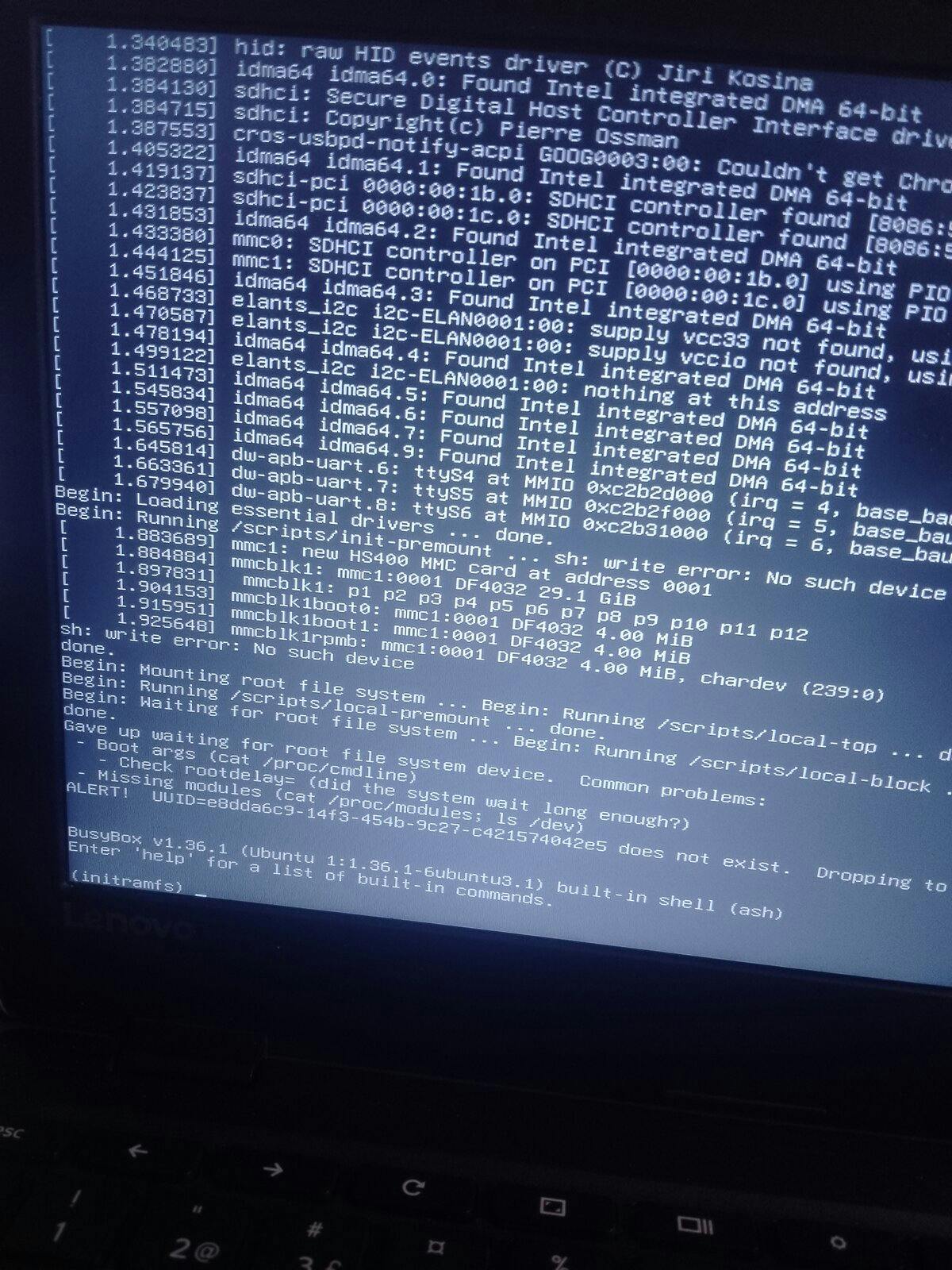
My Chromebook Wouldn't Boot Unless I Physically Removed the SD Card — Here's the Bug I FoundI recently dual-booted Ubuntu onto an old Chromebook by installing it to an SD card, keeping ChromeOS intact on the internal storage. The install went fine. Then I rebooted, and hit a wall.Every single time, the boot process would get partway through, throw an ALERT! UUID=... does not exist, and drop me into a bare (initramfs) recovery shell. The only way out was to physically pull the SD card out, push it back in, and type exit. Then it would boot fine, until the next reboot, when the whole thing happened again.That's not something you want to do every time you open your laptop.This post is the diagnosis and fix, in case you hit the same wall.The setupChromebook with an Apollo Lake CPU (Celeron N3350, board name coral)ChromeOS on internal eMMC, untouchedUbuntu 24.04 installed to a 64GB SD cardMrChromebox RW_LEGACY firmware enabling USB/SD boot alongside stock ChromeOSChasing the wrong fixes firstBefore finding the actual cause, I tried the usual suspects:Bumping rootdelay up to 15, then 20, then 30 seconds in GRUBAdding sdhci.debug_quirks2=4 as a kernel parameterExplicitly listing mmc_core, mmc_block, sdhci, sdhci_pci in /etc/initramfs-tools/modulesDouble-checking GRUB was already using root=UUID=... (it was, that's the Ubuntu default)None of it worked reliably. The boot would still, more often than not, land in (initramfs).Finding the actual causeThe kernel boot log itself turned out to hold most of the answer, once I actually read it end to end instead of skimming for the error line.At the very bottom, after the ALERT and the drop to (initramfs), the log showed the SD card controller working exactly as expected: SDHCI controllers detected around 1.38 seconds in, and the card fully enumerated with all twelve of its partitions by 1.93 seconds. That ruled out my first assumption, that the card was simply too slow. It wasn't slow. It was ready well before the kernel gave up on it.So if the card was ready, why did the mount fail?The answer came from comparing two states: what the system looks like once fully booted, versus what it looks like at the initramfs prompt during a failure.Booted normally, lsblk showed:mmcblk0 29.1G ChromeOS internal eMMC mmcblk1 58.2G SD card, Ubuntu root ├─mmcblk1p1 1G vfat /boot/efi └─mmcblk1p2 57G ext4 / At the initramfs prompt during a failed boot, cat /proc/partitions showed a mmcblk1p2 too, but at only 16,384 blocks. That's about 16MB. Ubuntu's actual root partition is 57GB. Same label, wildly different device.That was the moment it clicked. The label mmcblk1 isn't a fixed identity tied to one physical piece of hardware. It's assigned by whichever controller finishes registering first during that particular boot. Most of the time the SD card wins that race and becomes mmcblk1, matching what you see once fully booted. But early in the initramfs stage, before both controllers (one for the internal eMMC, one for the SD slot) have settled in a consistent order, the label can transiently point at the eMMC instead. And the eMMC has its own, completely different p2 partition, one that belongs to ChromeOS, not Ubuntu.Trying to mount it directly confirmed this:(initramfs) mount /dev/mmcblk1p2 /root mount: mounting /dev/mmcblk1p2 on /root failed: Invalid argument Not "no such device." Invalid argument, meaning the partition existed but its filesystem wasn't what initramfs was looking for, because it was the wrong physical device entirely.So the real bug wasn't a timing problem in the sense of "wait longer." It was a device enumeration ordering race between two MMC controllers. Ejecting and reinserting the SD card forces its controller through a full hardware reset, which in practice reliably wins it the mmcblk1 label on the next attempt. That's why the physical workaround worked every time, and why no amount of rootdelay alone ever fixed it. Waiting longer doesn't change which controller gets which label; it just gives the wrong one more time to also finish settling.The actual fixSince the problem isn't "wait longer," the fix isn't a longer fixed delay either. It's a script that polls for the target partition by UUID specifically, and only proceeds once that exact UUID is genuinely resolvable, regardless of which mmcblk number currently holds it.#!/bin/sh PREREQS="" prereqs() { echo "$PREREQS"; } case $1 in prereqs) prereqs; exit 0;; esac . /scripts/functions TARGET_UUID="your-uuid-here" log_begin_msg "Waiting for root device by UUID..." i=0 while [ $i -lt 60 ]; do DEV=$(blkid -U "$TARGET_UUID" 2>/dev/null) if [ -n "$DEV" ]; then log_begin_msg "Found root at $DEV after ${i}s, settling..." sleep 2 break fi sleep 1 i=$((i+1)) done log_end_msg Saved as /etc/initramfs-tools/scripts/init-premount/wait-sd, made executable, then:sudo update-initramfs -u -k all sudo update-grub sudo reboot Paired with the SDHCI quirk flag and explicit module list from my earlier attempts (still useful, just not sufficient alone), this fully resolved the issue. No more eject and reinsert. Every boot since has worked cleanly.Why checking by UUID matters more than checking by device nameA script that just waits for /dev/mmcblk1p2 to exist wouldn't have fixed anything, because that device node exists almost immediately, it's just sometimes the wrong one. The fix only works because it asks a more specific question: not "does a partition with this name exist," but "does a partition with this exact UUID exist." blkid -U resolves the UUID against whatever device actually carries it, however the kernel has currently labeled that device. That sidesteps the naming race entirely instead of trying to out-wait it.If you hit this tooThis isn't unique to my exact hardware. It's a structural issue with any system where:Two or more MMC/SD controllers are present (an internal eMMC plus an SD slot, most commonly)Their enumeration order isn't guaranteed to be identical on every bootinitramfs's root-wait logic resolves by whatever mmcblk name currently exists, rather than confirming the specific filesystem it expectsThat covers other Apollo Lake and Gemini Lake Chromebooks running Linux, but also other laptops and SBCs with both internal storage and an SD card reader, where the same naming race can occur.Full technical writeup with all the diagnostic steps, boot log screenshots, and the complete script: github.com/reignsi/initramfs-sd-boot-race-fixIf you've run into something similar on different hardware, I'd like to hear about it. I'm trying to build out a small compatibility list of what controllers and boards this affects.
Debugging a Linux Boot Failure Caused by a Chromebook's SD Card Controller Race Condition
Full Article
Original Source
Read the full article at Hackernoon →KhanList aggregates and links to publicly available news content. We do not host full articles from third-party sources. Always verify important information with original sources.