
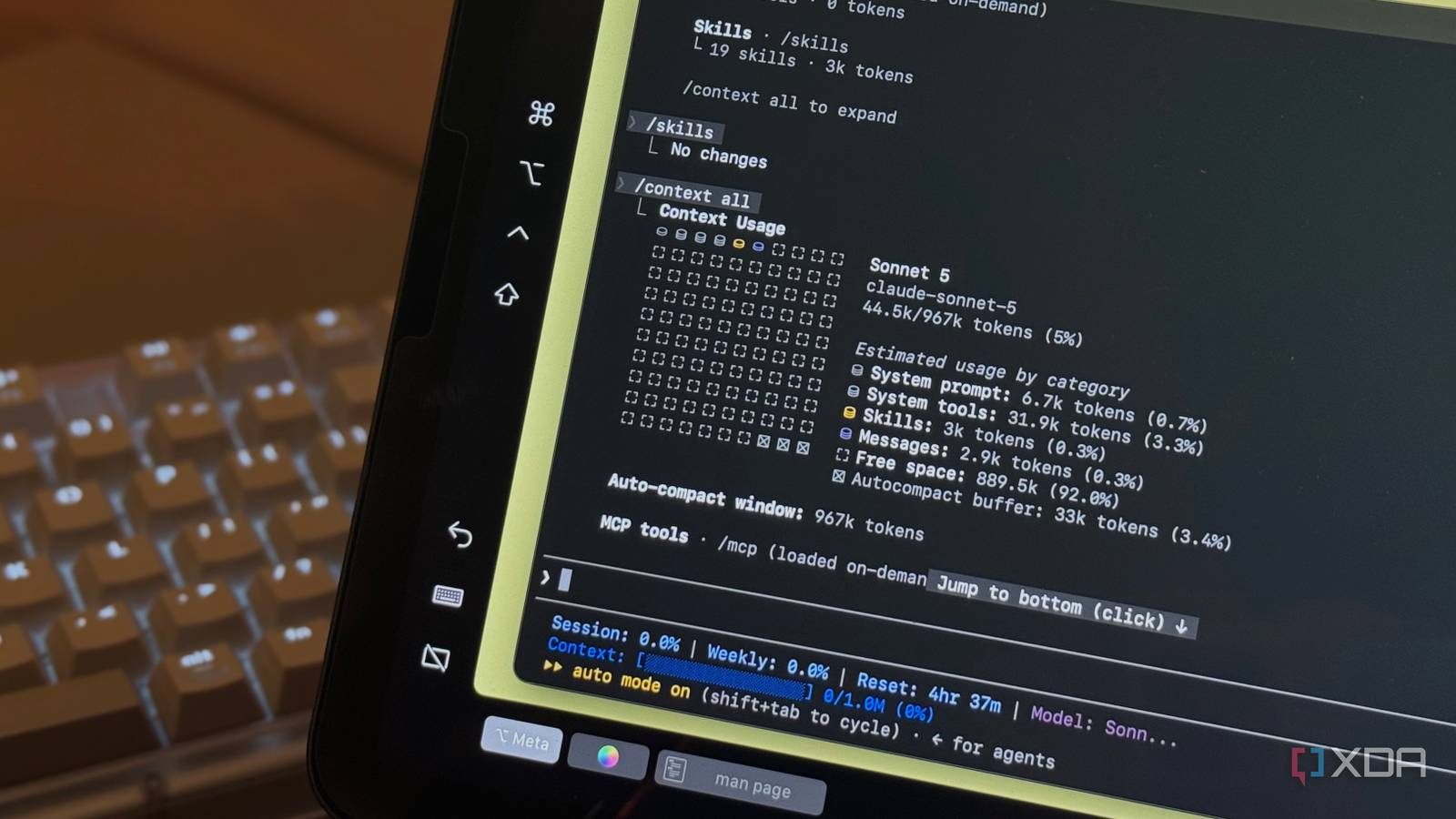
Published Aug 28, 2026, 4:00 PM EDT Mahnoor Faisal is a tech journalist covering AI and productivity tools with bylines at XDA, SlashGear, MakeUseOf, Laptop Mag, and Android Police. She's been writing professionally since she was sixteen, and has since penned hundreds of articles. This includes in-depth coverage of AI tools like NotebookLM to breaking news across the AI space. Her passion for technology started when she received her first iPod Touch (4th generation) on her 8th birthday, and she's been deep in the tech world ever since. Currently pursuing a degree in computer science, Mahnoor brings both a journalist's eye and a technical foundation to her coverage of how AI is reshaping the way we work and learn. I'm always looking for ways to squeeze more out of my Claude Code subscription without constantly running into its usage limits. A little while ago, that led me to experiment with Claude Code's effort setting. Dropping it from High to Medium ended up cutting my output token usage by 45% across five different tests, without any obvious drop in the quality of the results. That worked well enough that I started wondering what else I could optimize. This time, though, instead of looking at how many tokens Claude Code was burning while it worked, I wanted to know how many it was using before I even gave it anything to do. The answer ended up being 51,000 tokens, which was significantly more than I expected. How I spent the next few minutes is fairly predictable! I wanted as many of those tokens back as I could get. Your context window isn't empty when you start The context window starts filling before your first prompt Before I go any further, it's helpful to understand how a LLM's context window actually works under the hood. The context window is essentially an LLM's working memory for your current session. Everything the model needs to keep track of while it's working with you has to fit inside it, from the prompts you send and the responses it generates to files it reads and information pulled in by tools. The larger that running context becomes, the more information Claude has to carry forward as the conversation continues. With Claude Code, that context window doesn't start at zero. Before you type your first prompt, Claude Code has already loaded information it needs to function, including its system prompt, built-in tools, skill descriptions, custom agents, and any other instructions or context your setup adds automatically. I hadn't given much thought to how much space all of that was taking up until I opened a completely fresh Claude Code session and ran /context. The command gives you a breakdown of exactly what's occupying the context window, and in my case, 51,400 tokens were already spoken for before I'd actually asked Claude to do anything! This isn't the first time I've run into this kind of problem, either. I previously found that MCP servers could eat an absurd amount of Claude Code's context window before a session even began. Claude Code has since largely solved that particular problem with Tool Search, which keeps MCP tool definitions out of context until they're actually needed. This time, though, MCP servers weren't the culprit. Most of the bloat came from plugins I'd installed myself I had way too much Claude Code baggage installed When you run the /context command, Claude reveals exactly what is taking up space in the current context window and breaks it down by category. In my case, that included the system prompt, system tools, skills, custom agents, and messages that had already been loaded before I typed anything useful. That breakdown also made it pretty easy to see which parts were actually under my control. Now, similar to how iOS consumes a significant part of your iPhone's storage before you install a single app, some of Claude Code's starting context is simply the cost of running Claude Code. The system prompt alone accounted for 10,700 tokens in my session, while system tools took up another 28,500. Those weren't really things I could rip out. The more interesting part, and also the stuff I could control, was everything I'd installed myself. Now, before I go any further, I'm the kind of person who will install anything and everything just to try it out. Given what I do for work, I also end up downloading a bunch of plugins, skills, agents, and other Claude Code add-ons purely because I want to see what they do. Most of the time, I try something once, decide whether it's useful, and move on. What I rarely do is go back and clean up after myself. At the time I ran this test, I had four third-party plugins enabled: Caveman, claude-mem, claude-memory, and understand-anything. Between them, they were adding dozens of skills and custom agents to Claude Code, and some of them were also injecting information into fresh sessions automatically. Given all of these were plugins I'd installed for testing, I decided to see what disabling all of them would do. I worked through them one by one, opening a fresh Claude Code session and running /context after each change so I could make sure the difference was actually coming from the plugin I'd just disabled. By the time all four were switched off, my starting context had dropped from 51,400 tokens to 45,600. Skills fell from around 6,300 tokens to 3,200, custom agents dropped from 943 tokens to just 74, and the Messages category went from roughly 5,000 tokens to practically nothing. The reason Messages went down so dramatically is that some of those plugins were injecting their own context into fresh sessions automatically. Once they were disabled, Claude Code was essentially starting with a clean conversation again! The skills category was worth looking at separately, too. I had three of my own installed at the time: alt-text-namer, codebase-to-course, and frontend-slides. I use the first and last routinely, so I wasn't interested in removing useful parts of my setup just to make the number look better. I only moved codebase-to-course out temporarily and tested again. The difference was tiny. My starting context went from 45,600 tokens to around 45,500, while the Skills category dropped from roughly 3,200 tokens to 3,000. That made it pretty clear that my own skills weren't the real problem. Most of the skill-related bloat I'd removed earlier had come from the plugins, which were bringing dozens of extra skills with them. The two custom skills I actually wanted to keep were barely making a dent. The biggest single saving came from memory Turns out, remembering everything isn't free Ironically, I got a lot of starting context back from plugins related to memory. But that wasn't where the biggest single saving came from. I suddenly remembered that Anthropic had added auto-memory to Claude Code, which lets it carry useful information between sessions without me having to maintain all of it manually. Since memory is loaded into a new session automatically, I figured it was worth testing how much context that convenience was actually costing me. Before blaming auto-memory, I checked the more obvious places first. Claude Code showed both user and project instructions in its /memory menu, but my user-level CLAUDE.md was completely empty, and there wasn't even a project-level CLAUDE.md in the folder I was testing from. In other words, neither of those could explain what I was seeing. So, I launched Claude Code again with auto-memory disabled and immediately ran /context. My starting context dropped from around 45,500 tokens to 41,500. Since a 4,000-token difference felt large enough that I didn't want to trust a single run, I repeated the exact same test. The second session started at 41,400 tokens. What surprised me even more was where those tokens disappeared from. My Skills category stayed at roughly 3,000 tokens, while the system prompt dropped from around 10,700 tokens to 6,700. So, at least with my version and setup, simply having auto-memory enabled was accounting for roughly another 4,000 tokens of starting context. I wouldn't necessarily tell everyone to switch auto-memory off permanently. Unlike the old plugins I had installed for testing and forgotten about, memory is a feature I can genuinely get value from. However, seeing its cost made the tradeoff much easier to understand. If I'm starting a short, self-contained task where I don't need Claude to remember anything from previous sessions, I'd rather have those extra tokens available for the work in front of me. Ultimately, by the end of this, I'd taken my starting context from 51,400 tokens to roughly 41,400! This amounts to almost 10,000 tokens back before I typed a single real prompt. Not only does the starting context going down leave more of the context window available for the actual text, Claude also has less unnecessary information to carry forward as the session continues. The above matters for usage too, since all of that context has to be processed again across subsequent turns. Ultimately, it means you'll begin noticing your usage limits a little later than you otherwise would, particularly over longer sessions where that extra context would keep getting carried forward.
Claude Code was using 51,000 tokens before I even typed a prompt — I fixed it
Full Article
Original Source
Read the full article at Xda-developers →KhanList aggregates and links to publicly available news content. We do not host full articles from third-party sources. Always verify important information with original sources.