
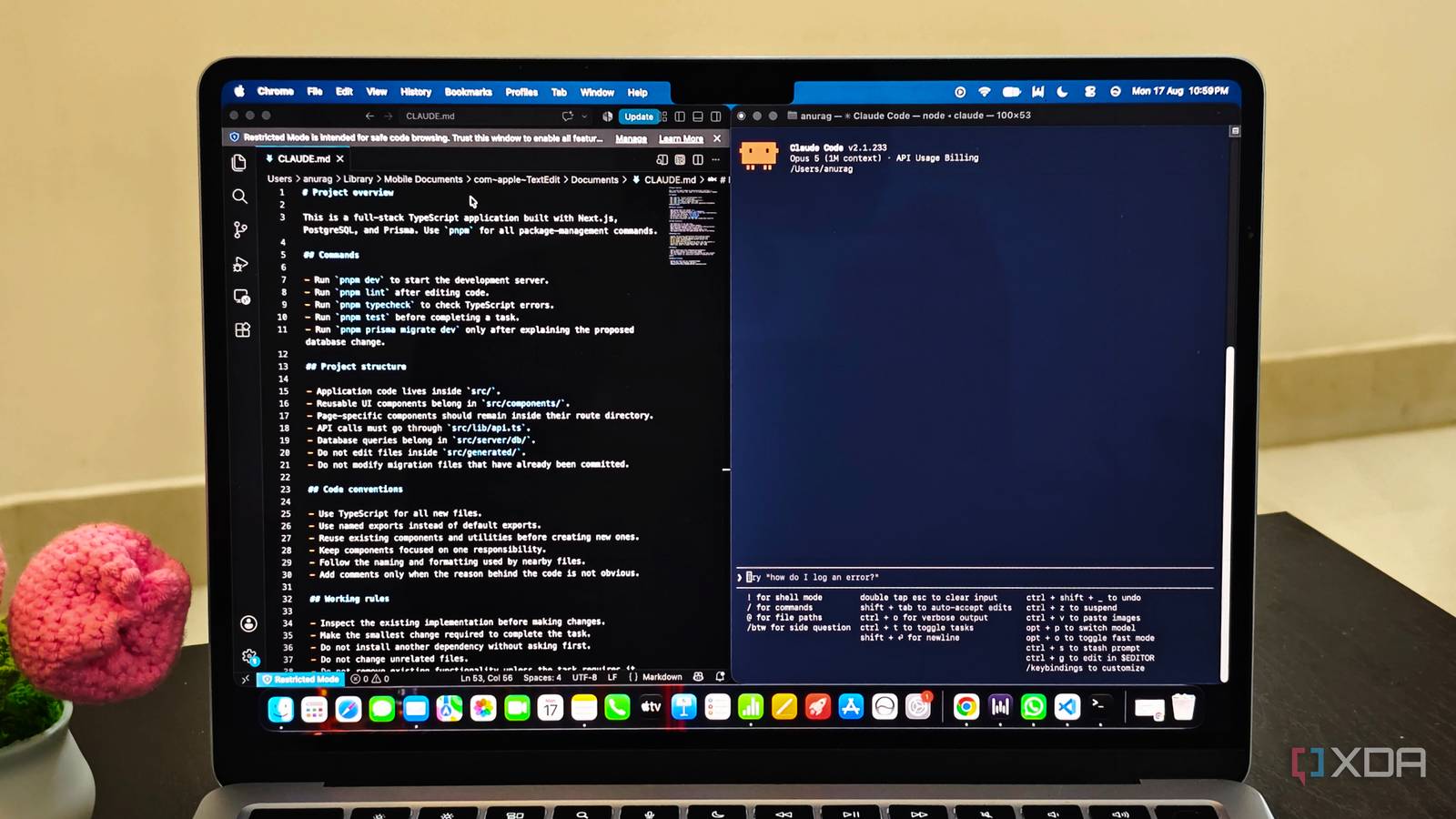
Published Aug 19, 2026, 10:30 AM EDT Anurag is an experienced journalist and author who’s been covering tech for the past 5 years, with a focus on Windows, Android, and Apple. He’s written for sites like Android Police, Neowin, Dexerto, and MakeTechEasier. Anurag’s always pumped about tech and loves getting his hands on the latest gadgets. When he's not procrastinating, you’ll probably find him catching the newest movies in theaters or scrolling through Twitter from his bed. I use Claude Code across projects, and every new session brings up the same questions. The answers almost never change within a project, so keeping them in individual conversations makes little sense. I now put these answers in a CLAUDE.md file at the root of the repository. This file acts as an onboarding manual for the bot and lists the commands I use, explains the parts of the project Claude needs to understand, and records the rules I otherwise type by hand. Claude Code reads the file when a session starts, so I can describe what I need and get straight to work without repeating the setup. You need a CLAUDE.md more than you think It saves a ton of time A codebase tells Claude what exists, but it doesn't explain why the project works a certain way or which decisions were made on purpose. Claude Code starts every new session with a fresh context window, so it doesn’t have access to discussions from previous sessions. What it can do is inspect the repository again and infer some of the same conventions, but that will make it spend time and tokens rediscovering info I already provided. In larger projects, it can also reach a different conclusion depending on which files it reads first. CLAUDE.md is a simple fix to this. It gives a source of truth for information that isn’t obvious from the code. Claude Code loads the file at the beginning of every session and keeps those instructions alongside the current conversation. If I specify that the project uses pnpm, tests require a particular command, or a certain directory should never be edited, Claude doesn’t need to infer any of it. Claude Code also has auto memory, which records useful details it learns while working. I don’t rely on that for important project rules because Claude decides what gets saved there. You write CLAUDE.md yourself, so the instructions inside it remain exact and can be checked into version control for anyone else using Claude Code on the same project. Creating and setting up a CLAUDE.md file Keep it on point You can create CLAUDE.md manually in the root of your repository or run /init inside Claude Code. The /init command analyzes the project and generates a starting file with the build commands, testing instructions, and conventions it finds. If the repository already has a CLAUDE.md, the command suggests changes instead of replacing the existing file. The generated version gives you something to work with, but you still need to add decisions Claude can't infer from the code. A basic file can look like this: # Project instructions ## Commands - Use pnpm instead of npm or yarn. - Run `pnpm lint` after editing code. - Run `pnpm test` before completing a task. ## Project structure - Reusable components belong in `src/components/`. - API requests must go through `src/lib/api.ts`. - Do not edit files inside `src/generated/`. ## Working rules - Inspect the existing implementation before making changes. - Reuse existing components and utilities where possible. - Ask before installing another dependency. - Make the smallest change required to complete the task. You don’t need to follow this exact format. Markdown headings make the file easier to scan, and grouping related instructions prevents them from becoming one large list. I also write instructions as direct statements, so there’s little room for Claude to interpret what “follow the existing style” or “test everything properly” means. You can commit a project-level CLAUDE.md and share it with anyone working on the repository. If you have personal instructions that shouldn’t be committed, you can place them in CLAUDE.local.md and add that file to .gitignore. Preferences that apply across every project, such as always asking before installing a dependency, can go inside ~/.claude/CLAUDE.md. Run /context after creating the file and check the Memory files section. If CLAUDE.md appears there, Claude Code loads it into the current session. Don’t let CLAUDE.md become another README Don't stuff it with everything A CLAUDE.md file becomes useless when it contains everything Claude could possibly need. Copying your README, listing every dependency, or adding the entire directory structure wastes context because Claude can inspect it directly. Anthropic recommends keeping each file under roughly 200 lines, although I would treat that as an upper limit rather than a target. If the file keeps growing, remove anything Claude can reliably discover from the repository. Also, make sure your instructions are specific. Things like “Write clean code,” “follow best practices,” and “test changes properly” leave Claude to decide what those phrases mean. You need to tell it to use named exports, run pnpm test, reuse components from src/components/, or ask before adding a dependency. You also need to look for conflicting rules. Claude Code can load instructions from ~/.claude/CLAUDE.md, the project root, and files inside subdirectories. It combines them instead of treating one file as a complete replacement for another. If one file says to use tabs and another requires two spaces, Claude can choose either. Make the most out of Claude Code A CLAUDE.md file keeps you from repeating the same things again and again in every session. While it's definitely helpful, you can take your Claude code to the next level by adding sub-agents and tweaking a few settings here and there.
Claude Code kept asking the same questions until I showed it this one markdown file
Full Article
Original Source
Read the full article at Xda-developers →KhanList aggregates and links to publicly available news content. We do not host full articles from third-party sources. Always verify important information with original sources.