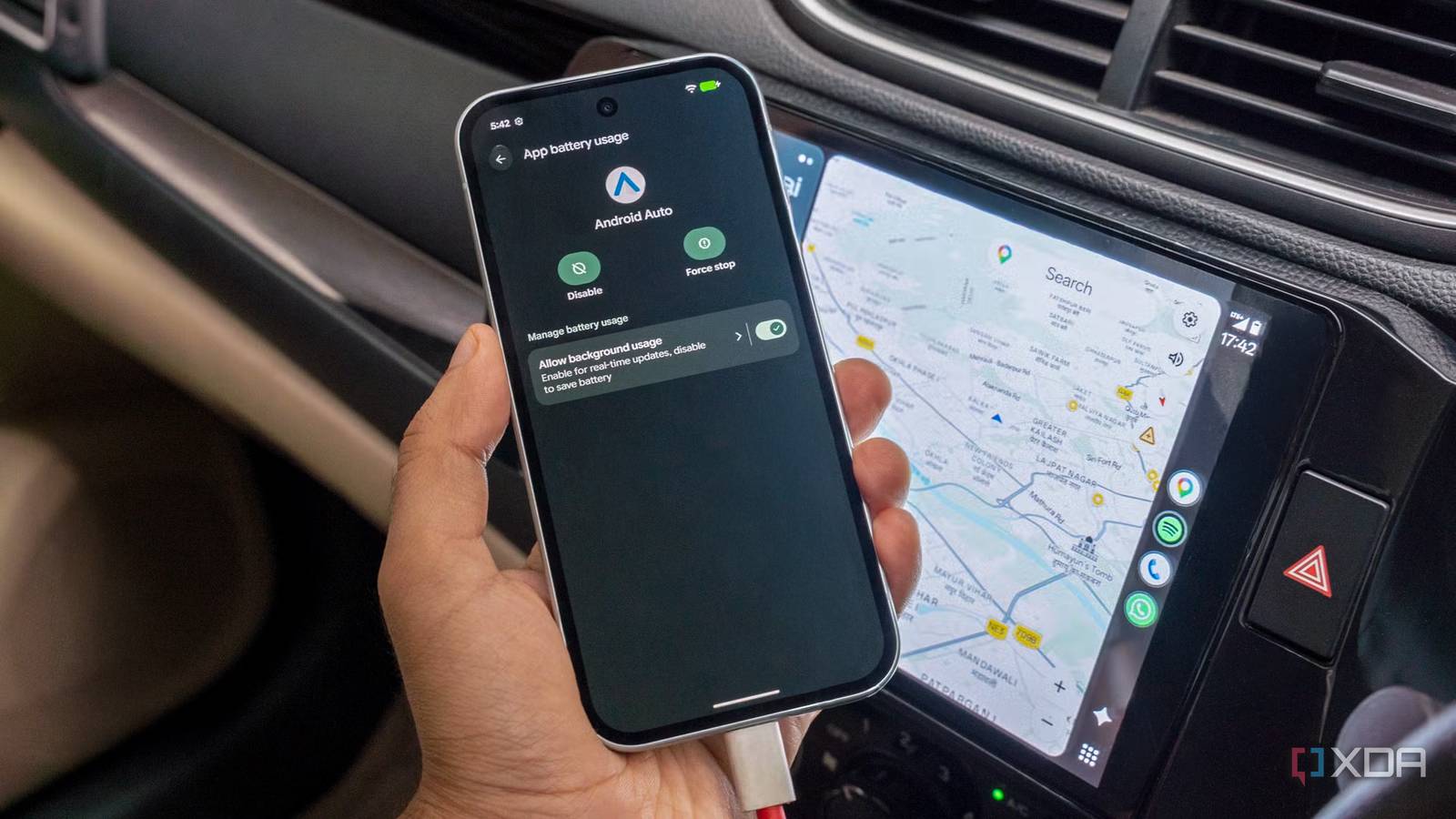
Published Aug 5, 2026, 3:00 PM EDT Dhruv Bhutani has been writing about consumer technology since 2008, offering deep insights into the personal technology landscape through features and opinion pieces. He writes for XDA-Developers, where he focuses on topics like productivity, networking, self-hosting, and more. Over the years, his work has also appeared in leading publications such as Android Police, Android Authority, CNET, PCMag, and more. Outside of his professional work, Dhruv is an avid fan of horror media spanning films and literature, enjoys fitness activities, collects vinyl records, and plays the guitar. Android Auto is essential to my driving experience. I enjoy setting off on a road trip every few months, and it's indispensable for keeping me on track. However, even in the city, be it for navigating around traffic, serving up my favorite playlists, or just handling calls and messages, it's something I can't live without. So, when it randomly disconnects, believe me, it puts a big dent in my driving experience. I've tried everything from replacing cables to restarting my phone to try and figure out why Android Auto kept disconnecting for me. Turns out, the solution was much simpler. It was as simple as toggling the battery optimization setting. In under a minute, I was able to fix the root cause of my troubles, and it's made a noticeable difference. If Android Auto has been randomly disconnecting for you, this is the first setting I'd recommend checking. Battery optimization is the real problem Takes less than a minute to fix Here's the problem. Android as an operating system is designed to extend battery life. It achieves this through aggressive battery management, putting apps to sleep. For social media apps and games, that makes a lot of sense. Less so for an app like Android Auto that needs to be awake and functioning throughout your drive. What many people don't realize is that even though the interface is on the screen, the actual processing is happening on your phone. Your phone maintains a constant connection with your car's infotainment system or head unit, streams map data, processes voice commands and delivers notifications. When Android Auto disconnects, it is usually your phone's operating system restricting the background process. This results in a dropout until it kicks back into action again. In my case, this is precisely what I was experiencing. Since we're dealing with battery optimization here, there's no predictability to how long Android Auto will keep working before it drops out. Sometimes it'd work just fine for hours on end, and sometimes it would drop off fifteen minutes into a drive. The fix involves changing Android Auto's battery optimization setting to unrestricted. This switch tells the operating system to avoid aggressively managing Android Auto in the background. This allows Android Auto to keep running for long periods, as the system avoids the battery management loop designed to save power. Since the operating system no longer shuts down the app to save power, there are no more disconnections. It's all it took to stop the random disconnections I'd been facing every time I was driving. The best part is that it takes under a minute to make the change. Just open the Settings app on your phone, navigate to Apps, select Android Auto, tap App battery usage, and choose Unrestricted. While the exact nomenclature might vary a bit depending on which Android device you're using, almost every brand exposes the option. Why I changed Android Auto to unrestricted battery mode The battery tradeoff is worth it Credit: Look, if your first instinct was to swap out the USB cable or restart your phone, that totally makes sense. The fix isn't immediately obvious simply because you'd expect the unrestricted setting to be the default for a critical app like this. While a USB cable can certainly fail, it wasn't the root cause of my issues. If you're concerned about heavier battery use, I understand. I was too. However, I wouldn't be too worried. When using Android Auto, it's almost guaranteed that your phone is connected to a wired or wireless charger. If not, you are probably close to a charger, making it a non-issue. Moreover, I'd happily take the trade off in power consumption for a more reliable Android Auto connection. Who wouldn't? The improvement goes beyond the random disconnections I faced earlier. I've also observed better reliability. For example, Google Maps stays active and centered throughout the drive instead of the occasional lag I used to see earlier. Similarly, podcasts and music play just a bit more seamlessly. It's not a night-and-day difference, but it's made the overall experience more reliable, and I'm definitely not complaining about that. It's worth noting that you'll notice a more dramatic difference in reliability if you use wireless Android Auto. For one, Android's battery optimization tends to be less aggressive when you're plugged in any way. Moreover, since wireless Android Auto depends on a combination of Wi-Fi Direct and Bluetooth, any interruption gets magnified and becomes much more obvious. Unrestricted battery access mitigates that. Try this simple fix before swapping out cables Let me be clear, the toggle isn't a universal fix. Between a faulty cable or a bug in the car's entertainment system, there are plenty of touchpoints where Android Auto can fail. However, this free fix is where I'd start if your problem is mostly sporadic disconnections. If it doesn't fix it, you can move on to swapping cables or exploring other fixes. The fact is that Android Auto works best when it can stay connected without interruptions, and setting the battery to unrestricted use allows that. After wasting days trying to diagnose the issue, the actual fix took me mere minutes, and if your Android Auto connection keeps dropping for no reason, this is where I'd start.
Changing this one simple setting solved all of my Android Auto disconnection issues
Full Article
Original Source
Read the full article at Xda-developers →KhanList aggregates and links to publicly available news content. We do not host full articles from third-party sources. Always verify important information with original sources.