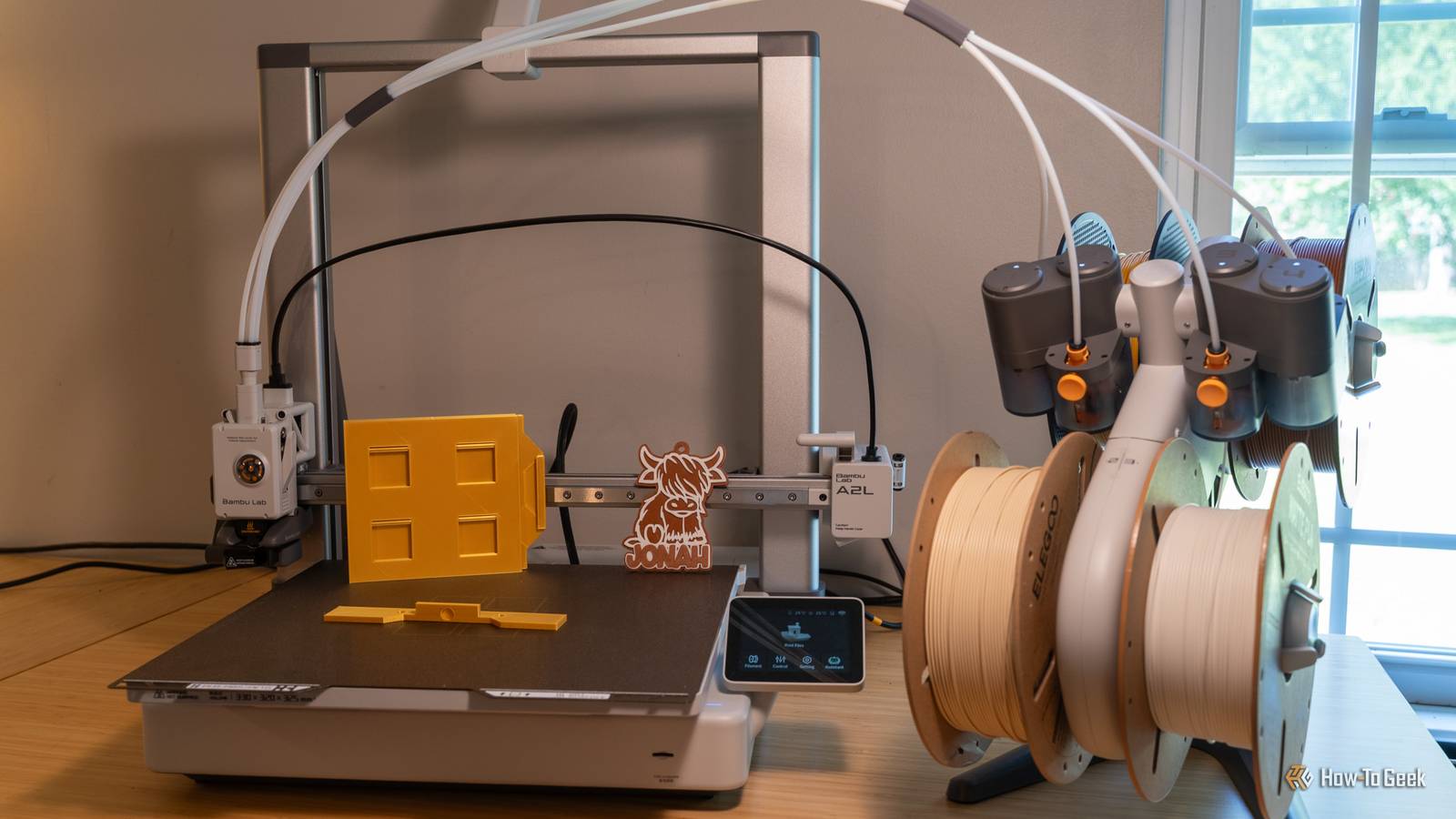
Published Aug 3, 2026, 6:00 AM EDT Patrick Campanale has been in the tech space for well over a decade, specializing in PC/gaming news and reviews, as well as maker-focused products to build small businesses. With a start in technology back in 2010 surrounding the Palm/webOS ecosystem, Patrick spent his formative years developing mobile applications as well as blogging for various publications, eventually leading to starting his own website in 2014. After running a technology blog for a few years, he stepped out of that role and into the world of high-end custom PC manufacturing and building, with a focus on YouTube video production and overclocking. Then, six years ago, Patrick joined the 9to5Toys team as an editor/writer/reviewer with over 14,000 articles being published there there, ranging from deals and roundups to in-depth reviews on the latest technology, video games, 3D printers, and more. In his free time, Patrick loves to create projects from wood using various robots and methods, including leveraging the technologies of CNCs and lasers. If Patrick isn't working on a computer or playing video games, he's likely in his 2-car garage workshop creating something unique. In addition to all this, Patrick is also a youth pastor at his local church where he feels God has called him to serve, and he loves every minute of it. The Bambu Lab A1 has finally grown up in more ways than one. The Bambu Lab A2L offers several meaningful upgrades over its predecessor, only one of which is the significantly increased print volume. After spending several weeks with the A2L, I can confidently say this is one of the best budget large-format printers money can buy. Price and Availability The Bambu Lab A2L is available to purchase at Bambu Lab and Best Buy. Pricing starts at $469 for just the printer, $569 with the AMS Lite, and $639 if you add the cutting and pen plotting upgrade. Specifications Brand Bambu Lab Build Volume 330 × 320 × 325 mm Connectivity Wi-Fi, microSD card Heated Build Plate Yes Feed Type Direct drive, single-nozzle servo extruder Dimensions 544 × 529 × 505 mm Weight 12.8 kg Multifunction Yes; 3D printing, blade cutting, and pen plotting with optional modules Top Print Speed 500 mm/s Max Extrusion Flow 28 mm³/s Max Plate Temperature 80°C Max Print Temperature 300°C MULTICOLOR PRINTING Yes, up to 19 colors with four AMS units plus one AMS Lite The A2L is an A1 XL But it has real upgrades Credit: Patrick Campanale / How-To Geek If you were to look at the A1 and A2L side-by-side, you wouldn't see much difference on the outside except for the A2L being substantially larger. Really, one could say the A2L is really an A1 XL in many respects. However, Bambu definitely made some under-the-hood changes to the A2L. For starters, the extruder motor is now a PMSM closed-loop servo, which means that it can actively monitor for extrusion problems like grinding, clogging, and air printing. This is the same type of extruder motor that we see in the P2S and X2D, marking a significant upgrade over the normal extruder motor in the A1. I haven't personally seen the benefit yet from the PMSM closed-loop servo motor in my A2L, but I also haven't run a crazy amount of prints on it yet, so I haven't had any of the issues that it would solve. On my P2S, the PMSM closed-loop servo motor definitely saved me a handful of times from extrusion issues, so I'd expect the A2L to function much in the same way. The A2L also features adaptive vibration compensation, which means that it can adapt to changing bed loads and toolhead positions. So, with a tall, heavy model, the printer can now adapt to keep things more stable long-term, resulting in better print quality. Bambu also changed up how the frame is designed with the A2L. In the upper right and left corners of the frame, there is now an inertial granular dampener section. Basically, it's a bunch of tiny little balls that are designed to physically absorb frame resonance, which is how Bambu keeps it relatively stable despite the massive bed slinging around. While Bambu Lab did do something to help with the vibration dampening, the A2L still shakes a lot. I have been using it on my pretty sturdy L-shaped standing desk, which has 3 sets of legs going to the floor. The A2L shakes it like a leaf when it's moving fast. That's probably one of the only complaints I would have with the A2L. It shakes much more than my A1 Mini or my P-series printers ever have. But, that's to be expected since it has such a large bed that it's slinging around. Two other features, which I'll dive into in more detail later in the review, are the cutting and pen-plotting functions that the A2L now has, and its broader AMS support compared to the A1. Needless to say, in most ways, this is an A1 XL, but it also has meaningful upgrades in several areas. Large-format printing is the main reason to buy it If you don't plan to do bigger projects, it might not be the printer for you Credit: Patrick Campanale / How-To Geek Depending on when you're looking to pick up the A2L, it can either be significantly more than the A1, or only a few bucks more. Either way, why would you spend more money on the A2L over the A1 if you don't need the features I mentioned above? The larger build platform is a significant upgrade I haven't dived into yet, but let's take a look at it now. The Bambu Lab A2L features a build volume of 330 x 320 x 325 mm, compared to the 256 × 256 × 256 mm build volume on the A1. While upgrading from 256mm to 330mm might not seem like a lot, it's actually quite a big difference. In fact, the A2L actually has over twice the overall print volume of the A1. The A1 has a print volume of 16.78 liters, while the A2L's print volume is 34.32 liters. Practically, however, you're gaining between 25% and 29% in all dimensions. This does add up to a lot, though. If you're printing miniatures, you can fit significantly more on the bed. Or, if you need to do large projects, there's a good chance it can be done on one build plate now instead of having to break it up. It's nice they're an option, but I'm not sure how useful they'll be With the H2-series printers, Bambu Lab introduced what's now known as a larger ecosystem of tools for its 3D printers. The H-series printers delivered a laser cutter, pen plotter, and blade cutter that all could attach to the 3D printer's gantry head for a multi-function design. The A2L actually adopts two of those features: the pen plotter and blade cutter. Essentially, it turns the A2L into a bed-slinging Cricut that can also 3D print. I tested out both the pen plotter and blade cutter to make a greeting card for my wife's Papa, and it worked quite well! This system requires the use of the Bambu Suite app, but it worked well in my testing. Here's the thing though; I don't know exactly how useful a feature like this will be. My wife and I haven't had a Cricut in years, so having something that can do Cricut-like things again is definitely nice. But, I don't know anyone who is buying the A2L to replace their existing cutting plotter machine. Really though, the cutter and pen plotter tools are unique additions to this machine. I could see it being the tipping point to push someone to buy the A2L over the A1 if that was something they were interested in, for sure. It's still an open-frame printer at the end of the day A lower bed temp and no enclosure really seal the deal for this being an entry-level machine Credit: Patrick Campanale / How-To Geek One thing that definitely didn't change with the A2L is the fact that it's an open-frame printer. In fact, in some ways, it's a slightly worse open-frame printer than the A1. You see, the A1's print bed can reach 100ºC, while the A2L can only hit 80ºC. This 20ºC difference just further solidifies that the A-series printers are designed to be used with PLA, PETG, TPU, and not much else. You really shouldn't use engineering-grade filaments with the A-series printers, and the A2L is no exception to the rule here. It still supports the AMS Lite, but the A2L offers more expansion opportunities Up to 19 colors means you can print quite a lot of colors on this budget-focused printer The A-series printers introduced Bambu Lab's lower-cost AMS Lite with the original A1, and the A2L retains compatibility if you already have one. However, the A2L supports more AMS systems than the A1 does. While the A1 and A2L each technically support both the AMS Lite and normal AMS units, only the A2L is able to combine the two systems. So, the A1 can either run one AMS Lite or four box-style AMS systems. This means it can handle a max of 16-color printing, which is pretty great, honestly. However, the A2L can support up to four box-style AMS systems plus the AMS Lite. Now, when in that configuration, the AMS Lite can only have three filaments going to the extruder head instead of four because that fourth tube is taken up by the other AMS system, giving you a total of 19 colors. But this is more than what the A1 can support and could be the selling point for you. I did not test the traditional AMS systems with my A2L, but I did use it with the AMS Lite, where it worked flawlessly for multicolor prints like the gift tag above. Should you buy the Bambu Lab A2L? Credit: Patrick Campanale / How-To Geek The Bambu Lab A2L is a fantastic large-format 3D printer. In fact, it's one of the more affordable large-format options out there if you need something bigger than the normal 256mm print beds. I think that Bambu Lab did a great job with all the updates to the A2L. Most of them are under-the-hood updates that you won't see in most cases, but you'll be happy they're there when needed, like the PMSM extruder motor. I definitely would recommend the Bambu Lab A2L. I have really no complaints about it, and it has worked flawlessly for me since the day I unboxed it. Just make sure you have a sturdy surface to set it on and you'll be good to go. Bambu Lab A2L 9/10 Brand Bambu Lab Build Volume 330 × 320 × 325 mm Connectivity Wi-Fi, microSD card Heated Build Plate Yes The Bambu Lab A2L is Bambu's first real upgrade to its open-frame printers in years. With an all-new PMSM closed-loop servo extruder motor, the A2L can now detect clogs, air printing, and more automatically. Plus, it has a large build volume of 330 x 320 x 325mm, which is a big step up from the previous generation. Feed Type Direct drive, single-nozzle servo extruder Dimensions 544 × 529 × 505 mm Weight 12.8 kg Multifunction Yes; 3D printing, blade cutting, and pen plotting with optional modules Top Print Speed 500 mm/s Max Extrusion Flow 28 mm³/s Max Plate Temperature 80°C Max Print Temperature 300°C MULTICOLOR PRINTING Yes, up to 19 colors with four AMS units plus one AMS Lite Bambu Lab A2L 9/10 Brand Bambu Lab Build Volume 330 × 320 × 325 mm Connectivity Wi-Fi, microSD card Heated Build Plate Yes The Bambu Lab A2L is Bambu's first real upgrade to its open-frame printers in years. With an all-new PMSM closed-loop servo extruder motor, the A2L can now detect clogs, air printing, and more automatically. Plus, it has a large build volume of 330 x 320 x 325mm, which is a big step up from the previous generation. Feed Type Direct drive, single-nozzle servo extruder Dimensions 544 × 529 × 505 mm Weight 12.8 kg Multifunction Yes; 3D printing, blade cutting, and pen plotting with optional modules Top Print Speed 500 mm/s Max Extrusion Flow 28 mm³/s Max Plate Temperature 80°C Max Print Temperature 300°C MULTICOLOR PRINTING Yes, up to 19 colors with four AMS units plus one AMS Lite Pros & Cons Large 330x320x325mm build volume Supports more AMS units than previous generation New PMSM closed-loop servo extruder should be a big help in preventing failed prints Will shake unstable tables like a leaf
Bambu Lab A2L Review: More than just an A1 XL
Full Article
Original Source
Read the full article at Howtogeek →KhanList aggregates and links to publicly available news content. We do not host full articles from third-party sources. Always verify important information with original sources.