
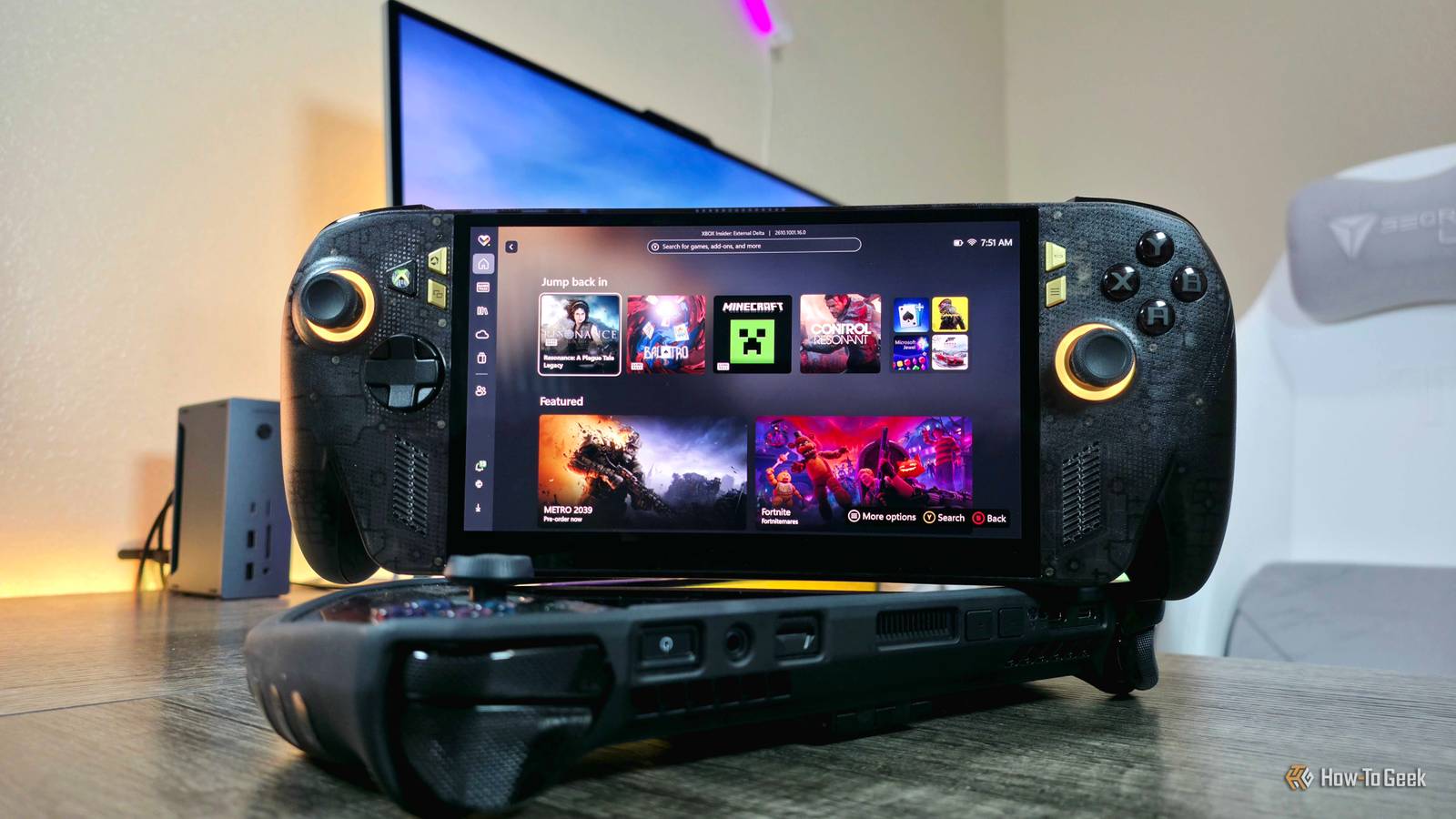
Published Oct 15, 2026, 9:00 AM EDT Zachary Boddy is a seasoned journalist with over six years of experience covering technology and video games, and is now contributing to How-To Geek. Zachary's career began at Windows Central, where their long-running, deep-rooted passion as a tech and gaming nerd fueled thousands of published articles, including reviews, guides, interviews, editorials, and so much more. When Zachary isn't writing, they're playing video games, reading books, listening to music, and spending time with their family, a very food-motivated cat and an exceptionally creative daughter. I've used a plethora of gaming handhelds over the years, but my go-to for portable gaming has been the ASUS ROG Ally X for over two years now. Even when ASUS and Xbox announced a partnership and the Xbox Ally family was unveiled, I wasn't tempted to upgrade—why should I, when the Xbox Ally X features the same display, just marginally improved performance and endurance, and only a handful of improvements? Even the headlining full-screen Xbox experience swiftly came to other handhelds, including my trustworthy ROG Ally X. Then the reveal of the special edition Xbox Ally X20 to celebrate 20 years of ASUS and 25 years of Xbox rapidly changed my way of thinking. It may not address any of my general issues with PC gaming handhelds, but the new Xbox Ally X20 does boast the two major upgrades I wanted to see in the original Xbox Ally X and a gorgeous translucent design to boot. My first impressions after actually getting an Xbox Ally X20 and comparing it directly to my last-gen ROG Ally X only cements the feeling that this could be my new favorite gaming handheld ever. A very, very big unboxing The Xbox Ally X20 bundle definitely has a lot going on I received the full Xbox Ally X20 bundle from ASUS, which arrived in a truly gargantuan box that matches its $2,500 price tag. Just three add-ons is a tough justification for a $1,200 price increase over the Xbox Ally X20 by itself, but unboxing everything made the bundle feel a little more reasonable... emphasis on "little." Aside from the Xbox Ally X20 handheld and its 65W USB-C charger, you also get the excellent, form-fitting Dbrand Killswitch case with its travel cover, thumbstick grips, and an X-Ray 3M skin. You sadly do not get Dbrand's tempered glass screen protector, which is certainly a choice for a $2,500 bundle. Next is the limited 20-year anniversary edition of the ASUS ROG XREAL R1 AR glasses, which let you play on the equivalent of a 171-inch, 240Hz OLED monitor absolutely anywhere, just by jacking into the Xbox Ally X20's USB-C port. At $850, the XREAL R1 glasses are a pricey bit of tech on their own, but I can attest that AR glasses really are an excellent companion to any PC gaming handheld—and these may be the best money can buy (wait for my full review to find out if that's true). That being said, the Xbox Ally X20 bundle doesn't include the ROG docking station the XREAL R1 glasses typically come with, which is another choice for this very expensive bundle. Moving on, what ultimately surprised me most about unboxing the Xbox Ally X20 bundle is the custom Pelican hard case, with dedicated storage space for the Xbox Ally X20, charger, and XREAL R1 glasses; there's even a dedicated space for an Xbox controller. Pelican is well-known for its protective cases for laptops, cameras, drones, and even firearms (with prices easily reaching $300 and more), and I have to admit this rugged case is seriously reassuring. The Pelican hard case may be an unexpected addition to the Xbox Ally X20 bundle, but it's well-designed, well-constructed, and built to protect your very expensive technology from everything short of an explosion (and it feels as if it might fare decently against that, too). Of course, the real main event is the handheld itself. Beautiful, and it actually feels like an upgrade The Xbox Ally X20 delivers where the regular Xbox Ally X failed The moment I got my hands on the Xbox Ally X20, I realized that the ergonomic grips introduced with the original Xbox Ally devices do make more of a difference than I initially assumed. The new rubberized texture takes those grips even further, making the Xbox Ally X20 significantly more comfortable to hold than my ROG Ally X. The next thing that caught my attention is, of course, the design. The Xbox Ally duo are good-looking handhelds by all accounts, but this smoky translucent shell that provides a peek into the internals is, in my opinion, peak handheld design (PSA to all companies: more transparent tech). I'm normally not a fan of gaudy gold, but the accents here are tasteful and understated, and simply work to make the Xbox Ally X20 feel like a real collector's item. Between this design and the grips, I'm seriously considering not using the included Dbrand case at all (even though the kickstand and travel cover are incredibly useful). Then I booted the Xbox Ally X20 to get my first experience with one of two major upgrades that made me want this handheld: the OLED display. Oh, and it did not disappoint, coming from the 7-inch IPS LCD display that all four previous Ally handhelds use. The extra 0.4 inches of display really does make a difference, and the OLED panel itself is brighter, it's more vibrant, color accurate, and responsive, and the perfect contrast makes everything look more defined. I can't wait to spend many hours gaming on this screen. If you're wondering about the aforementioned second major upgrade, it's the TMR thumbsticks, which rely on magnetism rather than a physical contact point that can wear down and break over time (so little to no risk of stick drift over time). It's too early to say exactly how good these thumbsticks are, but they immediately feel smoother than my ROG Ally X's more traditional thumbsticks. I've only used the Xbox Ally X20 for a few hours at this point, but one final thing that caught my attention is that Windows 11 and the full-screen Xbox experience really do feel much better on this handheld than the ROG Ally X. There are still plenty of pain points and frustrations, like with all Windows-powered handhelds, but navigating the interface has felt more responsive, controller input has actually worked consistently and predictably, and the dedicated Xbox button is actually lovely to have. I am very excited to dive more into the Xbox Ally X20 I obviously can't comment much on performance, battery life, or the day-to-day minutiae of actually living with a new device right now, but my early impressions of the Xbox Ally X20 have been fantastically positive. You can look forward to a full review in the coming weeks (plus a separate review just for the XREAL R1 AR glasses) to learn if the honeymoon phase fizzled out or if the Xbox Ally X20 really is the new ultimate gaming handheld. Asus ROG Xbox Ally X20 Dimensions 300 x 121 x 27.5-51.3mm Weight 756g Chipset AMD Ryzen AI Z2 Extreme RAM 24GB LPDDR5X @ 8,000MHz Storage 1TB PCIe 4.0 NVMe M.2 2280 Wireless Connectivity Yes, Wi-Fi 6E 2x2 + Bluetooth 5.4 With its vibrant OLED display, buttery smooth TMR thumbsticks, and gorgeous translucent design, the Xbox Ally X20 has seriously impressed me with my initial hands-on. My ASUS ROG Ally X might be able to retire, as this is the handheld gaming upgrade I've been waiting for.
ASUS ROG Xbox Ally X20 hands-on: Competing with my last-gen handheld
Full Article
Original Source
Read the full article at Howtogeek →KhanList aggregates and links to publicly available news content. We do not host full articles from third-party sources. Always verify important information with original sources.