
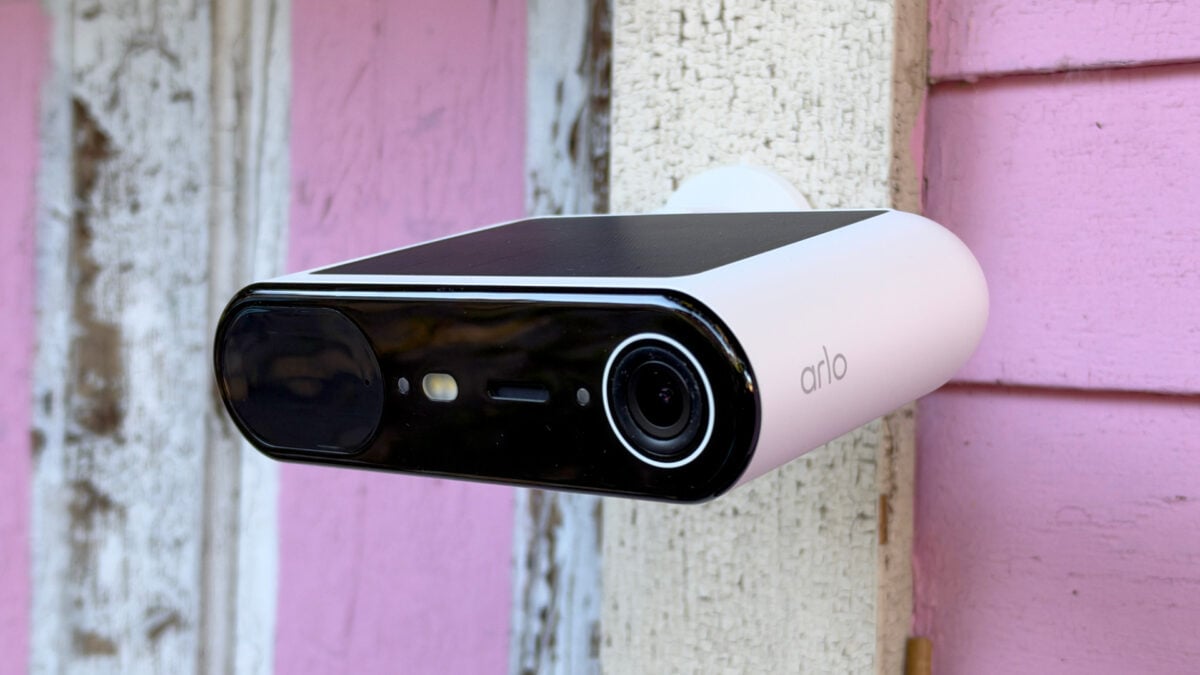
Outdoor security cameras are great, but there’s always a trade-off. On the one hand, wired cameras work year-round without your intervention, but they’re limited to areas where wires run. On the other, battery-powered options offer flexible placement, but you’ll have to take them down every few weeks or months to charge them. Then there are solar cameras, a whole category of ostensibly wire-free cameras that, ideally, give you the best of both worlds. I’ve been putting the Arlo Essential Solar Camera through its paces. It’s a broad, flat, $100 outdoor camera with a large, square solar panel taking up most of its top side. Arlo says it can run for up to six months on battery alone and year-round on as little as two hours of direct sunlight per day. Like most battery-powered security cameras, it doesn’t record continuously; instead, it captures clips when it detects motion. There are asterisks on its solar capability, though. Arlo acknowledges in the fine print on the Essential Solar’s product page that “battery life will vary with settings, use, activity captured, and environment,” which is true of any such device, solar or not. Still, it’s good if its solar panel means slower battery consumption, especially if you’re planning to put your camera up somewhere that requires a ladder to reach. Would I recommend the Essential Solar Camera over competing options from the likes of Eufy and Reolink? Not for most people, no, but it’s not for lack of quality. As ever, with me, it’s about the cost of a cloud-based subscription plan and poor local storage options. Arlo Essential Solar Camera A solid outdoor security camera, as long as its security monitoring subscription appeals to you. Crisp, high-quality video Solar-powered Solid build quality Multiple mounting positions No local storage without an additional hub Subscription required for most features Solar panel may not be enough Tricky installation Confusing app No ability to rotate screen No magnetic mount © Wes Davis / Gizmodo I miss Arlo’s magnetic mounts The Essential Solar Camera is an unusually shaped but nice-looking device. While most of its competitors are housed in cylindrical casings or oblong bodies, Arlo’s new camera is broad and flat. It reminds me of an external DVD or Blu-ray drive. The reason for this design is obvious: it lets Arlo stick a larger solar panel on top of it, so it can soak up more of the sun’s rays to—hopefully—keep its battery topped off. The Essential Solar Camera’s mount is a bit of a pain. It comes in three pieces: a mounting plate that you screw into the wall and a ball joint that you slip between the outer cowl and the plate. I felt like I needed three hands to tighten the ball joint while keeping the camera angled just how I wanted it, because a part of the mount with a cutout that lets you point it farther downward kept turning as I tightened. I got it done, but I really prefer the strong magnetic mounts of other Arlo cameras, which let you aim the camera just about any way you’d like. Sure, they’re easier to steal, but it’s not like it would be hard for someone to unscrew the Essential Solar Camera from its base, anyway. In the plus column, there are three mounting holes on the back of the camera, which allowed me to choose a side mount so I didn’t risk bonking my head on the device when I exited the garage door I installed it immediately next to. © Screenshots by Wes Davis / Gizmodo Setup was otherwise easy via the Arlo app. You’ll hold down a sync button on the camera’s underside, then press a “+” button in the app, tap the camera when it appears, and let the app guide you through the rest. This involves connecting the camera to Wi-Fi or a compatible Arlo hub, if you have one. When that was all done, a splash screen let me know I had begun a 30-day trial of Arlo’s Smart Secure plan that enables most of the features I’ll discuss below. This whole process only took a couple of minutes. The Arlo app journey The Essential Solar Camera’s home screen, which you access by tapping the devices tab at the bottom of the Arlo app’s main screen and then the camera’s live view snapshot, contains the feed, which you can set live by tapping a play button overlaid on the image and various other controls, along with a scrollable list of thumbnails of recently recorded events. Each event has an AI-generated caption—something like “Person approaches door” or “Dog stands on patio.” If you tap one of those videos, you’ll also see an AI-generated description that can be quite detailed and accurate, like this one: “A person wearing a black t-shirt, grey shorts, and a black cap with a logo walks up the path to the house. The person has a beard, wears glasses, and is holding a smartphone while wiping the camera lens with a white cloth.” That was pretty much exactly what happened, except that I had actually walked from the house to the garage, where it was installed. © Wes Davis / Gizmodo A gear icon in the upper right of this screen takes you to settings, where you can adjust the camera’s power settings, i.e., choose to prioritize video quality over battery life, battery over quality, a balanced approach, or Low Power Mode, which only takes snapshots of detected events, rather than video. Other settings menu options let you adjust the Essential Solar Camera’s brightness, choose black-and-white or color night video, and more. That’s also where you’ll go to set up and name detection zones by drawing rectangles on a snapshot of its live view, where you’d like the camera to monitor. Similarly, you can create privacy zones that place opaque boxes where you’d rather not monitor or record, such as a neighbor’s house or the sidewalk in front of your home. If you have one of Arlo’s subscription plans, you’ll have an option in settings called “Early Warning System.” That’s where you’ll find options to turn motion detection types on or off. Want the camera to record and notify you when it sees people, but not pets? This is where you would do that, and each one that I tested reliably called out when it saw one of my dogs, my cat, or me. There’s a beta setting for fire detection, which I chose not to test because, well, I don’t want to light my yard on fire. All of that stuff is pretty standard fare for a security camera app—though it’s behind a subscription paywall here, which is not always the case—but I have beef with some of Arlo’s decisions. The app loves to advertise its products and services to you through full-screen pop-ups and banners, which are all too common in smart home apps. Also, the scheduling features that let you set when you want the Essential Solar (or any other Arlo camera) to record things or notify you aren’t found in the camera’s settings, but rather in the “Routines” tab, where you’ll set up timed automations that can set the camera to the modes “Arm Home,” “Arm Away,” or “Standby.” Those first two are not dedicated, preconfigured modes with specific purposes, per se—you set what happens in each. For instance, maybe you want the camera to sound its alarm if it detects motion while you’re away but not when you’re home. Standby, meanwhile, turns off motion detection on all cameras by default. But you can still configure each and every one to do the same things that other cameras do in the other modes. I guess I appreciate the flexibility, but it’s a weird way to handle scheduling. Quick detection and notification The Essential Solar was quick to notify me of activity in the backyard where I mounted it. These notifications, since I was using a Smart Secure plan (via the 30-day trial that automatically activated when I first set up the camera), included the same AI-generated captions that appear in the camera feed, and they were usually pretty accurate. At a glance, I might learn that a dog had exited through my house’s back door or that a person and a dog had been spotted. Sometimes it identified my miniature pinscher as a black cat, just like Google’s Gemini did when I tested the Nest Cam Outdoor. © Wes Davis / Gizmodo The notifications came a little too frequently when something was happening continuously in front of the camera. When my partner let our dogs out to go to the bathroom before she left for work, my phone buzzed constantly until she let them back in. I’d like the option to tweak how long the camera waits between detection events, as you can on devices like the Reolink Altas, since this quickly became annoying and made me ignore the notifications entirely. Arlo’s cameras have always impressed me with their video quality, and the Essential Solar is no different. The footage it produced was as sharp and colorful as any I’ve tested by day, though it suffers when pointed at a shady area with bright light elsewhere. When I was looking at the back of my house one morning, the building next door appeared totally blown out. You can lower the brightness of the image the camera produces, but this only seems to tweak the resulting image rather than the exposure as it’s captured, which isn’t helpful. At night, its color vision could be very blurry, but in infrared black-and-white mode, it was crisp and handled motion very well. I didn’t test the Essential Solar long enough to know how well its battery will do over many months, but I got a loose idea from my week of testing. The first day was rough—I set the device up around noon, and by a little after seven o’clock that night, it had lost a full five percent, dropping from 67% to 62%. It only sank to 59% over the next couple of days, however, even though I put it into its highest-battery-consuming mode. When I switched it to “Best Battery Life,” the charge climbed to 61% and hung there for the rest of my testing. That was with the backyard at a normal activity level—dogs going outside every couple of hours to pee, or someone occasionally wandering through—and the camera receiving about two hours of upper-midwestern morning sun. Pay up, or it’s not much of a security camera © Wes Davis / Gizmodo Everything beyond the basics—free features such as the ability to check Essential Solar’s live feed, set privacy zones, or receive generic motion-detection alerts from the Arlo app—costs extra. Custom detection zones, object recognition (i.e., person, vehicle, animal, and package detection), rich notifications, AI-based descriptions and summaries, and 60 days of video recordings are all largely tucked behind Arlo’s subscription paywall. I say “largely” because, as I mentioned above, you can get video recordings if you have a SmartHub. But you still won’t get any of the other subscription features, and the Essential Solar only works with the $100 Arlo Pro SmartHub or $150 Ultra SmartHub. If you already have one of the company’s older Base Station devices, it seems it’s about time to upgrade, which is understandable but disappointing. The real trouble is that most of the features I mentioned above are standard for other cameras that I’d consider just as good in terms of video, performance, and build quality. And many come with features you won’t get from the Essential Solar. Take the Reolink Altas, which I reviewed last year and offers nearly all of that—plus more advanced, nerdy things like the ability to store footage on a local network device like an NAS. Meanwhile, you’re on the hook for $10 per month if you buy the Arlo Smart Aware plan, which covers only a single camera. Sure, the Altas costs $50 more than the Essential Solar, but that’s worth it if you’re saving on subscription fees. Still, some people like the peace of mind that comes with subscriptions like the Smart Secure and Ultra Secure plans. Each has features such as 24/7 professional monitoring by human “certified experts,” who can check on your home and alert authorities “when sensors are triggered for events like doors and windows opening, water leaks, and more,” as described on Arlo’s website. You’ll also get “Threat Assessment,” which uses AI to alert you to potential break-in attempts and, if the activity continues without receiving a response from you, can alert professional monitors, who may contact emergency responders if they determine it’s necessary. These subscriptions aren’t especially cheap: the Ultra Secure plan, which gets you all the monitoring features above plus 24/7 continuous video for up to three cameras (excluding the Essential Solar, which doesn’t support that, making that option pointless without other Arlo cameras), can run as high as $50 a month. Arlo’s prices may be lower than those of dedicated solutions from the likes of ADT or SimpliSafe—depending on which plans you’re comparing—but higher than what the Amazon-owned Ring charges for similar subscriptions. Then again, buying a Ring camera is tantamount to participating in what sure feels a lot like a surveillance state. A solid investment for the Arlo-dedicated © Wes Davis / Gizmodo If you’re already in the Arlo ecosystem and are tired of swapping batteries or bringing your camera in to charge, the Essential Solar could be a great option. Its video quality is very good, it had no issues maintaining a solid Wi-Fi connection, and I never had to wait more than a few seconds for its live feed to load. I wish it worked with more of Arlo’s hubs, though, and I don’t like that its battery is nonremovable—I’ve always appreciated how so many of the company’s cameras feature swappable power packs—and I wish it had the magnetic mount found on devices like the Arlo Ultra. If you’re not already in the Arlo ecosystem, though, and you prize devices that don’t lean on a subscription to be good, then there’s not much here for you. The Essential Solar becomes just a basic motion detector with a camera when it’s not attached to either an Arlo hub or one of the company’s cloud storage plans. It could be worth considering if you like to get peace of mind from monitoring plans, sure. But if that doesn’t describe you, there are so many affordable, decent security cameras with good on-device smart detection features and storage that a subscription-based device really isn’t necessary. And many such devices don’t even need an internet connection to be useful, as long as you don’t mind going outside to yank their microSD cards every now and then.
Arlo Essential Solar Camera Review: Solar Is Great, but Subscription Paywalls Aren’t
Full Article
Original Source
Read the full article at Gizmodo →KhanList aggregates and links to publicly available news content. We do not host full articles from third-party sources. Always verify important information with original sources.