
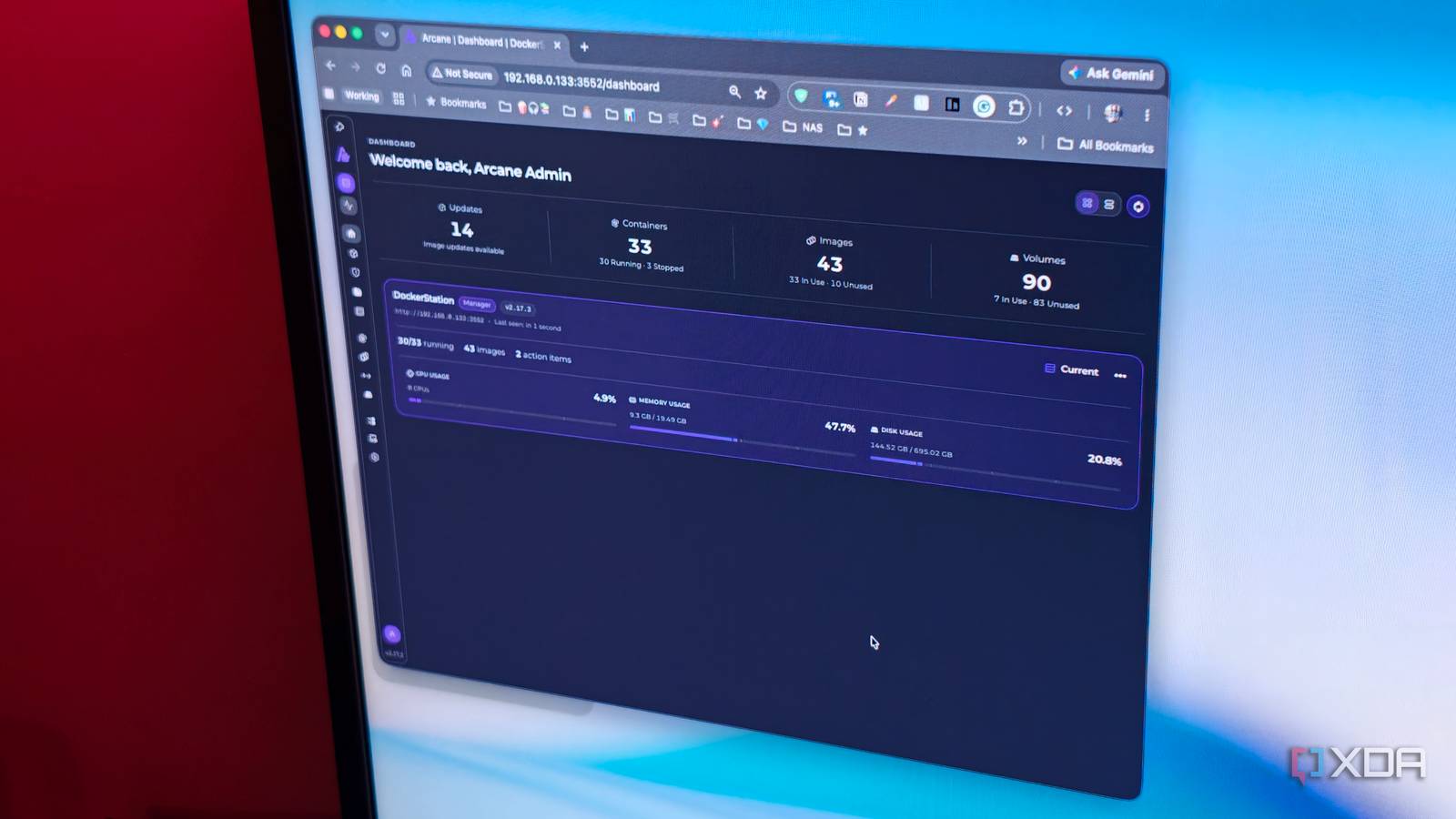
Published Nov 10, 2026, 2:00 PM EST Dhruv Bhutani has been writing about consumer technology since 2008, offering deep insights into the personal technology landscape through features and opinion pieces. He writes for XDA-Developers, where he focuses on topics like productivity, networking, self-hosting, and more. Over the years, his work has also appeared in leading publications such as Android Police, Android Authority, CNET, PCMag, and more. Outside of his professional work, Dhruv is an avid fan of horror media spanning films and literature, enjoys fitness activities, collects vinyl records, and plays the guitar. I run a pretty extensive home lab. Between the apps that power my own stack and the apps and services I install for testing out, Docker is great until you have dozens of containers running. From media servers to photo management tools like Immich, RSS readers, and smart home services, I'll be honest, my setup is pretty hectic. While Docker Compose makes deploying these applications fairly straightforward, keeping track of everything is a whole different matter. I've previously experimented with tools like Portainer and Dockge to make container management easier. Now, those apps work well enough, but I've been looking for something that combines the strengths of both for a comprehensive solution that also makes updating containers easier. That's how I came across Arcane. This self-hosted Docker management platform brings full container controls, Compose deployment, logs, and resource monitoring into a single, easy-to-understand web interface, and I've gotta say it's been solid enough that I've almost fully switched over. Arcane gives me a central dashboard to manage all my containers Docker Compose management here is much more effective than Portainer and even Dockge Credit: Docker Desktop is fine for what it is, but once you're deploying a growing collection of containers, things get scattered quickly. Like me, you'll probably have a number of applications running independently while others will have dependencies. When something stops working, figuring out what happened usually involves a trip to the terminal to dig up logs. That's fine for a few containers, but if you're just a hobbyist, you want a simpler way to access all this data. That's where Arcane steps in. This Docker container gives you a central dashboard for all your container management needs. Once installed, it connects directly to the Docker engine and pulls in the containers running on the host. In doing so, it lets you see exactly what containers are running, which ones are stopped, and how much CPU and memory they are consuming. This is pretty handy both when you are just setting up containers and when troubleshooting. If an app stops working, just open Arcane, find the relevant container, and inspect its logs right from the unified interface. If you need to fix the Compose file, you can do that right there. Additionally, you can do the standard stuff like restarting the container, stopping it, or inspecting its configuration. No surprises there. One of my favorite features here is Arcane's treatment of Docker Compose deployments. These are considered projects and serve as a one-stop destination to edit Compose files as well as environment variables. Portainer also offers an equivalent, but it requires too many steps to fix environment variables. Arcane, on the other hand, presents a two-pane layout that makes changes immediately obvious. Plus, unlike Dockge, which offers limited management of existing containers, Arcane taps into your existing Compose configurations and lets you manage them seamlessly. This means you don't have to start from scratch while making the switch over. Arcane does more than manage Docker containers Built-in remote Docker management and monitoring are standout features Of course, container management is just one part of running a home lab. You'll also want to manage Docker images, volumes, and networks. Once again, Arcane simplifies this process dramatically. A dedicated tab is available that presents all existing images for you to delete if you wish. Similarly, Arcane includes a built-in update checker. Now, maybe I'm mistaken, but in all my time testing out Portainer, I couldn't find a built-in utility to check updates, so I ended up installing Watchtower to handle that task. However, switching over to Arcane means one less additional tool to host or take care of. The toolset is plenty comprehensive, and some of the standout features for me include volume backup functionality. This is great to have when you want an additional safeguard before making changes to an application deployment. You'll still want proper backups, but built-in volume backups are a convenient addition if you want something a bit simpler and all-in-one. All this sounds pretty standard, just well implemented. However, there are two more features that really stood out for me. For one, Arcane isn't limited to managing Docker on a single machine. It supports remote environments through its agent, letting you connect to additional Docker hosts and manage them from the same interface. I run a couple of servers, and once I switch to Arcane across the board, this should let me manage containers across my home servers from a unified interface. That's pretty amazing. In addition, there's a monitoring interface built in that gives you live information about container resource usage, as well as visualizations for CPU, memory, and network activity. There are more granular monitoring utilities around, but this is a feature that definitely comes in handy when a particular container starts acting up or if the system starts behaving slower than expected. Arcane simplifies everyday self-hosting maintenance The whole point of using containers for self-hosted applications is that deployments are portable and easy to manage. However, Docker Desktop and some of the many Docker management apps manage to make it more complicated than it should be. The beauty of Arcane is in how it packages all the functionality you could need into an interface that is instantly familiar and also has nice-to-have additions. You can keep your Compose configurations and pop into the terminal whenever you want, but for everyday tasks, fresh deployments, and maintenance, Arcane gives you a simpler way to handle it all. Arcane Arcane is a self-hosted Docker management tool that makes it easy to manage container deployment, monitoring and updates.
Arcane replaced Portainer and Dockge in my home lab, and my containers are finally easy to manage
Full Article
Original Source
Read the full article at Xda-developers →KhanList aggregates and links to publicly available news content. We do not host full articles from third-party sources. Always verify important information with original sources.