
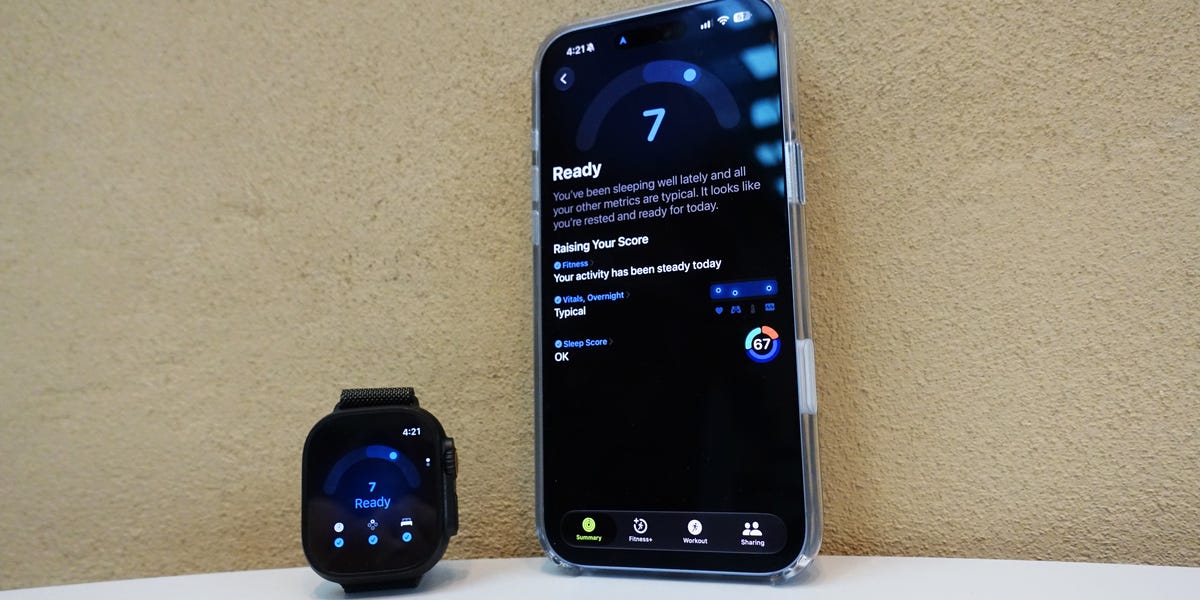
5 min readHOW DO YOU go about planning your day? Do you follow rigid schedules based on what you need to accomplish, from your workouts to when you go to bed, or do you just wing it based on how you’re feeling?For anyone between these two extremes, the latest Apple Watches have a new measure that aims to provide extra insight to help you better understand when your body is primed for action—and when you might be better off taking it easy.The feature is called Readiness. One of the biggest improvements to Apple’s new wearables this year came to the sensor suite. The company claims the new Health Sensing System is more accurate than ever (and more accurate than any other wearable on the market, for that matter)—and with that improved performance comes capabilities like new heart rate variability (HRV) measures which help to power Readiness.I tested the feature (along with the Apple Watch Ultra 4) to see just how much it can help me understand all the data my smartwatch captures—and if I feel more empowered to make decisions about where I dedicate my efforts and energy.What Is Apple’s New Readiness Feature?Readiness is a numerical score between 1 and 10 calculated using data collected by the device, which is then crunched together considering factors like your long term trends by an algorithm developed using insights from Apple’s Heart and Movement Study. You’ll need to log seven nights of sleep using an Apple Watch Series 12 or Ultra 4 to use the feature. “This breakthrough in the Health Sensing System is really what's enabled this,” Craig Bolton, Apple’s Director of Fitness Technologies, told Men’s Health. “So getting that right, enabling the HRV has been the big unlock for us.”Depending on the score, you’re then provided a recommendation on how to go about their day, along with some general reasoning behind the reading within four tiers: Recover (0 to 1), Pace Yourself (2 to 4), Ready (5 to 7), or Go For It (8 to 10). There’s an Apple Watch app and new complication to view Readiness directly on your wrist, and you can also access it through the Fitness app on iPhone.Check out the example below from a morning I woke up feeling well-rested:Brett WilliamsYou can get even more granular and sort through the data that contributes to the score from three distinct sources: Fitness, Vitals, and Sleep Score. Tap through and you’ll cycle through a few screens with a more detailed breakdown of measures like heart rate, respiratory rate, and recovery HRV (Vitals), sleep duration, bedtime, and interruptions (Sleep Score), and Move Ring, Workouts. and Training Load (Fitness). These three categories are positioned in ways to encourage you to raise your score—but if your Training Load is high, for example, you might also be shown some guidance on how to reduce it.When you view the results this way, it can feel like a torrent of data. That’s exactly why Readiness exists. You’re synthesizing multiple aspects of your health that will contribute to your body’s ability to take on the day.You can use the guidance to help inform your approach to workouts if you’re following a larger training plan—but Apple reps assured me that the feature was made with non-athletes in mind as well. “We built Readiness for anyone, whether you are someone that is training for a race or you have an active, busy life,” Apple Watch and Health Product Marketing Manager Cait Dooley said.Readiness also stays fluid; it’s not locked in once you wake up. The score can be updated depending on how you approach your day—when you log a workout or take a nap, for instance. And there’s no demand to follow its guidance; you won’t be penalized for ignoring a low score to grind through your scheduled workout.Think of the score as a suggestion to help you maximize your performance, or even validation for how you feel. “Sometimes that number may actually just tell you something or confirm something that your body's already telling you,” Bolton said.What Sets Apple’s Readiness Apart?IF YOU’VE WORN other health-focused wearables, the concept of Readiness will sound familiar. Brands like Whoop, Fitbit, Garmin, and Oura provide users similar scores and guidance—and Oura, Garmin, and Fitbit even use “readiness” in the name of their measures, too.I also wear an Oura ring and a Whoop band. On a morning my Apple Readiness score was 8, my Oura’s readiness grade was an 85. The Oura app provided a similar readout to Apple’s—large text at the top read “Go get ‘em!” and I could click into some of the contributing factors for deeper insights. My Whoop’s recovery score was 86 percent, and the app’s Whoop AI feature provided some context as to why and guidance on how to maximize my day.All three of these devices told me similar things—which is reassuring if my main concern was tracking accuracy. But the uniformity is not ideal if you’re only going to pick one single wearable, as is the case for most people who don’t need to review tech for their day job. If these gadgets are providing similar messaging, what makes one better than another? What sets Apple’s Readiness apart?Brett WilliamsThe answer isn’t necessarily in what the feature does. It’s where you’ll find it, and the types of people who will likely be using it. The team at Apple understand health tech is a large market. They also realize that lots of people use Apple’s devices—most people who use wearables, actually, as Apple leads all companies with 20 percent of the market, according to research firm IDC. And unlike Whoop and Oura, which are explicitly wellness-first brands, Apple Watch is worn by lots of people who don’t tend to know what HRV means or have long term training plans to follow.“We always take the lens of, how do we provide value to users across the spectrum?” Bolton said. “And this is no different.”Bolton and Dooley both stress that the feature is designed to be used simply. Even for Apple Watch wearers who aren’t heavy optimizers, Readiness can serve as another way to understand the data they’ve already been used to collecting with their wearable. “The reality for our users, I think, and the value it brings is they're used to these features that we've had in the system for some time—Training Load Activity Rings, sleep,” Bolton said. “This is really synthesizing that, or it's distilling it into a really glanceable view.”And for users who might not want another fitness stat to worry about, Readiness is opt-in. Much like how Apple allows users to mute features like Activity Rings, you can control whether or not you’ll receive the guidance.So should you get an Apple Watch solely for the new Readiness feature? No. But it can provide a similar experience that you’ll find on dedicated devices—along with everything else an Apple Watch does for millions of users.I’m not exactly going to ditch my other wellness-first devices (I’m also a data sicko), but other people who don’t want to rock straps on both wrists and a tracker on their finger might feel more comfortable just wearing a Watch to get a similar synthesis of their health info. Think of Readiness, then, as a gateway to more advanced wellness planning. For a lot of people—including many who might never have considered using a tool like this—that’s a great way to leverage all the data a device can collect to help you have better days.Brett Williams, NASM-CPT, PES, a senior editor at Men's Health, is a certified trainer and former pro football player and tech reporter. You can find his work elsewhere at Mashable, Thrillist, and other outlets.
Apple’s New Readiness Score Is a Gateway to Wellness Planning
Full Article
Original Source
Read the full article at Menshealth →KhanList aggregates and links to publicly available news content. We do not host full articles from third-party sources. Always verify important information with original sources.