
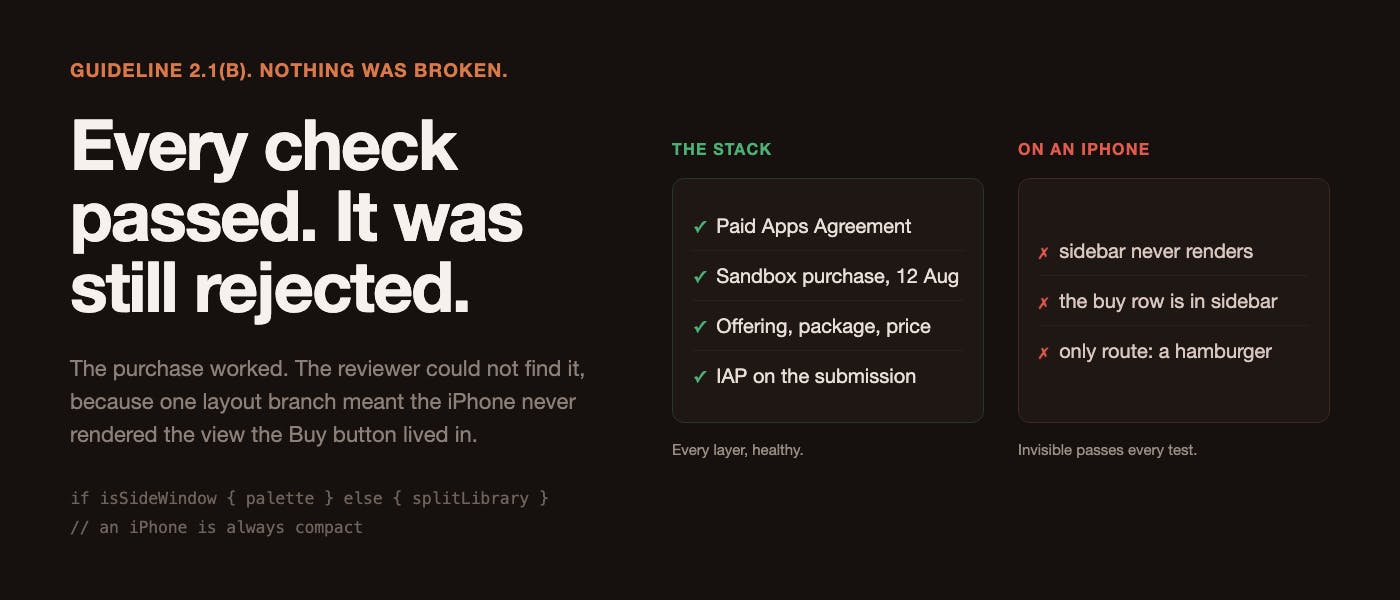
On September 2, Apple rejected build 22. The explanation was just six words: we were unable to purchase IAPs Reviewed on an iPhone 17 Pro Max, iOS 26.6. If you have shipped an in-app purchase, you know the feeling this produces: a specific kind of dread, because 2.1(b) sounds like an infrastructure problem, and infrastructure problems are the slow ones. So I did what everybody does. I went and checked the stack. Everything checked out, which was the worst possible result I went through it in order, and I want to list all of it, because the length of this list is the point: The Paid Applications Agreement is active. A real sandbox purchase was completed on 12 August. Fingertips Unlock, $14.19 in that storefront, one-time, no expiration. It is still visible in the RevenueCat dashboard. RevenueCat has one offering, default, marked current, containing an $rc_lifetime package carrying app. fingertips.pro, active. Its App Store Connect credentials validate on all three checks. The IAP has a price schedule with a USA base price. The IAP was attached to the submission. Two items on submission f7e1392e: the version and the in-app purchase. Entitlement.swift has not changed since that working purchase, apart from a #if DEBUG block that is inert in Release. Every check passed. The purchase flow worked. It had demonstrably worked five days after I wrote it and it still worked now. Which left exactly one explanation, and it took me far too long to reach it: the reviewer could not find it. That is a different category of bug from the one I was hunting. I was looking for something that was broken. Nothing was broken. Something was invisible, and invisible passes every test you can write. One line private var library: some View { Group { if isSideWindow { palette } else { splitLibrary } } isSideWindow is sizeClass == .compact. An iPhone is always compact. So on an iPhone this app renders palette and never renders splitLibrary, which means it never renders sidebar. And the prominent buy row, the one that says "Buy Fingertips, 14 days left" and is impossible to miss, lives inside sidebar. So on the device Apple reviewed, the only route to paying money was this: Menu("Library", systemImage: "line.3.horizontal") { // ... Folders submenu // ... Tags submenu Button(buyButtonTitle, systemImage: "cart") { showPaywall = true } } An unlabelled hamburger icon, opened, scrolled past a Folders submenu and a Tags submenu, to a purchase button at the bottom. On a fresh install, by a stranger, in a few minutes, with no idea what the app does. I would not have found it either. I have used this app daily since 17 August and I did not know that was the only way to buy it on an iPhone, because I do not develop on an iPhone. I develop on an iPad and a Mac, both of which render sidebar, both of which show the obvious row. The device class you develop on decides which bugs are invisible to you. Not which bugs exist. Which ones you are structurally incapable of noticing. The part that stings Here is the comment that was already sitting above that buy row, written weeks earlier: // The countdown lived in the toolbar and never fitted: at sidebar // width iOS truncated it to "8 da…", then hid it in its own overflow // menu, then rendered the button icon-only. Three attempts at the // same wrong place. A row has the whole column and cannot truncate, // it is the first thing in the sidebar rather than the last, and it // disappears entirely on purchase. Three previous attempts at putting the purchase entry point in a menu. Three failures, each documented, ending in a rule I had written down for myself: a row has the whole column and cannot truncate. And the compact layout was quietly making a fourth attempt at the same wrong place, in a different file path, the entire time. I had learned the lesson, written it down in the exact place someone would read it, and shipped a layout that had never been given it. If your codebase has a comment recording three failed attempts at something, go and check whether a fourth attempt is already running somewhere else. Mine was, and it cost a review cycle in the last month before a deadline. The first fix was dead code This is the part I would most want another developer to read, because it is a failure of process rather than knowledge, and I would have shipped it. The obvious fix is a toolbar item. So I added one, guarded so it only appears on the compact layout, and it compiled, and it looked completely correct in review. It was in sidebar's toolbar. sidebar only renders when isSideWindow is false. The new item was guarded on isSideWindow being true. The condition could never be true in the place the view existed. It was dead code that read as a fix, in a diff that read as correct, addressing a rejection. It was caught by a review agent reading the diff against the surrounding file, and I want to be precise about why that worked when my own reading did not: the bug is not visible in the diff. The diff shows a sensible guarded toolbar item. You have to hold the diff and the enclosing view's render condition in your head at the same time to see that they contradict, and the enclosing condition is 250 lines away. A fix for a rejection deserves the same scrutiny as the code that caused it, and usually gets less, because you are annoyed, and it is late, and the fix is obviously right. And the second fix would have been rejected too Even in the correct toolbar, it would have failed. The side window layout is 370pt wide. It already has four bar items. A fifth renders half off the edge, and iOS 26 collapses the overflow into a More menu. Which is a purchase button hidden inside an unlabelled menu. Which is the rejection I had just received, arriving for a third time by a different route. The thing that actually works is not a toolbar item at all: // A `safeAreaInset`, NOT a toolbar item. The first attempt at this fix // WAS a toolbar item and it was dead code, because it was added to // `sidebar`'s toolbar where `isSideWindow` is false by definition. Even // in the right toolbar it would have been wrong: the side window is // 370pt, a fifth item renders half off the edge, and iOS 26 collapses // the overflow into a More menu - which is the rejection again. An inset // has the full width, cannot truncate and cannot collapse. .safeAreaInset(edge: .top) { if entitlement.state != .purchased { Button { showPaywall = true } label: { HStack(spacing: Design.Space.tight) { Image(systemName: "cart") Text(buyButtonTitle) .font(Design.Text.body) .fontWeight(.medium) Spacer(minLength: 0) Image(systemName: "chevron.right") .font(Design.Text.meta) .foregroundStyle(Design.Ink.secondary) } .padding(.horizontal, Design.Space.regular) .frame(minHeight: Design.Row.minHeight) .frame(maxWidth: .infinity) .background(.bar) } .buttonStyle(.plain) .accessibilityHint("Opens the purchase screen") } } Full width. Cannot truncate. Cannot collapse into an overflow menu. Removes itself on purchase. It is the same conclusion the sidebar comment reached months ago, applied to the layout that never got it. Verified by looking at it, on an iPhone 17 Pro Max simulator, which is the exact device named in the rejection. "Buy Fingertips - 14 days left" is pinned above the list on launch, tapping it opens the paywall, and the paywall shows a real $9.99 rather than a blank. That last detail matters more than it looks: a real price on screen proves StoreKit resolved the product, which is the thing the rejection appeared to be about and never was. The Mac had the same hole, and worse Once I knew the shape of the bug I went looking for it elsewhere, which is the only useful thing to do with a bug like this. The Mac build is a menu bar app. The browsing window that carries the buy row is .suppressed at launch, so a reviewer who opens the Mac app gets a menu bar icon and nothing else. And the menu bar menu had no way to pay at all. The purchase was two steps away, behind "Open Fingertips…". macOS 1.0 (23) was staged and ready to submit and would very likely have earned the identical 2.1(b) a week later. There is now a buy item as the first thing in the menu bar menu, above the palette, sharing a single title property with the iOS row so the two surfaces cannot drift into reporting different day counts. That is the actual return on investigating a rejection properly rather than patching the reported symptom. One rejection, two platforms fixed, one of them before it was ever reported. Two things found while fixing it A dead Buy button had four possible causes and all of them were silent. purchase() returned .unavailable whether RevenueCat was not configured, the offerings fetch threw, the offering had no packages, or the purchase itself threw. Identical from the outside. That cost me an evening, so each reason now logs itself: guard let package = offerings.current?.availablePackages.first else { // The usual cause is StoreKit returning no product for the id, which // drops the package from `availablePackages` and leaves the offering // itself looking perfectly healthy. let current = offerings.current?.identifier ?? "nil" print("[entitlement] purchase unavailable: no packages in current offering " + "(current=\(current), offerings=\(offerings.all.keys.sorted()))") return .unavailable } Note the comment. The failure that is hardest to diagnose is the one where the container looks healthy and is empty, and that is exactly the one that prints the least by default. And a second, independent 2.1(b) was sitting in the success path. After a purchase completes, the old code called refresh() to re-read entitlement state. refresh() goes back to the network, and a nil answer there reported failure to someone whose money had already left: // Trust the customerInfo StoreKit just handed us, BEFORE asking // again. `refresh()` re-fetches, and a nil answer on that second // call reported failure to somebody whose money had already gone - // the paywall saying "The App Store isn't reachable right now" over // a completed purchase. A reviewer seeing that is 2.1(b) on its own. if result.customerInfo.entitlements[Self.entitlementID]?.isActive == true { state = .purchased return .purchased } StoreKit hands you a fresh customerInfo with the transaction that just succeeded. Asking the network again to confirm what you are already holding can only ever lose information. If you take one line of code from this article, take that one. The resubmission has a trap in it Worth knowing if you have ever bumped a version while waiting for review. The iOS record is 1.0, rejected, holding build 22. On 14 August, I bumped the project to 1.1, on the reasonable assumption that 1.0 was about to clear. It never cleared. A build stamped 1.1 cannot attach to the 1.0 record. It would force a new version record with its own metadata pass, in 39 locales. So the resubmission stayed 1.0, with the version forced back down on the command line and only the build number moving: 24 first, because 23 was already used by the Mac build, then 25 when an accessibility audit found two more undersized tap targets on the paywall itself. 1.0 (25) is what shipped. Do not bump your version number while a review is in flight. The bump is free and reversing it is not. It cleared. 1.0 (25) went back on 2 September, the evening of the rejection, and was approved on 5 September. Three days. No second 2.1(b), and no question from the reviewer about where the purchase was. I want to be careful about what that does and does not prove. It does not prove the diagnosis was right, because Apple does not tell you that. A different reviewer on a different device could have found the old hamburger menu and passed it. What it does prove is the cheaper claim: the app that went back had a purchase entry point that a stranger could not miss on any layout, and it was not rejected again. The findings above never depended on the outcome anyway, which is why I wrote them down before I had one. The Mac build carrying the same fix went into review the same day the iPhone one was approved. I will know how that lands after this is published. What to take away A feature a reviewer cannot find does not exist. Neither does one your users cannot find, and the reviewer is just the first user who tells you. I did not have a purchase bug. I had a discoverability bug that presented as a purchase bug, and every test I could write agreed with me that the purchase worked. You are structurally blind to bugs on device classes you do not use. I develop on an iPad and a Mac. Both render the layout with the obvious buy row. The iPhone, which is what a reviewer picks up, renders the one without it. Open your app on the device class in the rejection, not the one on your desk. Give the fix for a rejection more scrutiny than the code that caused it. Mine was dead code that read as correct, and my second attempt would have earned the same rejection by a different mechanism. Two wrong fixes in a row, both of which compiled and reviewed well. When you find the shape of a bug, go looking for the shape elsewhere. The Mac had the same hole, worse, and unreported. Fixing the instance would have bought me one more rejection a week later. And read your own old comments. Mine recorded three failed attempts at putting a purchase button in a menu, ending in the exact rule that would have prevented this. The lesson was written down. It just was not applied to the layout that had not existed yet when I learned it. Fingertips is a snippet library for iPhone, iPad and Mac, built for RevenueCat's Shipaton 2026. It is on the App Store and at usefingertips.com. Earlier in this series: an entitlement check that turned an unreachable RevenueCat into an unlimited licence, why you cannot give a hackathon judge a free unlock before you submit, and an on-device model that ignored its search tool and made up my data.
Apple Rejected My App Because Its Buy Button Was Too Hard to Find
Full Article
Original Source
Read the full article at Hackernoon →KhanList aggregates and links to publicly available news content. We do not host full articles from third-party sources. Always verify important information with original sources.