
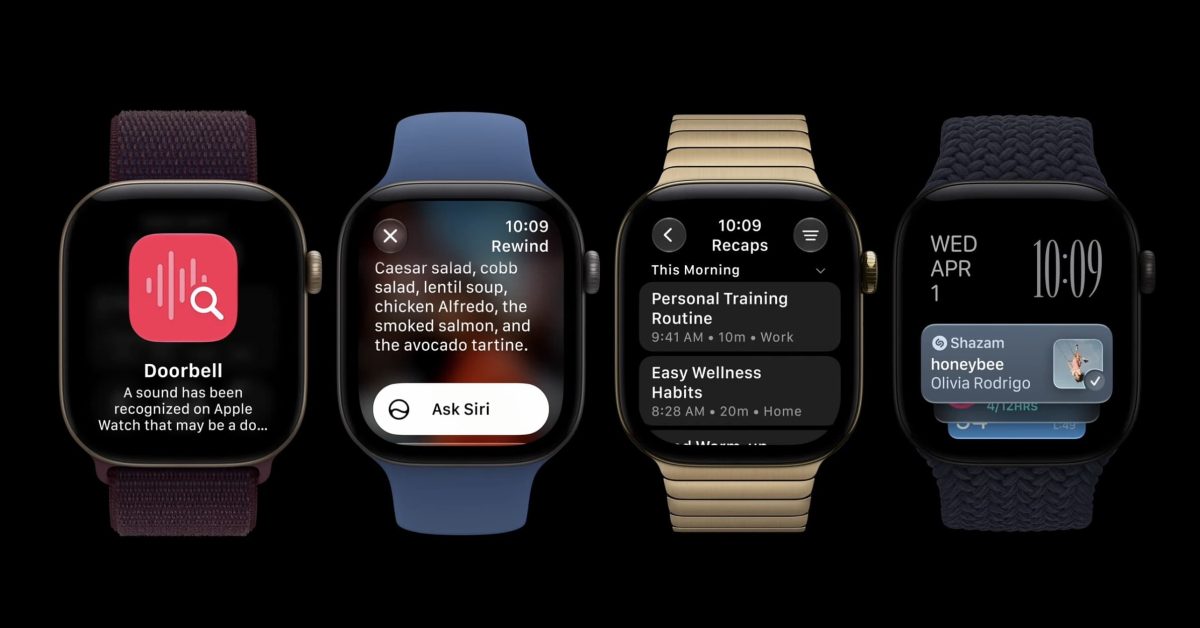
Apple is launching an all-new set of features called Audio Intelligence, starting with today’s new Apple Watch Series 12 and Apple Watch Ultra 4. The company details how the new feature works, especially around privacy, in a new paper. Audio Intelligence on Apple Watch covers four features, including Live Rewind and Siri Recap “Audio Intelligence is a brand-new class of Apple Intelligence features that use the microphones of Apple Watch, the power of Apple silicon, and on-device and cloud-based AI models to help you detect sounds, identify music, and stay present and engaged — all while protecting your privacy at every step,” Apple explains. Audio Intelligence includes four specific features to start: Sound Recognition, automatic Music Recognition with Shazam, Live Rewind, and Siri Recap. The company says that both Live Rewind and Siri Recap will arrive in beta with English support later this year, adding that “more details will be available at launch.” Each Audio Intelligence feature is opt-in, Apple says. Live Rewind and Siri Recap also let you easily enable or disable the feature as needed. Here’s more on Live Rewind from Apple: Live Rewind only activates when you deliberately double-press the Digital Crown. It only shows the last 15 seconds of speech as a text snippet on your display. It doesn’t continue to transcribe in the background, nor does it save the text unless you choose to ask Siri about the content or save it to the Siri app. You can turn it on through the Watch app on iPhone — just open the Watch app, tap Siri, then tap Live Rewind and turn on “Double Click Digital Crown”. And here’s more on Siri Recap from Apple: Siri Recap runs only when you choose. You can turn on Siri Recap in the Watch app on iPhone. When you turn it on, you can set a schedule based on time and/or location (for example, “only at work” or “never at night”), or you can manually turn it on and off. Across all these options, you can always turn it on or off at any time from Control Center. Audio Intelligence doesn’t attribute speech to speakers, and Siri Recap is designed to omit potentially harmful content and sensitive information. Live Rewind alerts nearby people with an audible chime and visual indicators, Apple says. You can learn much more about the new features here. How Audio Intelligence is designed to work with privacy in mind If you want to really take a deep dive on privacy and the new features, Apple has published an 11-page privacy paper that goes even further. Interestingly, Apple explains in the paper how Live Rewind works with privacy in mind: Live Rewind Audio from the microphone flows into the audio buffer inside the Secure Exclave on the S11 chip. Old audio is continuously replaced by new audio, so audio doesn’t accumulate, and raw audio isn’t accessible outside this protected buffer. And for the Siri Recap feature, here’s part of Apple’s explanation on how it works: The S11 chip uses a lightweight AI model to determine whether speech is occurring nearby. This model doesn’t transcribe or record anything. It simply detects whether a conversation has started. If a conversation is detected, audio flows into a protected buffer inside the Secure Exclave on the S11 chip. It is isolated in hardware so that it is inaccessible to the user, the operating system, apps, and even Apple. Again, you can read the full 11-page paper for yourself here. FTC: We use income earning auto affiliate links. More.
Apple details how Apple Watch’s new Audio Intelligence features work in privacy paper
Full Article
Original Source
Read the full article at 9to5mac →KhanList aggregates and links to publicly available news content. We do not host full articles from third-party sources. Always verify important information with original sources.