
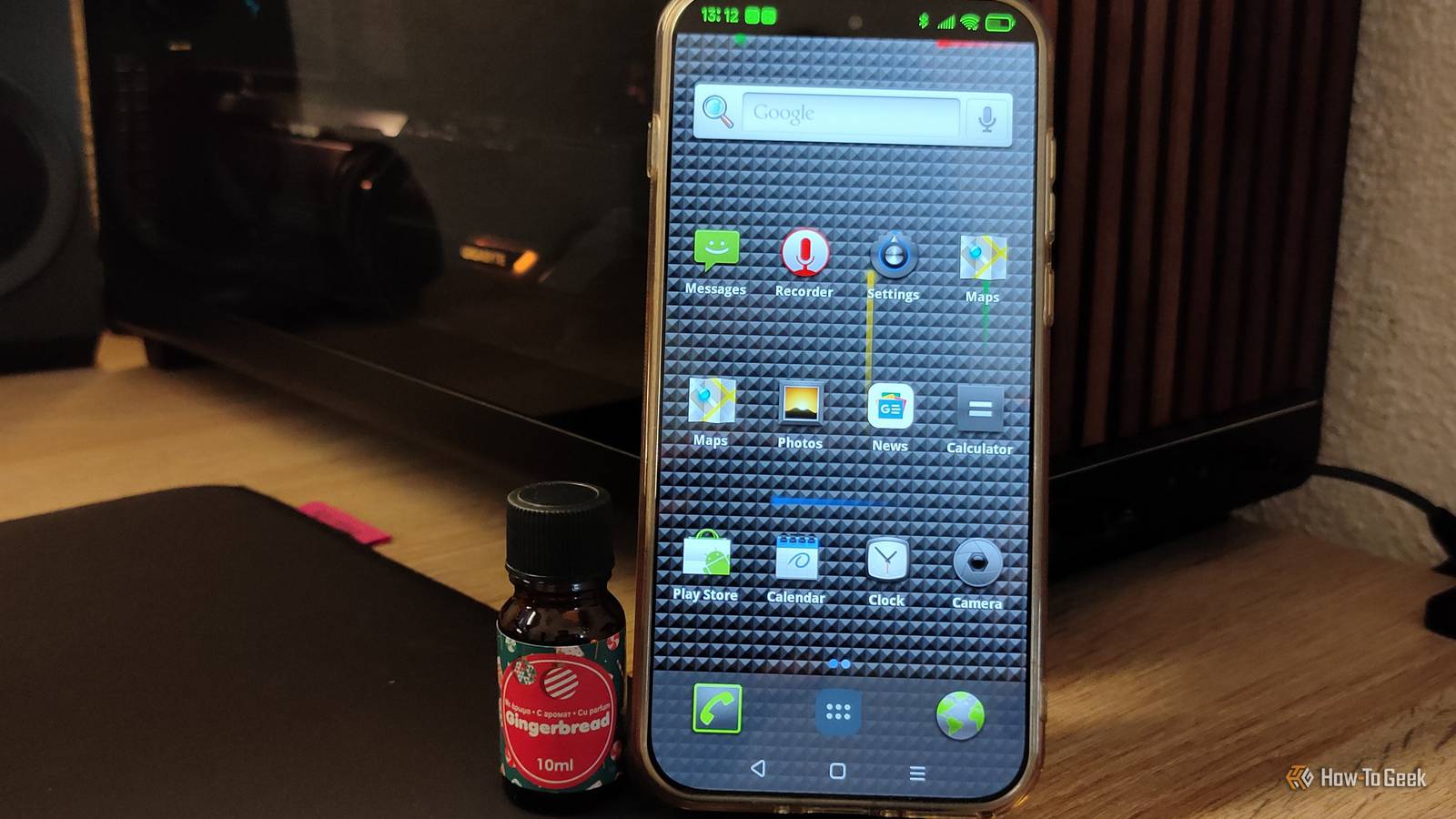
Published Nov 26, 2026, 1:00 PM EST Ismar is a Senior Author at How-To Geek. He previously worked as a writer, editor, and general manager at a content agency before joining the team in 2023. He began his writing career in 2021 after completing a BA in English Language and Literature. Beyond How-To Geek, Ismar has contributed to Red Stag Fulfillment and Authority Hacker. He has also worked on various SEO projects to help clients improve their search visibility. Ismar has been around Windows PCs since the age of three, so friends and family naturally chose him as the resident tech support. His projects often involve tinkering, such as disassembling mechanical keyboards and gaming mice to mod his beloved gear. He also enjoys pushing hardware to the max through overclocking while staying on a reasonable budget. An avid gamer, Ismar has logged thousands of hours across various genres, including first-person shooters, RPGs, racing games, and roguelites. When he is not at his desk, he is probably exploring other people’s phones to discover their quirks and features or experimenting with the latest AI tools. In his free time, Ismar enjoys spending time with his wife, working out at the gym, playing guitar and bass, cooking gourmet meals, and traveling. Above all else, he’s a proud cat owner. If you were around in the early days of Android, you probably have fond memories of Gingerbread. Google leaned heavily into a dark-and-green sci-fi aesthetic on its Nexus phones, a complete contrast to Apple's glassy, liquid-like style, although many manufacturers had their own skins at the time. For many of us, Gingerbread was one of the first, if not the very first, versions of Android we interacted with, and we never looked back. I missed some of that nostalgic experience, so I decided to recreate it on my main phone to feel like I'd traveled back to 2010, without giving up the modern conveniences my phone has to offer. My goal was to bring some Gingerbread nostalgia without limiting or compromising my phone The best of both worlds Before I tell you about all the cool little changes I've made to my OnePlus 15 to make it look like it's running an OS that came out years before the brand was even founded, allow me to first lay some ground rules. First and foremost, we need to address the fact that Android 2.3 Gingerbread could look drastically different across various phone brands, as many manufacturers had their own unique skins running on top of Google's base Android code. My goal was to recreate the experience you'd get when you first booted up the Google Nexus S. I used the Android Time Machine, along with old YouTube videos and reviews, as reference points for recreating the experience. I went over each element and tried my best to recreate it on my phone without compromising its functionality or security. This meant working with a limited set of options for the project: no root access, custom ROMs, or sideloading potentially insecure apps, especially those that require Accessibility permission. To be more specific, I found a GitHub project that recreates Gingerbread's iconic CRT screen-off animation, but it requires Accessibility permission. Nothing against the developer, but I wasn't comfortable giving an unfamiliar app that much access just to recreate a small piece of the overall Gingerbread aesthetic. Here are all the little details that made my phone feel like Gingerbread A few apps did most of the heavy lifting Since there's no single Android Gingerbread theme I could simply install on my phone, I had to recreate the experience bit by bit using a collection of apps. And anyone who's ever customized an Android phone knows that the launcher is the foundation of a good custom theme. It lets you customize the home screen, app drawer, dock, animations, and more. Of course, no launcher would be better suited for this task than Nova Launcher, an app that's only a year younger than Gingerbread itself. In Nova Launcher, I changed the grid size on the home screen and in the app drawer, created a custom dock, and replaced app icons individually using a Gingerbread icon pack I downloaded from XDA Forums. Unfortunately, Nova Launcher couldn't recreate the vertical 3D scrolling animation in the app drawer, but my phone was already starting to look like it came out in 2010 thanks to those chunky, spacious retro icons. Of course, no launcher would be complete without a cool wallpaper, and the Nexus S was especially famous for its live wallpaper, which sent red, green, blue, and yellow (the Google colors) particles trailing across the screen when you tapped it. I installed Nexus Revamped, but unfortunately, the app focuses on the older Froyo 2.2 grid-style background rather than the abstract waves that came with the Gingerbread version. I spent over an hour trying to find a way to get the actual Gingerbread wallpaper working on my phone using these apps and other means, but unfortunately, I couldn't find a workaround. Another major part of Gingerbread's aesthetic was its iconic black status bar. Like with the wallpaper, recreating it perfectly proved impossible, so I just used Neo Status Bar to approximate the classic green-on-black look. The keyboard is another area that I wanted to Gingerbread-ify. I really wanted to stick with Gboard, but its limited customization options pushed me to switch to HeliBoard. The open-source app allowed me to closely match the visual style of the Gingerbread keyboard, though I still couldn't recreate the subtle raised effect of the original keys. I was also able to bring back some of the Gingerbread magic through my phone's own settings. I enabled Enhanced Dark Mode, which makes system apps essentially pitch black, applied a neon green accent color throughout the system, and installed the iconic Droid Sans font that helped define Gingerbread. All in all, the end result was more or less what I was hoping for. I managed to give Android 17 on my phone an old-school Android vibe that brought back fond memories every time I turned it on. Recreating Gingerbread turned out to be way harder than I thought And I still wasn't completely happy with the results To be completely honest, this whole project turned out to be a massive exercise in frustration. I went into it thinking I could get most of the Gingerbread experience through apps, but I got sidetracked at almost every step. One major omission, as you might have noticed, is the lack of widgets on my home screen. Gingerbread had a handful of iconic stock widgets, including the black-and-green analog clock and Power Control widget, which let you toggle Wi-Fi, Bluetooth, GPS, and other settings directly from your home screen. This was particularly useful because Android's notification shade didn't get Quick Settings until Android 4.2. Unfortunately, I couldn't get either working on my phone. Android users often turn to KWGT to create custom widgets, but I couldn't find any user-created Gingerbread widgets to download. Since I don't have the technical skills to make my own, I tried vibe-coding a few but couldn't quite get them right, so I eventually gave up. All these hurdles helped me come to an important realization: there's just no easy way to recreate older Android experiences on modern phones. We've arguably never had more built-in customization options, thanks to Material You and first-party theme stores, which offer some genuinely cool ways to personalize your phone. Yet it's never been harder to customize your phone's appearance yourself, especially if you're after an old-school Android aesthetic. Customization is fragmented across many different apps, some of which have been abandoned for years and need to be sideloaded, and still, you'll likely never be able to fully recreate the experience of an older Android version. Infusing old-school Android into your phone is the key Despite all the hoops I had to jump through just to make my phone look a little more like Gingerbread, it was ultimately a fun experiment that brought some welcome nostalgia and personality to my otherwise relatively bland flagship. If there's one takeaway, it's that you should focus on the major elements of an old Android version when you want to relive the experience. In my opinion, the wallpaper, icons, and font do most of the heavy lifting, while everything else you can add is just a bonus.
Android used to have personality, so I gave my phone a Gingerbread makeover
Full Article
Original Source
Read the full article at Howtogeek →KhanList aggregates and links to publicly available news content. We do not host full articles from third-party sources. Always verify important information with original sources.