
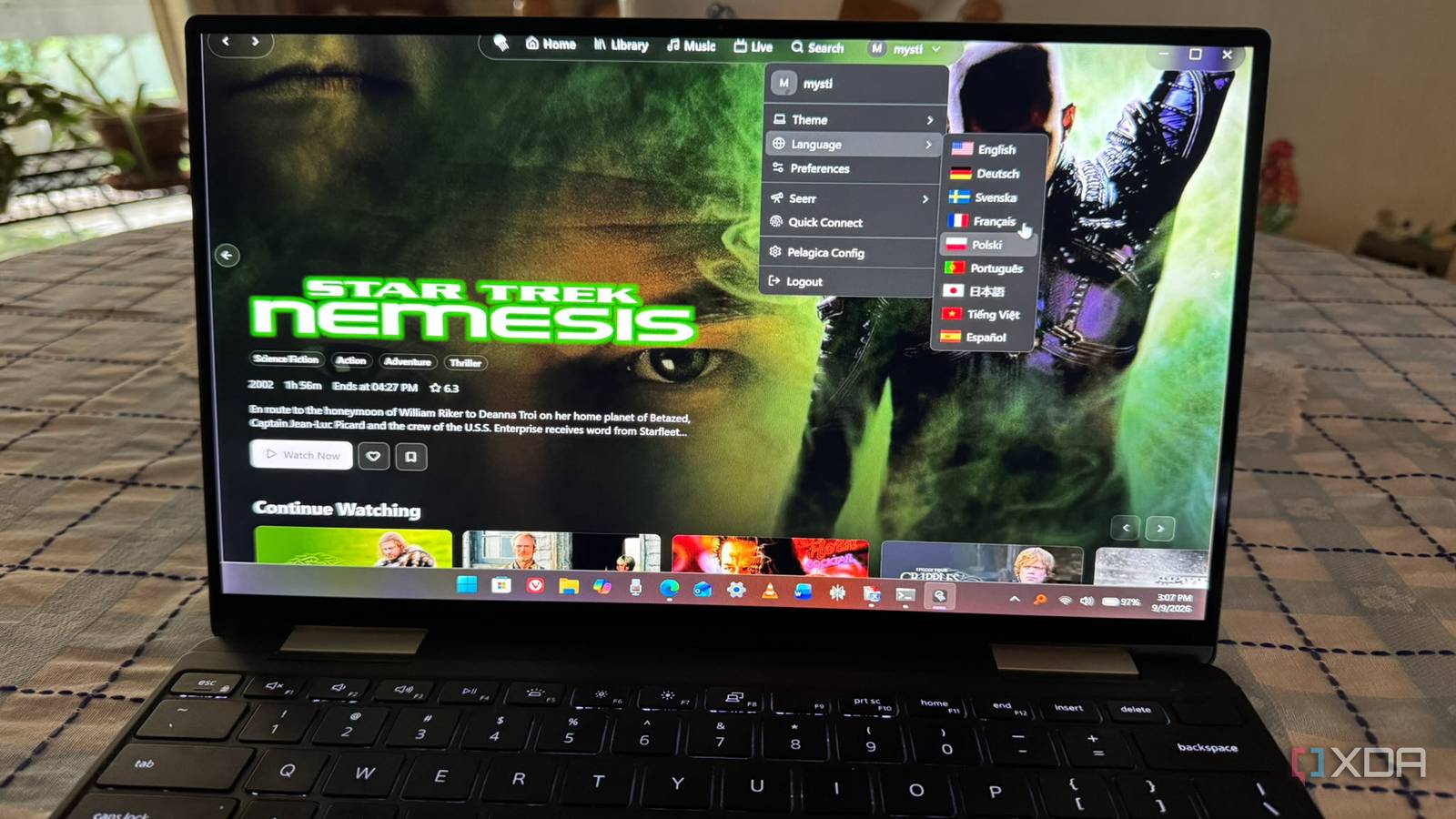
Published Sep 12, 2026, 6:00 PM EDT Based in rural Minnesota, Brian Burgess worked in IT for 10 years before finding his passion for writing about consumer technology. Brian earned his degree in computer and network technology in 2000. He held various IT positions, including help desk support, router installations for IBM, database administration, and other associate network administration roles. He's been a personal technology journalist for 18 years and has written thousands of articles about Microsoft products and services, Android, iOS, streaming, and more. He has written for notable tech sites including XDA, InformationWeek, How-To Geek, Byte, groovyPost, and others. When he is away from the keyboard, you will hear him playing guitar, working outdoors, and watching Star Trek. I've used virtually every Jellyfin client app currently available. Of course, new ones keep popping up every day. One of the awesome things about the Jellyfin community is that there's always something new to try. While some alternative apps focus on a single media type or platform, like Findroid for video or Jellybox for music, Pelagica delivers all of my media in a lightweight UI. It includes light and dark themes, a video player, and a music player with the controls you'd expect from a media app. You don't need to install separate apps for different media types. It also works on multiple devices, including Windows, Mac, Linux, Samsung smart TVs running Tizen, and LG TVs on WebOS. You can also install a web version via the Docker image. Pelagica is responsive A lightweight Jellyfin client Some of the Jellyfin clients I have tried are slow and hog a lot of resources. Pelagica is fast and responsive, with load times that are far quicker than other clients I've tried. It doesn't hog system resources on my PC or Mac either. It runs smoothly and starts playing videos more quickly than others, including the official Jellyfin client or Moonfin. It integrates with different services, like Seerr to discover new movies, Streamystats for recommendations on the home page, and Kefintweak Watchlist to manage watchlists, It is also faster and easier to navigate than the standard Jellyfin Web app (or client) I use for verifying videos work after adding new content to my server or restructuring my media library. The app is light and offers a zippy interface that lets me move quickly between videos and other libraries. A responsive UI makes playing my content easier. In addition to being a responsive front end for the Jellyfin client, it supports multiple languages, including German, Spanish, Japanese, and others. If you are unsure whether you want to try another Jellyfin app, the developer set it up so you can test it out on the Pelagica live web demo. There isn't a mobile or streaming device version yet, but you can use it on desktop, smart TVs, or the web. Whatever device you have, you can find the latest release on the Pelagica GitHub page. It also has a host of settings you can tweak to improve the app's experience. Go to the Pelagica Config section to add your Seerr and Streamystats URLs to improve recommendations on the home screen and via search. You can also adjust watched badges, manage sections on the home screen, add links to other sites or web apps, change themes, and a lot more. Pelagica for Jellyfin does it all An all-in-one app I have run Pelagica on Windows and Mac, and it runs well on both systems. Unfortunately, I don't have a smart TV with Tizen or WebOS to try it. But from the minute I launched the app, I was impressed by how fast and responsive it is. I can fly through my media library faster than other clients that can sometimes get bogged down. Pelagica is a Jellyfin client for the web, desktop, and select smart TV brands. For movies and shows, it breaks down and displays the IMDB information that you see on some other clients. It shows backdrops, poster art, and banners included in your library. That isn't something unique to Pelagica, but it's nice to know it's there, it works, and it's fast. It is minimalistic in how it shows media; it doesn't show poster art, thumbnails, or banners for everything while I'm searching through my media library. I was taken aback at first, but I found that is one reason it is so snappy. Plus, it really doesn't have to. The title descriptions are always present. I still have a top row that displays my titles, which I can click to see the full description. Jellyfin iOS compatible Yes Android compatible Yes Finding content on Pelagica Straightforward search and browsing It lets me search through my entire library and brings up the results fast. It also arranges my titles into categories like Sci-fi, Western, Dramas, Thrillers, etc. I can click through those categories to find what I want to watch or search directly for a specific title. Once I click the play button, the movie, show, or music loads instantaneously. It doesn't include many extra playback controls, but it gives me the basics you would expect from a media player. However, when you download the Windows .exe file, it will flag it as malware. Just allow it through anyway; it's trusted and safe. I've been running it on multiple machines for a week. Pelagica launches quickly, uses few system resources, loads content faster than other clients, and makes it easy to find my media. In addition to browsing through media categories, I can use the top toolbar to choose what I want to watch in my library. Or, I can select the home page for content I want to continue to watch or something recently added. Another cool thing it does is break down my movies and shows by the studio that produced them. The all-in-one Jellyfin client I have used the word fast a lot in this article, and I'm not sorry. On top of its capabilities, Pelagica's speed is the most impressive feature it has. What I am sorry about is that it isn't available on more devices — namely streaming sticks and boxes. However, I say that about many of the cool Jellyfin apps and plugins I've covered. Still, if you want speed and functionality, Pelagica delivers.
After trying countless Jellyfin apps, I finally found my all-in-one favorite
Full Article
Original Source
Read the full article at Xda-developers →KhanList aggregates and links to publicly available news content. We do not host full articles from third-party sources. Always verify important information with original sources.