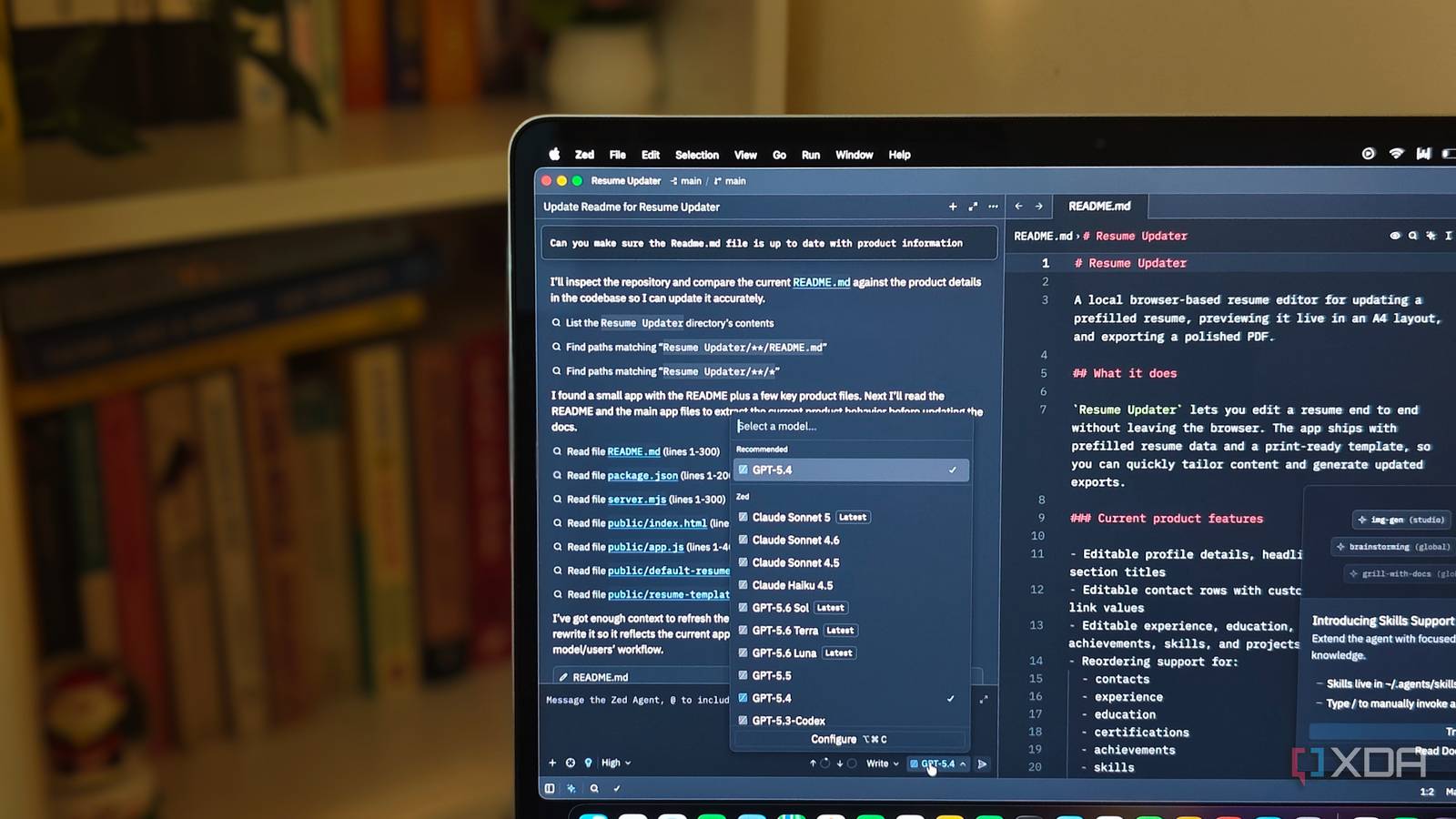
Published Aug 6, 2026, 6:00 AM EDT Anurag is an experienced journalist and author who’s been covering tech for the past 5 years, with a focus on Windows, Android, and Apple. He’s written for sites like Android Police, Neowin, Dexerto, and MakeTechEasier. Anurag’s always pumped about tech and loves getting his hands on the latest gadgets. When he's not procrastinating, you’ll probably find him catching the newest movies in theaters or scrolling through Twitter from his bed. Sign in to your XDA account I prefer Cursor over VS Code because it is more agentic, and its $20 subscription gives me generous usage limits that let me get actual work done. I am comparing Cursor with VS Code because both are based on the Electron framework and are similar in speed and performance. They take longer to open files and folders once you have a significant number of extensions installed. They also consume a lot of RAM. I decided to ditch Cursor for a week and start using Zed, an entirely open-source code editor written in Rust from scratch. For the longest time, switching to Zed meant leaving AI features behind, but with its recent updates, that is no longer the case. Having used it for some time now, I can say Zed is a complete code editor that won't make you miss Cursor. Cursor feels slow once you use Zed You don't notice the difference otherwise Zed is a lot faster than Cursor in regular use, and you notice the difference across almost every part of the editor. It launches faster, opens folders faster, and remains responsive when moving between files or searching through a project. Cursor becomes noticeably slower once you install a bunch of extensions, and that's when its memory consumption starts to become difficult to ignore. This has been a problem with VS Code for years, and Cursor carries it forward because it is built on the same foundation. Since Cursor is a fork of VS Code, it retains the Electron framework and the architecture required to support the existing VS Code ecosystem. Like other Electron apps, it bundles Chromium and Node.js, adding considerable overhead to something as fundamental as a code editor. That is a lot of machinery for an app whose most basic job is still opening text files. Cursor then adds its own AI features, background processes, indexing, and project analysis on top of that foundation, so it requires a lot of system resources even before you ask its agent to do anything substantial. Zed starts from a completely different technical foundation because it is written in Rust and uses GPUI, its own GPU-accelerated interface framework, instead of Electron. You can see the difference in how quickly the editor responds to inputs and how little time it takes to open a project. Zed also consumes less memory during normal use, which matters when you already have terminals, Docker containers, and a browser running alongside your editor. You don't have to give up AI to use Cursor Cursor now has its own AI agent Cursor still has the stronger AI implementation, which is hardly surprising, given that the entire editor has been built around its agent. Its Agent is better at understanding a large codebase, gathering the right context, and completing complex tasks that require multiple rounds of editing and testing. Cursor also provides more mature features such as Plan Mode, specialized subagents, and cloud agents that can continue working outside the editor. Zed has not caught up with all of that yet, and its native agent occasionally needs more guidance to complete the same task. However, Zed now covers most of the AI workflow I regularly use in Cursor. Its Agent Panel gives the agent access to the project, allows it to search and edit multiple files, run terminal commands, check diagnostics, fetch documentation, and review the resulting changes. It also supports MCP servers, project instructions, reusable skills, configurable permissions, and parallel agent threads with optional Git worktree isolation. This is already far beyond the basic chat window that Zed offered when its AI features first appeared. Cursor also has access to a larger selection of models, including Fable 5, Opus 5, Opus 4.8, and some actually useful Grok models. Zed still gives you the major Claude, GPT, and Gemini models, along with several ways to connect models that are not included directly. You can use Zed-hosted models, bring your own API keys, sign in with supported subscriptions, connect services such as OpenRouter and Amazon Bedrock, or run local models through Ollama and LM Studio. The model picker is smaller than Cursor’s, although it includes the frontier models that I would choose for serious coding work anyway. Zed also supports external agents, which helps it close the gap with Cursor. You can run Claude, Codex, Gemini CLI, OpenCode, Copilot, and even Cursor through its Agent Client Protocol integration. Zed already has almost everything I need I don't miss out on major extensions Zed’s extension gallery is considerably smaller than the one available for VS Code and Cursor, although that matters far less once you look at what the editor already provides. Zed supports the major programming languages, language servers, themes, snippets, debug adapters, MCP servers, and agent servers through its extension system. The long tail of highly specific Cursor extensions is missing, but I found everything required for my regular workflow without spending hours searching for replacements. A large part of that comes down to how much Zed includes directly in the editor. It has an integrated terminal, configurable tasks, a debugger, REPL support, project-wide search, code navigation, language server integration, and a toolchain selector for managing environments. Its native Git integration handles staging, commits, diffs, pulls, and pushes without requiring another extension. You can also open projects over SSH, work inside development containers, and collaborate with other people directly inside the editor. Zed’s gallery already covers the languages and tools most developers use. It currently provides built-in or extension-based language server support for dozens of languages, including Python, JavaScript, TypeScript, Rust, Go, Java, C++, C#, PHP, Ruby, Kotlin, Swift, and Dart. Extensions can also add debuggers, themes, icon packs, snippets, and AI integrations, so the ecosystem is useful even if it cannot compete with the sheer size of the Cursor’s Open VSX Registry. Zed is worth a try Zed might not be the code editor for everyone. If you are looking to use it professionally, you might be better off with something like Cursor, VS Code, or whatever your team is already using. You often need collaborative features and other tools, and many companies have internal policies requiring employees to use specific software. You don't really have much choice there. However, if you are an individual developer, you should definitely give Zed a try. It is on par with anything else you can get in the market. Zed Zed is a code editor based on Rust.
After a week in Zed, I couldn't go back to how slow Cursor had become
Full Article
Original Source
Read the full article at Xda-developers →KhanList aggregates and links to publicly available news content. We do not host full articles from third-party sources. Always verify important information with original sources.