
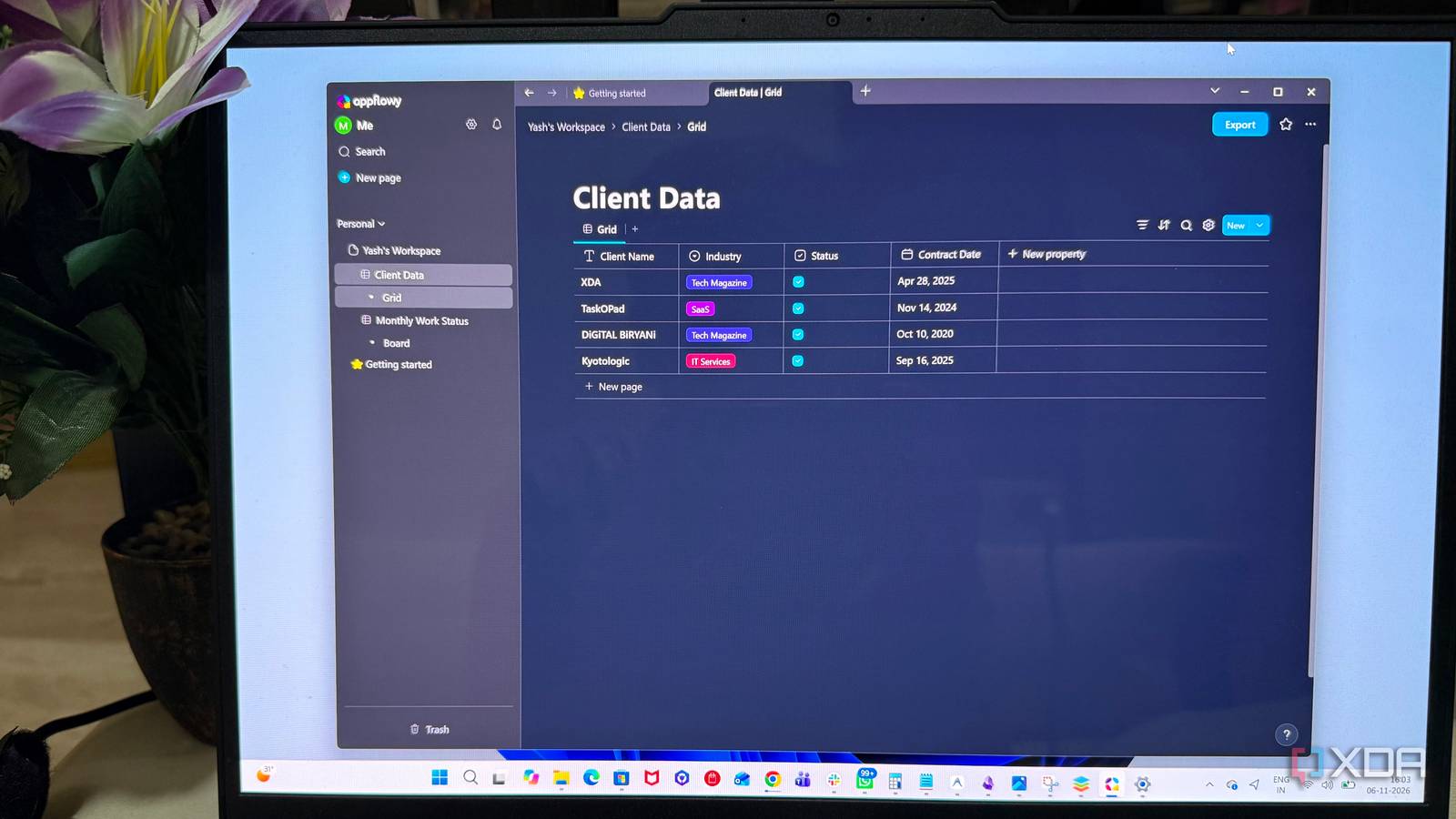
Published Nov 8, 2026, 10:00 AM EST Beginning his professional journey in the tech industry in 2018, Yash spent over three years as a Software Engineer. After that, he shifted his focus to empowering readers through informative and engaging content on his tech blog – DiGiTAL BiRYANi. He has also published tech articles for MakeTechEasier. He loves to explore new tech gadgets and platforms. When he is not writing, you’ll find him exploring food. He is known as Digital Chef Yash among his readers because of his love for Technology and Food. I've always appreciated tools that give me more control over how I organize my work and manage my data. Notion is great for keeping everything in one place, but I wanted to see whether other platforms could offer a similar level of flexibility while better matching the way I work. So, I spent a month testing four Notion alternatives, using each one to write blog articles, manage client information, organize assignments, and track deadlines. I explored their features, customization options, and everyday usability to see how well they handled my freelance workflow. One of them impressed me enough to make me seriously consider leaving Notion behind. Docmost It makes collaboration easy, but lacks flexibility Docmost focuses on documentation and team knowledge sharing. Its clean editor makes writing and organizing content straightforward. Spaces, nested pages, and collaborative editing helped me keep different projects and blog topics neatly organized. The editor also supports tables, code blocks, diagrams, images, and embedded content, making it useful for creating detailed client documentation. Page permissions and comments added another layer of control when collaborating with my team. Using Docmost felt more like working with a team wiki than a complete productivity tool. It lacks advanced database capabilities for managing structured information, along with built-in task management and calendar features. Workspace customization was also more limited compared with Notion. It worked well for documenting information and sharing knowledge, but managing projects and connecting different types of data required more. Docmost Docmost is an open-source, self-hosted collaborative wiki and knowledge-base. Outline It gets the writing experience right Outline stood out for its polished writing experience and simple approach to knowledge management. Its editor was smooth, with handy formatting options, keyboard shortcuts, and Markdown support. Organizing content into collections and nested documents made larger workspaces easier to navigate. Like other tools I tested, it also offered real-time collaboration, comments, and access permissions, making it suitable for team documentation. The uncluttered layout was the cherry on top, keeping the focus on writing rather than filling the screen with unnecessary controls. Its document-focused approach also came with limitations. Outline works primarily as a knowledge base, so it doesn't offer much flexibility for building custom workflows or managing information beyond documents. While I enjoyed writing and organizing client-specific content, I wanted more options for managing client details, tracking article assignments, and keeping tabs on deadlines. Outline Outline is a fast, feature-rich, open-source team knowledge base and wiki designed as a modern, collaborative alternative to Notion. Memos I enjoyed its simplicity, but needed more structure Memos takes a much simpler approach to note-taking compared with the other tools I tested. Instead of building everything around pages and workspaces, it focuses on capturing thoughts quickly. The timeline-based interface made adding short notes, links, images, and longer entries effortless. Its tagging system, Markdown support, and search options helped keep everyday notes easy to find. Self-hosting was another welcome addition, especially for keeping personal notes on my own server. The lightweight interface loaded quickly and kept the experience focused without too many distractions. The tool doesn't support databases, multiple content views, or advanced ways to connect related information. During the month I spent using it, I didn't have much trouble with its timeline-based approach. In fact, I enjoyed how easily I could organize and revisit notes based on their dates. Still, managing larger projects became less practical when everything was stored as individual notes. Memos worked well as a personal note-taking space or daily journal, but I needed something more structured to manage clients, article assignments, and deadlines. Memos Memos is a lightweight, self-hosted memo hub for effortlessly capturing and sharing your ideas. Hosted via Docker, it's an open source application with no tracking and free forever. AppFlowy Finally, a Notion alternative that gets databases right AppFlowy was the alternative that finally brought together the flexibility I was looking for. The first positive point for me was the interface; it was pretty much similar to Notion. Its database features gave me more room to organize information. I created custom databases to manage client details and blog assignments, added different properties, and experimented with filtering, sorting, and grouping entries. These features made it easier to manage larger collections without creating separate pages for everything. It also offers templates, Kanban boards, calendar views, and relations between databases. Together, these options helped me build a practical system for tracking projects, managing article deadlines, and connecting related information. Linking client records with their respective articles and tasks added another layer of structure. Being able to open a client record and see its associated articles and tasks made it easier to understand what I was working on for each client. Its self-hosting and cloud options also gave me flexibility in how I wanted to run my workspace. After a month of testing, AppFlowy became my clear pick for everyday organization and freelance project management. AppFlowy.IO AppFlowy is an open-source, cross-platform alternative to Notion. Notion has some serious competition After spending a month with each tool, I realized that the best Notion alternative depends on how you prefer to work. Each tool has its own strengths, but AppFlowy struck the right balance for me. It gave me the flexibility to organize information without feeling restricted by the usual database limitations. Notion is still a solid option, but AppFlowy has earned its place as my go-to knowledge management tool.
After a month with 4 Notion alternatives, only one beat Notion on databases
Full Article
Original Source
Read the full article at Xda-developers →KhanList aggregates and links to publicly available news content. We do not host full articles from third-party sources. Always verify important information with original sources.