
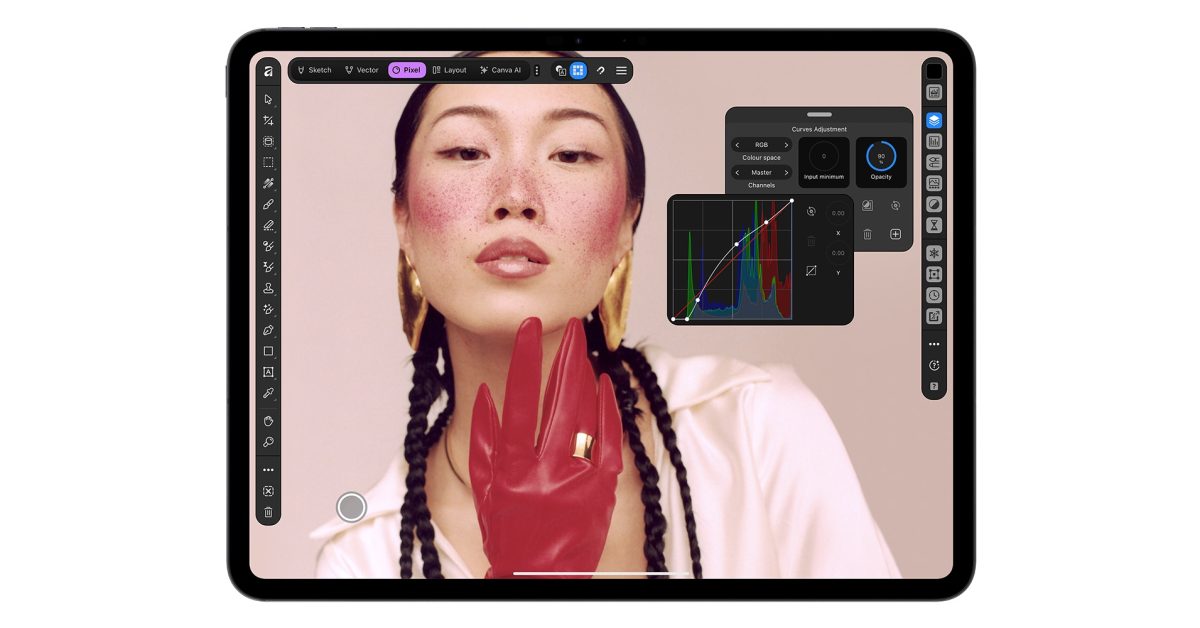
Design app Affinity has long been popular with Mac users, and a long-awaited iPad version has launched today. Canva promises that Affinity for iPad offers “the same pro-level power” as the Mac app. It’s been a year since the company’s vector, photo, and layout tools were unified into a single app on Mac, and the same is now true on iPad … The company made the announcement today. Created specifically for the touch-first interface and unique capabilities of iPad and Apple Pencil, the app brings professional sketch, vector, photo and layout editing together with the same pro-level power of Affinity on the desktop […] With Affinity for iPad, creatives can take a project from first sketch with Apple Pencil to print-ready file on iPad alone. And it’s free for individuals, just like Affinity on desktop, which has recorded more than seven million sign-ups since launching a year ago. “Creative work doesn’t stay in one discipline, so your tools shouldn’t either,” said Duncan Clark, CEO of Pro Design at Canva. “Since we brought Affinity together on desktop, our biggest user request has been the desire to bring it to iPad. Today we’re delivering it: a fully-fledged, professional app built for touch.” Being able to carry out all of the work within a single app on a single file is a key attraction of Affinity. The integrated app replaces the separate Affinity Photo, Affinity Publisher, and Affinity Designer apps. Sketch: Rough out concepts the moment they land, with the unique capabilities of Apple Pencil like pressure and tilt in every mark, thick where you press and soft where you tilt. A full brush library comes with controls to shape each brush into the exact tool you need. Sketches stay live in the file to build on, rather than trace again. Vector: Responsive, smooth and under control. Build a full logo or icon system with real curves and precise nodes, or bring a rough drawing through from Sketch. Sketch to Shapes turns hand-drawn forms into clean vector shapes. Photo: Fine-tune RAW files, make intelligent selections, retouch in real time and build full composites at the shoot or on the go. Users can even sketch over a photo first to plan where a subject or prop should sit. The Mask Tool finds the boundary as the Apple Pencil pixel precision runs along a challenging edge, so hair, fur and foliage take a stroke rather than an afternoon. Every mask, grade and retouch stays live and undoable, even thousands of layers deep. Layout: Create multi-page documents such as ‘zines, lookbooks and photo books, with text and images flowing across pages; master pages and grids keep everything consistent, and typography exactly right. Projects go all the way to a print-ready file with proper colour handling. Canva says the app supports all of the advanced capabilities of Apple Pencil Pro: pressure, tilt, barrel roll, squeeze, and hover. AI features include generative expand, upscaling resolution, and adding attributes like motion blur. A Decompose Layer feature even splits a flat image into editable layers. Affinity for iPad is a free download from the App Store. iPhone Duo cases Beats Woven USB-C cables Certified refurbished Apple products 15% off at apple.com Discounted AirPods Pro 3 Wireless CarPlay adapter 10-year AirTag battery case Logitech MX Master 4 for Mac FTC: We use income earning auto affiliate links. More.
Affinity for iPad all-in-one design app now available, free for individuals
Full Article
Original Source
Read the full article at 9to5mac →KhanList aggregates and links to publicly available news content. We do not host full articles from third-party sources. Always verify important information with original sources.