
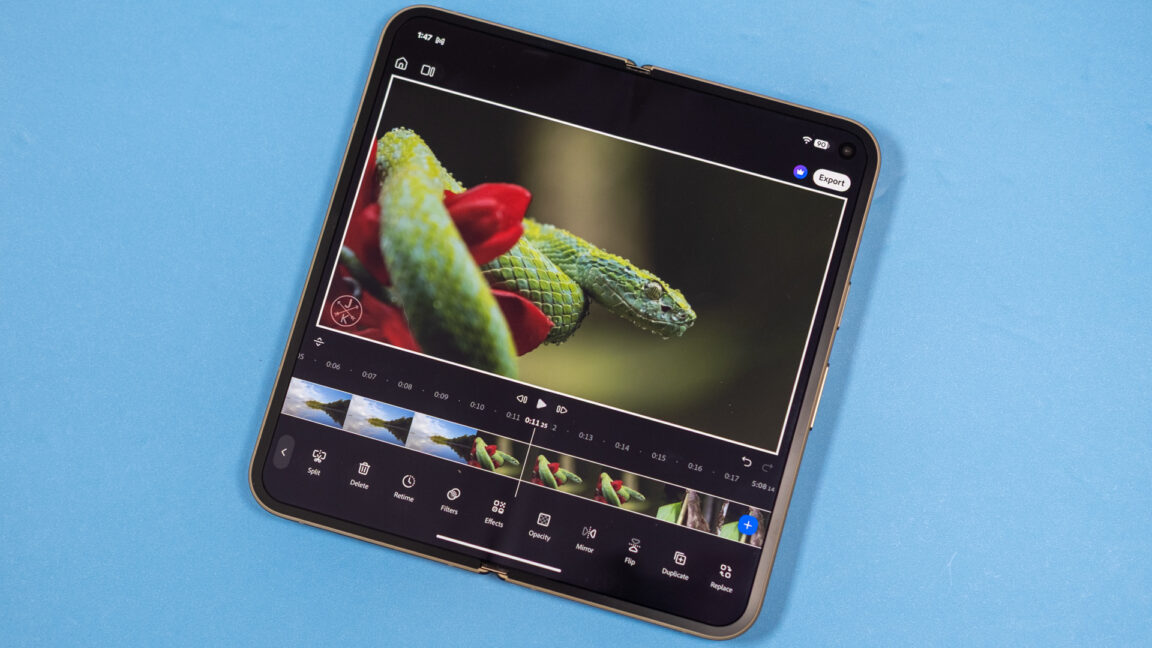
I tested Premiere by importing multiple high-bitrate 4K clips, and it didn’t choke. However, processing newly added video tracks can take a minute. Exporting is also not instant, but it’s faster than I expected on a Pixel, which isn’t exactly known for extreme performance. A three-minute 4K60 video in high-quality mode took about three minutes. The app is designed to work on any Android device with at least 5GB of RAM. Credit: Adobe Credit: Adobe There are a good number of options in the editing interface—unless you’re a pro or enthusiast video editor, this app should be more than powerful enough. Adobe also says that Premiere (and the rest of its mobile app portfolio) is optimized for Googlebook laptops. If you need more, there’s always the full desktop version of Premiere. Of course, that won’t be an option on Googlebooks. Premiere for Android is free, and you don’t even need a subscription or Creative Cloud account unless you care about generative AI tools. The new Premiere app has image-to-video and text to video, with options for Adobe’s “commercial safe” Firefly model as well as Google Veo, Google Omni, Luma Ray, and Kling models. You can generate some clips for free in Premiere, which comes with 250 monthly AI credits. That’s enough for a few Veo Fast clips (80 credits each) or a single Firefly video. For $70 per year or $8 per month, you get 1,200 monthly AI credits in the Premiere mobile app. If that’s not your thing, you can just enjoy the free, vastly improved video editing experience on Android. Apple devices got this app last year, but “better late than never” has always been the Android app motto.
Adobe Premiere finally brings powerful video editing to Android, and it's free
Full Article
Original Source
Read the full article at Arstechnica →KhanList aggregates and links to publicly available news content. We do not host full articles from third-party sources. Always verify important information with original sources.