
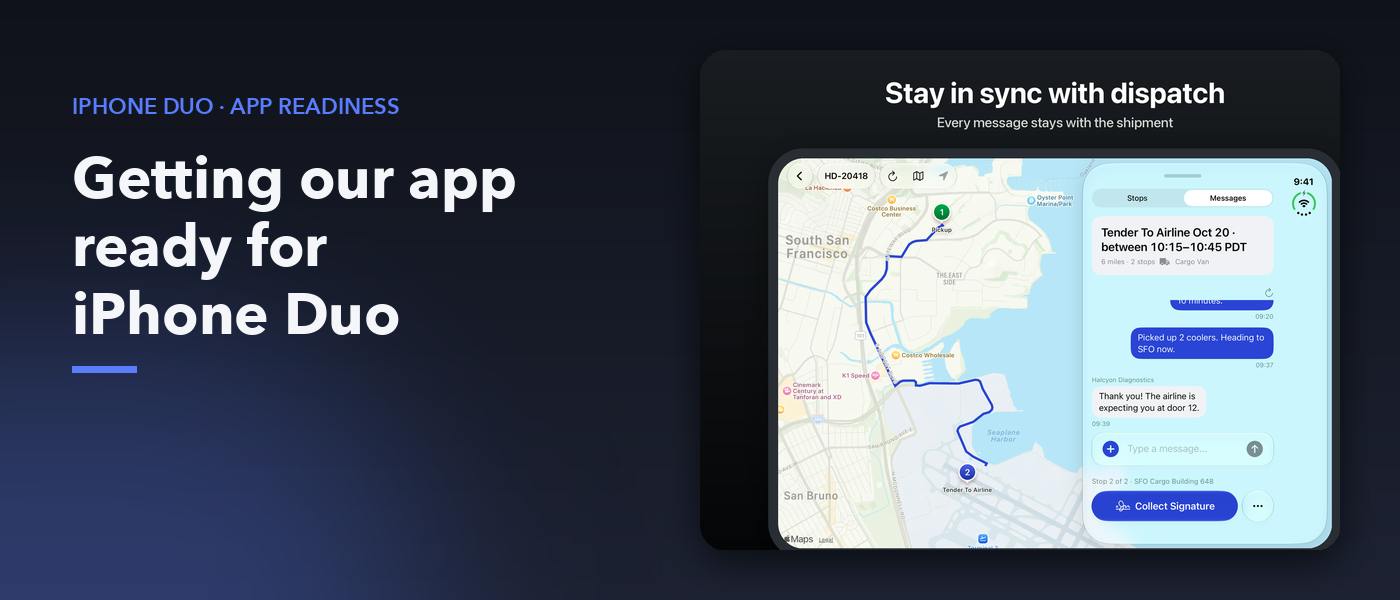
Our courier app launched on the iPhone Duo simulator but there was no back button on the Messages screen. The details sheet covered the navigation controls. On a map, part of the route could easily be out of view. These were gaps in our app. We wanted to fix them before marking the app ready for the Duo. Much of the work involved how our existing interface worked in a differently-shaped window. Once the map, sheets and navigation started to play well together, we could produce a screenshot of the app for the App Store in an unfolded state. In our driver screens we show a route on a map, delivery details, messages and actions for proof of delivery. On a narrow iPhone, a bottom sheet lets the driver switch between the details and the map. On the Duo, both could be shown at once. Opening the app was the beginning In this wider view, the relationship between the views changed. At times, the system would present the sheet next to the map. And navigation buttons could appear in a space occupied by the sheet. In the narrow view, we had assumptions about this layout. They no longer held up. We started this work using the iOS 27.1 Duo simulator and Xcode 27.1 beta tooling. The observations below are of that tooling, not necessarily of every release of Xcode or of every piece of Duo hardware. We didn't save the version of the beta build used to take our screenshots. You could check Apple's release notes for Xcode 27.1 and test for tooling issues in that version. Work out where the sheet actually is In our first pass at this, we used size classes to work out whether the sheet would be docked. In three places in our code we guessed at that. But a size class doesn't tell us where the sheet might end up. It's up to the system whether to present the sheet on one side of the map. We wanted the content of the sheet, the map and navigation to all agree on the layout. Instead of guessing, we took a measurement of the sheet and the map. And we compared the horizontal position of the sheet with the bounds of the map. struct SheetPlacement: Equatable { var map: ClosedRange? var sheet: ClosedRange? var isDocked: Bool { guard let map, let sheet else { return false } let width = map.upperBound - map.lowerBound return sheet.lowerBound - map.lowerBound > width / 4 && map.upperBound - sheet.upperBound area($1.image) } .first { !isBlank($0.image) } ?? XCUIScreen.main.screenshot() In our setup, the inactive display produced a black image. For our fixture scenes, choosing the largest nonblank image let us select the active display’s screenshot. We also checked capture dimensions to reject images from the wrong display. After rebooting, the simulator lost its unfolded posture. To work around this, we wrote a watcher that restored the unfolded posture after reboot. We launched our app directly into fixture scenes because test taps could reach the cover display instead of the visible panel. This made captures repeatable, but didn't replace testing user navigation. But this didn't eliminate the value of testing navigation in the app for someone using it. In its screenshot specs (check as of October 28) Apple does allow 2853 x 2007 or 2007 x 2853 images of the unfolded screen. Our capture tool rotates and resizes the image for use in the landscape slot. Apple says from April 2027, apps using the iOS 27.1 SDK or later will need Duo screenshots. The screenshots showed the result of the app fixes: reachable controls, sheet states suited to their placement, and a route framed in the visible map area. Before you take screenshots of your own Duo, go into key screens for your app and move the window around them. What gets selected, what moves and what doesn't? These checks helped us find the fixes we needed before submitting our screenshots and getting our app up to date with a first class Duo experience.
Adapting a SwiftUI Courier App for iPhone Duo's Foldable Display
Full Article
Original Source
Read the full article at Hackernoon →KhanList aggregates and links to publicly available news content. We do not host full articles from third-party sources. Always verify important information with original sources.