
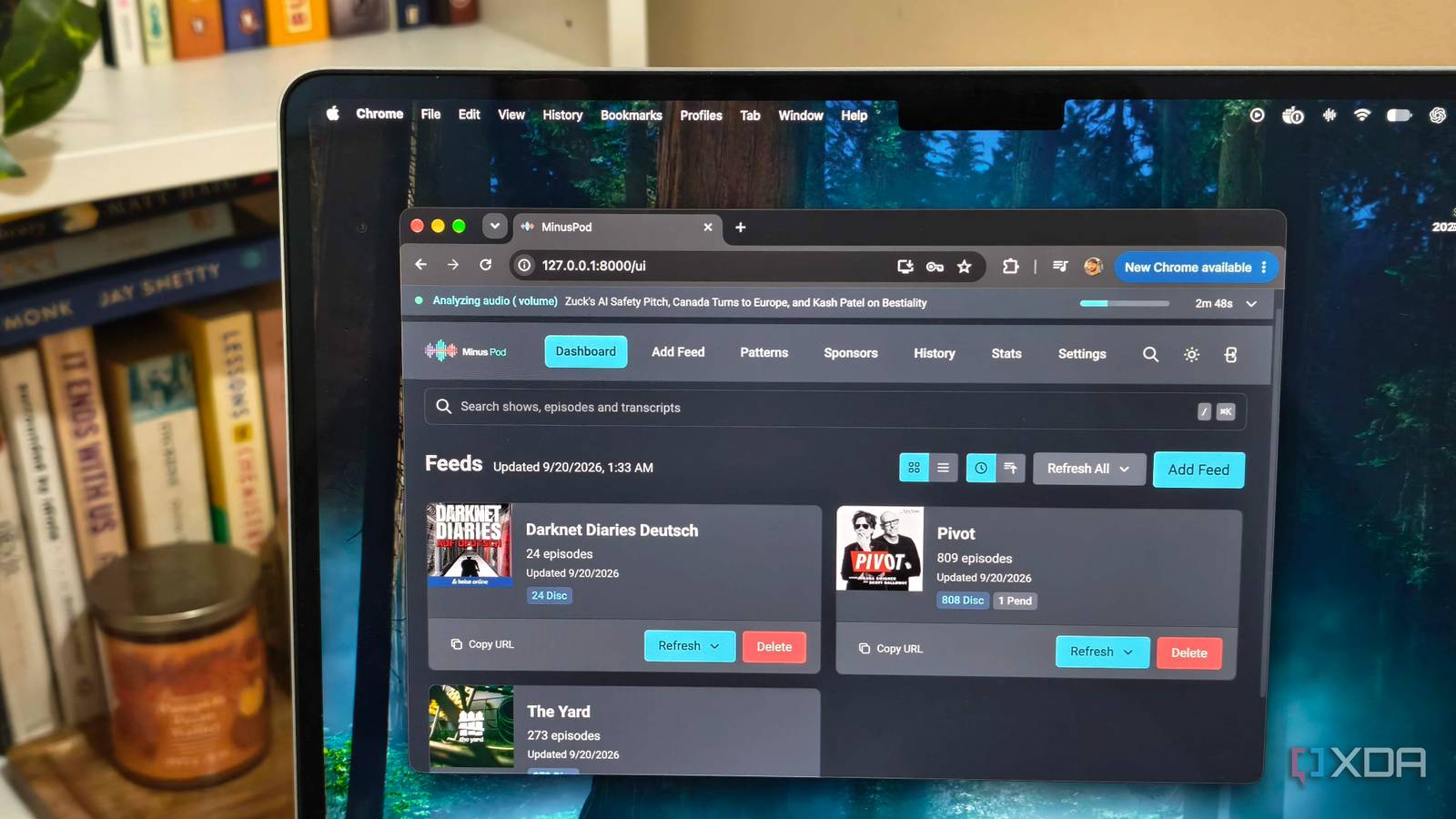
Published Sep 20, 2026, 3:00 PM EDT Anurag is an experienced journalist and author who’s been covering tech for the past 5 years, with a focus on Windows, Android, and Apple. He’s written for sites like Android Police, Neowin, Dexerto, and MakeTechEasier. Anurag’s always pumped about tech and loves getting his hands on the latest gadgets. When he's not procrastinating, you’ll probably find him catching the newest movies in theaters or scrolling through Twitter from his bed. Podcast ads have become difficult to ignore. Every show nowadays begins with a pre-roll, stops for one or two sponsor messages in the middle, and finishes with another promotion. You can always skip them manually, but if, like me, you like to listen to podcasts while doing something else, you have to reach for your phone to skip the ads. An ordinary ad blocker can’t do much here because podcast ads are commonly stitched into the same audio file as the episode. I needed to process the audio before my podcast app downloaded it. My setup uses MinusPod, a self-hosted podcast proxy running inside Docker on my Mac. It transcribes each episode, identifies the advertising sections, removes them, and publishes the cleaned audio through a replacement RSS feed. By the time my podcast app downloads the episode on my phone, the ads are already gone. MinusPod listens to the ads so I don’t have to And it does a good job at it MinusPod sits between the original podcast feed and the app on my phone. I give it the RSS feed for a show, and it creates a replacement feed containing the processed episodes. Pocket Casts subscribes to this new address, while MinusPod continues checking the publisher’s original feed for releases. When an episode appears, MinusPod downloads the audio and sends it through Whisper to create a transcript with timestamps. Then, an LLM examines that transcript for host-read sponsorships, dynamically inserted commercials, cross-promotions, and other sections that do not belong to the episode itself. Once it has the start and end points, FFmpeg cuts those sections from the audio. MinusPod publishes the edited file through its own RSS feed, along with regenerated chapters and transcript information where supported. This works better than other ad blockers because MinusPod processes the exact copy of the episode it receives. Since MinusPod can see the actual transcript of what is being said in the podcast, it can use the relevant tools to cut out only what is needed. In contrast, a traditional ad blocker looks for server-side ads and known patterns to identify and block them. MinusPod can also run another transcription pass over the edited episode to check whether anything unwanted remains. It assigns confidence scores to detected segments, sends uncertain matches to a review queue, and learns patterns from confirmed advertisements. A Docker container handles it all You do need cloud AI API keys MinusPod supports a fully local pipeline, but running it properly requires more hardware than I want to dedicate to podcast processing. For instance, larger Whisper models need around 5GB to 6GB of GPU memory, and CPU transcription is considerably slower. My Mac also can't use the project’s CUDA-based Nvidia image. MinusPod is available as a prebuilt Docker image, including a CPU-compatible version for Macs, so you don't need to compile anything manually. You can pull the stable image, attach persistent storage, supply the required environment variables, and bring it online through the included Compose configuration. I use the CPU-compatible MinusPod image and move both AI workloads to cloud APIs. Groq runs Whisper Large V3 Turbo and returns the timestamped transcript, and OpenAI handles ad detection, verification, and chapter generation. The container still downloads the episodes, manages the feeds, cuts the audio with FFmpeg, and stores the processed files on my Mac. MinusPod lets each stage use a different model, but starting with the same low-cost model keeps the configuration and spending under your control. I always begin with one podcast and one recent episode. That gives me a chance to inspect the proposed cuts, correct false positives, and see how that particular show handles its sponsorships. I wouldn’t recommend processing an entire archive immediately. That consumes API credits, storage, and time before you know whether the detection works well for the feed. The cloud route is still usage-based, but the cost remains modest at normal personal-listening volumes. If you process long episodes, run multiple verification passes, or work through a large archive, you will see your bill increase. Only cleaned episodes reach my phone I use Pocket Casts for the actual listening MinusPod gives every processed podcast its own replacement RSS feed. I add that feed to Pocket Casts as a private podcast and follow it like any other show. Pocket Casts is the best option because it supports private RSS feeds on both Android and iOS, and I don’t have to switch to a specialized player built around AI ad skipping. The feed needs to be available outside my Mac because Pocket Casts must be able to retrieve and parse it. I expose MinusPod through a secure HTTPS address using a reverse proxy, then enable authenticated feeds, so anyone who discovers the URL can't use it freely. There is a delay between an episode being published and appearing in its cleaned form because MinusPod has to finish the transcription and editing first. The replacement feed also appears as a separate show in Pocket Casts, so existing playback history from the original subscription does not carry over automatically. Also, this setup only works with podcasts that provide an RSS feed. Spotify-exclusive shows remain outside it, and Spotify is not useful as the destination for a custom feed. For everything else, Pocket Casts behaves like a regular podcast player. Other useful Docker containers you can explore There are plenty of Docker containers that can help you be more productive. For example, you can run your entire household with these five Docker containers, or, if you want to reduce your dependence on the Google ecosystem, you can consider these alternatives.
A Docker container now strips the ads out of every podcast before it reaches my phone
Full Article
Original Source
Read the full article at Xda-developers →KhanList aggregates and links to publicly available news content. We do not host full articles from third-party sources. Always verify important information with original sources.