
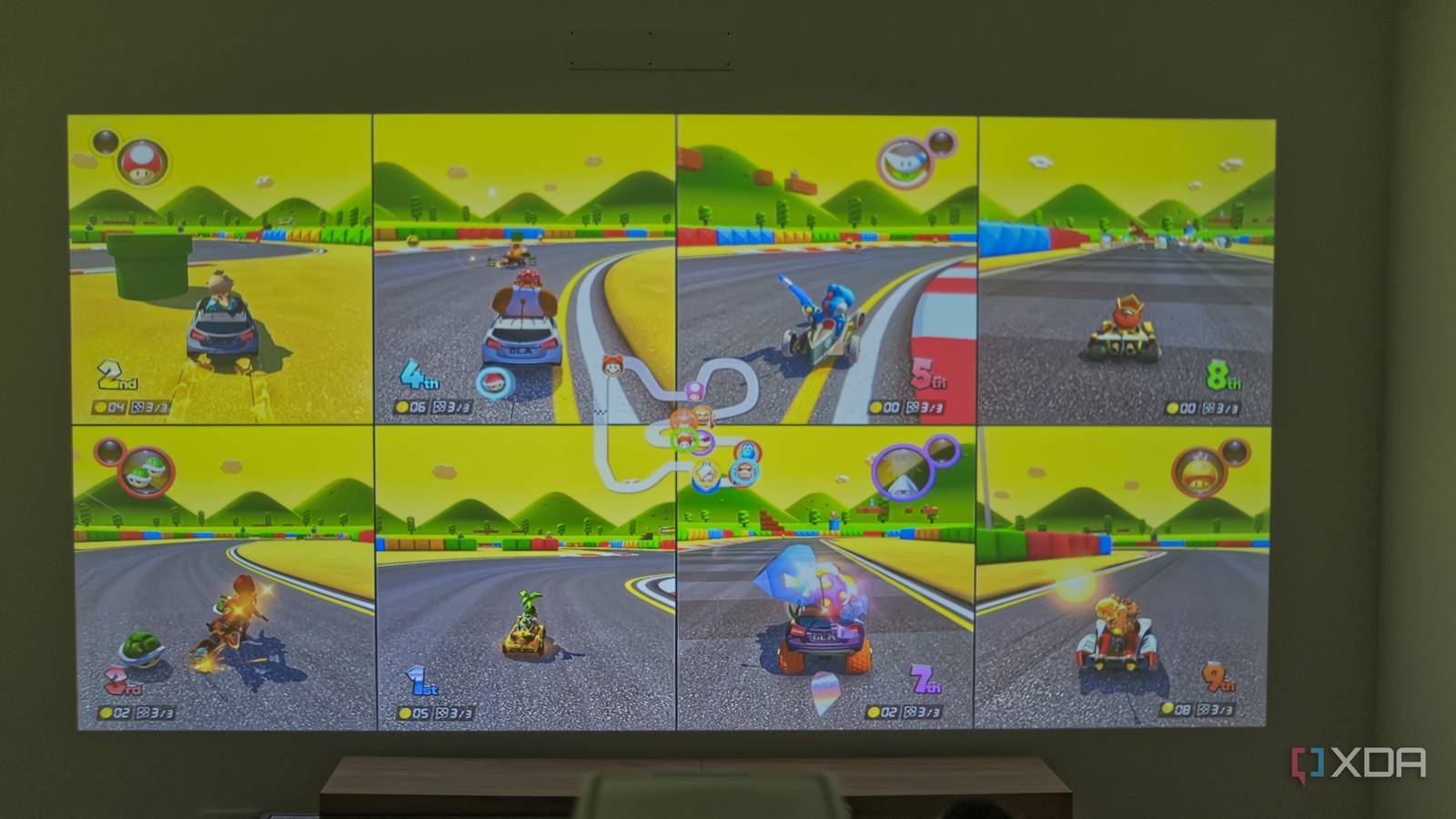
I've always felt that gaming is one of the best social experiences you can have. Yes, a lot of gaming is single-player, but even the discussion around the medium can be endlessly entertaining to me. And when it comes to multiplayer, there's nothing quite like getting together with a group of friends and spending an afternoon or evening playing together. That's how I celebrate my birthday every year. But this year, I wanted to take that further. Couch multiplayer games are too often limited to around four players in split-screen, but recently, Nintendo released an update for Mario Kart 8 Deluxe enabling eight-player split-screen on the Nintendo Switch 2. That got the idea in my head to set up a gaming session with a huge screen, and thanks to the MagCubic M800 projector, I had the multiplayer session of my dreams. About this article: MagCubic sent me the M800 projector for the purposes of this article. The company had no input on — nor an early preview of — its contents, and no compensation was provided. Setting up the projector Things have evolved since I last used one Like most people, I didn't really own a projector before this, and all my experiences with projectors were at public venues or school, and they weren't mind-blowing. Low resolutions, VGA inputs, and very careful setups were kind of required at the time. I remember briefly going hands-on with LG's CineBeam Q at CES 2024, though, and that was really cool. The MagCubic M800 is quite a bit more evolved than those old projectors, though I'm not going to say it's perfect. Its 1080p resolution was a little disappointing, and after seeing the wonders of an ultra-short-throw projector like the CineBeam Q, going back to a more standard model was a little deflating at first. I wanted something that would be noticeably bigger than my 65-inch TV, so I needed close to three meters of clearance to cover most of my living room wall. That was a bit of a problem for my living room setup, but after moving the couch and propping up the projector on a cardboard box on top of my table, I was able to get a pleasant result. I had to get creative because no matter what I did, the projector always warned the angle was higher than 15 degrees, and I wanted to lower distortion as much as possible. The power cable is also pretty short, so I had to rely on an extension. But this setup worked fairly well once it was all said and done. One thing that's great about the MagCubic M800 is that it sets itself up automatically on boot. It tries to determine the ideal projection size and focuses the lens so you get a clearer image. The automatic configuration was solid, but I could also make manual adjustments afterward, so I made my screen slightly bigger and nailed down the perspective as best I could. One problem I noticed, though this may be because I was pushing the limits of how far I could use the projector, is that the image was more clearly in focus towards the center of the projector compared to the edges. To be completely honest, I only noticed it with text or more well-defined static elements. When I started actually using the projector, I stopped noticing it. The best couch gaming experience I've had Eight players at once is something to behold The reason I really needed a projector to make this work was that I wanted to go all the way and test an eight-player Mario Kart 8 Deluxe session in split-screen. A 65-inch TV is pretty big, but even with just four players, it can sometimes start to get hard to have a great view of the game. Eight players just didn't seem feasible, and that's where the M800 comes in. For my party this year, I asked my friends to bring extra guests, and with 10 people in my living room, it truly was an experience like nothing else. I didn't measure the exact size of the screen, but it was easily over 100 inches, and even with eight people playing at the same time, it was possible to see the track just fine. That added screen real estate really made the game perfectly playable with this many people, and it was one of the most fun moments I've had in a long time. It frankly made me want to organize more parties like this. The pure chaos of eight people trying to finish first in a Mario Kart race and talking to each other in real-time and in person is just a joy to behold. I almost enjoyed watching the other participants play as much as playing the game myself. If you're trying something like this and you want to spice things up, I recommend trying to use a custom item loadout so that you can only get the Spiny Shell from item boxes. It removes almost all skill from the game, and it's amazing when you have this many people, especially if some of them aren't that good in the first place. Adding eight-player split-screen to Mario Kart 8 Deluxe on the Switch 2 is one of the coolest things Nintendo could have done to extend the life of this game. The company remains one of the few that really cares about split-screen multiplayer, so leveraging the power of the Switch 2 to expand on this game designed for the original Switch is a fantastic way to build on that idea. And with a screen this big, it just works perfectly. The projector held up, for the most part I had worried that the 1080p resolution would significantly hurt the experience at such a large size, but it ended up not being a problem in the slightest for something like this. When I was playing a high-fidelity game like the new The Legend of Zelda: Ocarina of Time remake, then the cracks started to show, but in Mario Kart 8 Deluxe, it was completely fine. Colors were also okay for the most part. Certainly not as good as my TV, but the experience wasn't totally ruined, either. That being said, there is a bigger problem with some games. Before we got to Mario Kart 8 Deluxe, we tried playing Rhythm Heaven Groove, and there was a very noticeable audio delay, which, for a rhythm game, basically breaks the entire experience. Surprisingly, we were able to succeed in some of the mini-games, but overall, it was a mess. Aside from that, we played Super Smash Bros. Ultimate, and while the huge screen is great, it's not as transformative as split-screen Mario Kart. It's worth noting this is a fairly cheap projector, costing $238. As a point of comparison, the cheapest BenQ projector on the company's website costs $599, and it's obviously better in aspects such as brightness, but that's a much bigger investment. If you want to get a bigger screen on the cheap and you're willing to compromise, this feels like a solid option. I used it mostly at night or with the windows partly closed, and it worked great in those settings, but it may not do great in bright environments. Watching movies is great, too You can use your typical apps After we were done with gaming, we shifted to using the projector for watching a movie (the 1992 Alien 3, if you're curious), and another relevant aspect of the M800 comes into play: it's a smart projector, meaning it runs Android TV. It's my first time using an Android TV device that doesn't use Google TV, and it's honestly nice to not have to use such a bloated launcher. It still supports the Google Play Store, so I could have installed apps like Netflix or any other streaming service. Instead, we used Jellyfin to stream the movie, and everything worked as expected. Much like with gaming, having a huge screen for watching movies is great and made for a more engrossing experience (even if the movie itself wasn't great). The audio delay I noticed during gaming wasn't much of a problem here, and the speakers themselves seemed pretty solid. More than loud enough for everyone in the room to hear clearly, though you're obviously not getting a surround sound experience here. To be fair, I'm only used to TV speakers anyway, so my standards aren't the highest. An extremely fun pairing I've always loved that Nintendo focuses on split-screen or couch multiplayer for so many of its most popular games, and getting to experience Mario Kart 8 Deluxe with eight players using the Switch 2 and this projector was amazing. That's on top of the usual multiplayer experiences now being that much more immersive. I'm sure you could find a better projector, but at $238, this one is a solid way to get started, and it's a small enough amount that you can get it as a Christmas gift without feeling too guilty. MagCubic M800 Native Resolution 1920x1080, 30Hz ANSI Lumens 1200 Connectivity Wi-Fi, Bluetooth Throw Ratio 1.0:1 (standard throw) Audio Single 15W Speaker OS Android 14 The MagCubic M800 is s smart projector running android 14, and supporting projection sizes between 40 and 140 inches. It's on the lower end of the spectrum, but it offers a decent experience for the price, and it's great for multiplayer sessions. Mounting Type Table or ceiling mounted Image Size 40 to 140 inches Ports 1x HDMI, 1x USB Type-A
A cheap projector and a Nintendo Switch 2 gave me the couch multiplayer session I dreamed of as a kid
Full Article
Original Source
Read the full article at Xda-developers →KhanList aggregates and links to publicly available news content. We do not host full articles from third-party sources. Always verify important information with original sources.