
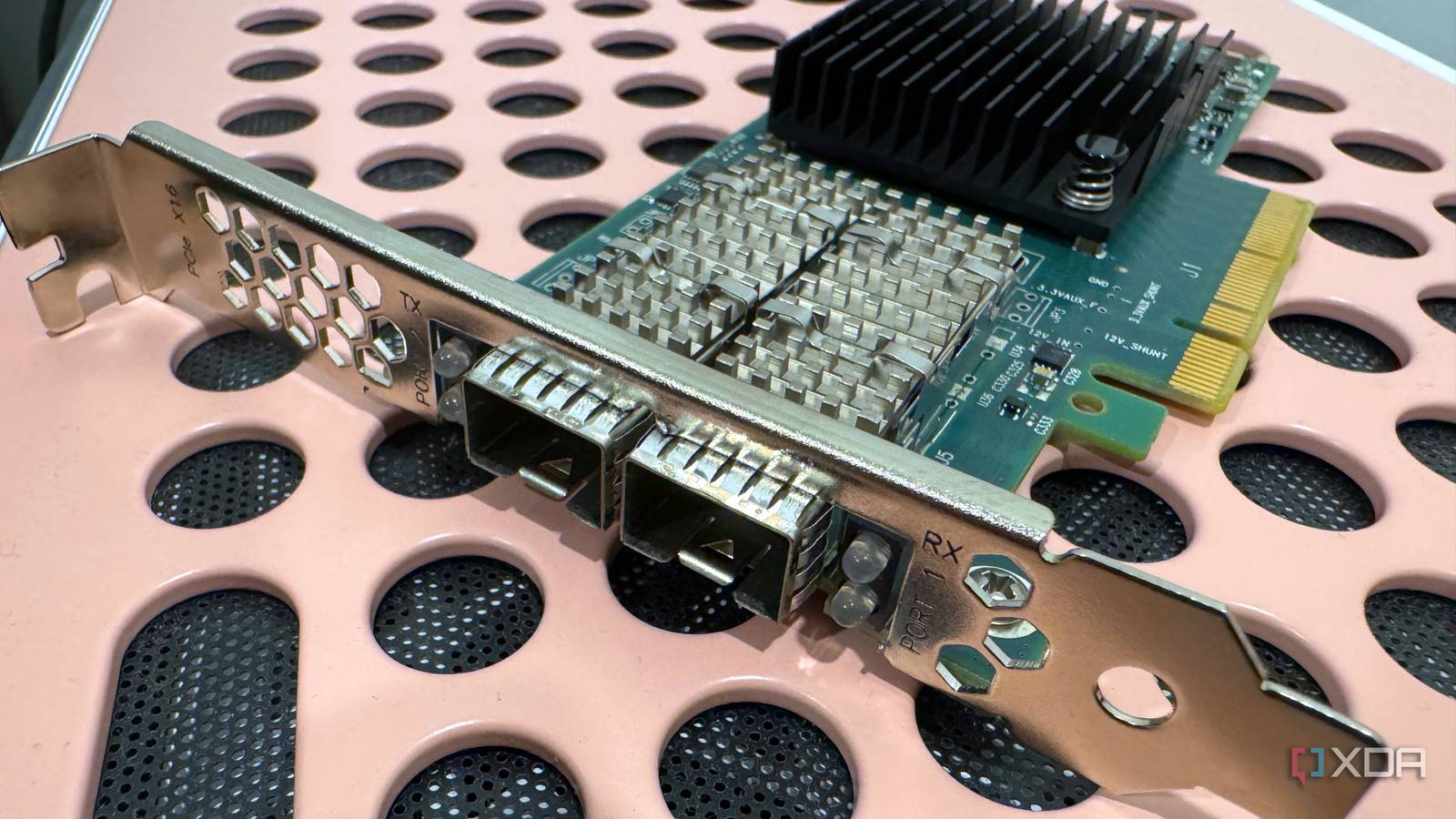
Published Sep 13, 2026, 4:30 PM EDT His love of PCs and their components was born out of trying to squeeze every ounce of performance out of the family computer. Tinkering with his own build at age 10 turned into building PCs for friends and family, fostering a passion that would ultimately take shape as a career path. Besides being the first call for tech support for those close to him, Ty is a computer science student, with his focus being cloud computing and networking. He also competed in semi-pro Counter-Strike for 8 years, making him intimately familiar with everything to do with peripherals. Gigabit is what most homes start with, and for the vast majority of home networks, that's more than enough. But then, you buy a new PC that has 2.5GbE capability, so you upgrade the switch and router to match. Then you get more devices that can handle multi-gig, and it turns into a constant temptation to level up to the illustrious 10GbE. 10-gig isn't for everyone, but if you want to upgrade a few of the load-bearing devices in your home, 10GbE cards are constantly being pulled from decommissioned enterprise servers and can be bought for a fraction of their original cost, and it's one of the best ways to upgrade your speeds. Why retired server cards are so inexpensive Data centers retire them constantly Just as they do with hard drives and other components, data centers replace network hardware on the schedule, and as they move to even faster links, 10GbE cards are taken out in bulk and hit the open used market. There are two primary "families" of card that are typically found there: Mellanox's ConnectX-3, now an Nvidia product, is the favorite among home lab enthusiasts. The usual pick within that is a single port MCX311A, which is a PCIe 3.0 4x card with passive copper cables. Intel's X520 is the other, which is PCIe 2.0 8x. These cards are by no means cut-down, and they were designed to run around the clock, so they're definitely good enough for your home lab. They also tend to have features you want that consumer cards don't have, like SR-IOV support for handing off the NIC directly to multiple VMs. Luckily, on Linux, both of them use drives found in the mainline kernel, so it doesn't matter if you use plain Debian, Proxmox, or TrueNAS. SFP+ and DAC are different to RJ45 This isn't your grandma's UTP Most of these cards are not going to have the RJ45 jack you're used to. Instead, they have something called an SFP+ port, which is a "cage" rather than a connector, and what you choose to plug into it will ultimately decide how the link functions. A direct attach copper cable, or DAC, is a thick twinax cable with the SFP+ ends built in. These are cheap, draw very little power, and can handle runs of a few meters without much of an issue, which is more than enough for a couple of devices in the same room or within the same rack. Longer distances call for fiber and optical transceivers, which are more expensive and likely overkill for what you're doing in a home lab. There are RJ45 modules for SFP+ ports, but it gets a little more complicated. 10GBase-T is the same twisted-pair Cat6 or Cat6a cable that you might be using for your 2.5GbE connections, but the catch is power and heat. Pushing 10Gb/s through four copper pairs takes a lot more signal processing to cancel out echo and crosstalk, so hardware that does 10GBase-T will just naturally run much warmer. You can get cards that are just RJ45, but that effectively locks you out of using DAC in the future unless you buy a new NIC. Windows 11 doesn't always play nice These cards vary in their compatibility on Windows Linux will happily take these cards and use them out of the box in most instances, but Windows is a different story. NVIDIA's final ConnectX-3 package, WinOF 5.50.54000, only includes a driver for Windows Server 2019, and NVIDIA's Windows 11 inbox driver only lists ConnectX-4 and newer, which leaves out most of the cards you'll see on the used market. The degrees to which these cards work in a Windows 11 machine vary pretty heavily, so just prepared for a bit of troubleshooting if you buy one. In the case of the Intel-based cards, there are no X520 drivers for Windows 11 at all, but you can download and use the Windows 10 driver manually through Device Manager. This probably doesn't matter for the home lab side of the equation, but if you're slotting in one of these into your PC, it can bite you. Your ATX system might not be a 1:1 fit Just as is the case with other enterprise gear, throwing it directly into an ATX chassis and expecting it to work like a consumer device is not advisable. There's the first issue of airflow, which matters a lot more with RJ45 usage because of the extra heat, but regardless of which standard you use, airflow across these NICs is necessary. Don't be surprised if your quiet ATX tower with front intake fans isn't going to be enough, and attaching a small fan to the heat sink on the card is the easiest way to remedy that. Idle power is another consideration, but it's not as pressing of an issue as it is with thermals or the literal physical fit of the card. The X520 is an x8 card, which means it requires a full-length PCIe slot, so that's something to consider if you're already using them for other devices. If you can actually saturate a 10GbE link, it can absolutely be worth it It is worth considering whether you need 10GbE at all, as the situations where a home lab can actually take advantage of 1.25GB/s are quite few and far between. The SAS HDDs in my ZFS mirror can only output around 220MB/s in a best case scenario, and even with a large ARC, I'm not looking at sustained 10GbE speeds. 10GbE earns its keep with SSD-based NAS boxes where you're video editing off of it, or you consistently have multiple clients hitting it at the same time. But if you just really like speed, that's as good enough of a reason as any to throw more cash at your home lab.
A $15 card pulled out of a decommissioned server is still the cheapest way to get 10GbE at home
Full Article
Original Source
Read the full article at Xda-developers →KhanList aggregates and links to publicly available news content. We do not host full articles from third-party sources. Always verify important information with original sources.