
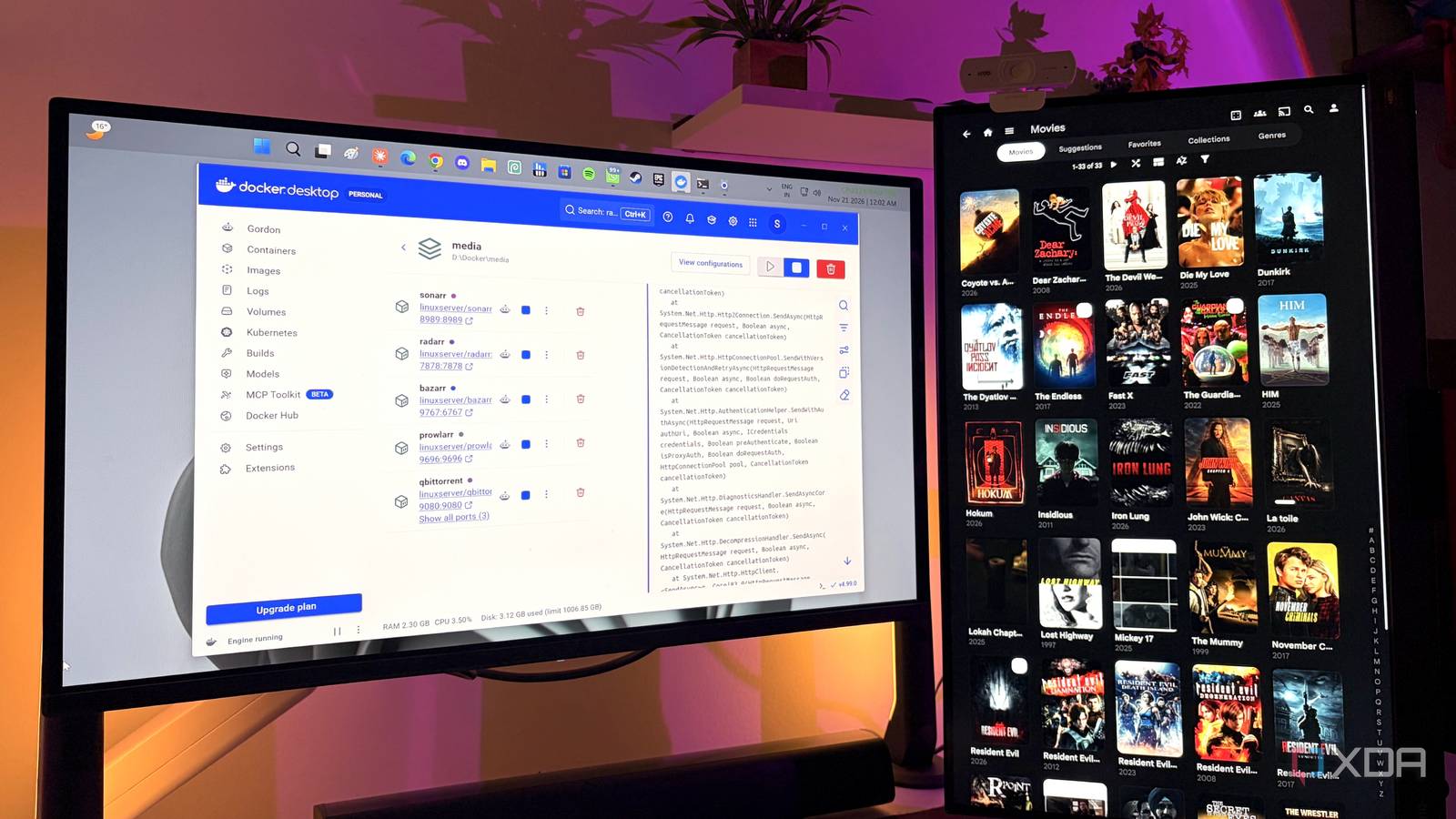
Published Nov 22, 2026, 3:00 PM EST Gaming has been Samarveer’s greatest passion, and the Literature graduate in him takes immense joy in dissecting games for their themes, messages, and impact. Samarveer holds a deep appreciation of gaming, and considers the platform to be the most immersive and impactful across all media. He can be found engaging with gaming communities online, always ready to debate the finer points of ray tracing or itching to write an 8-page collegiate thesis on any game that impacts him emotionally. I used to think a streaming subscription was the most convenient option because everything was just there. Then I built my own media server and realized that "just there" comes with an awful lot of fine print. The moment I stopped renting access to my library and started actually keeping it, the rules changed rather dramatically. I'm not going to pretend running a server is always easier. There are downloads to manage, storage to worry about, and the occasional Docker-induced headache that makes you question your life choices. But my setup also lets me do things I simply can’t hand over to a streaming app, because the whole point is that I make the rules. I know exactly what I have, and it won't leave, either The biggest advantage of running my own media server is also the simplest — my library can't suddenly change because somebody else's licensing agreement did. Streaming services can shuffle their catalogs around as contracts expire, rights change hands, or a title simply gets rotated out. Thankfully, my server doesn't care. If I have the file, it stays there until I decide it shouldn't. I got a particularly good demonstration of this while rebuilding my server. While moving Docker, Sonarr, and Radarr over to an old repurposed laptop, all I had to do was configure the services on the new device, and the media library itself remained on my external HDDs, which I unplugged from my desktop and plugged into my laptop. I simply brought the automation stack back, pointed everything at the existing media, and let it re-import what was already sitting on the drive. The library was mine before the rebuild, and it was mine afterward. The Office leaving Netflix in my country is still something I can't forget. There is something uniquely annoying about discovering that the thing you wanted to watch has vanished from a service you paid for. With my own server, Dunder Mifflin's team is on any screen I want, forever. I get subtitles in any language, fetched and synced for me No more subtitle hunting, ever Subtitles were one of the first things that made me appreciate having my own server. With Bazarr sitting alongside Jellyfin, Sonarr, and Radarr, I can tell it which languages I want and let it look for missing subtitles automatically. I don't have to discover halfway through an episode that the one language I actually need isn't available. A show or movie isn't considered "wanted" until I've assigned it a language profile, which ensures that Bazarr doesn't simply start downloading everything in sight. Once that's done, the daily task can handle the boring part for me, checking the library and filling in the gaps as subtitles become available. There is one catch: the free OpenSubtitles tier allows 20 downloads per day. That's perfectly reasonable for normal use, but it makes a large backfill a waiting game. If I've added hundreds of files to the server, Bazarr isn't going to magically subtitle them all overnight. It will work through them over several days. I can actually add something the service doesn't have My library doesn't need permission from a catalog manager I can't call Netflix or Prime Video and say, "Hey, I noticed you don't have this movie. Could you add it?" There is no button for that, and even if there were, my request would probably disappear into the same void as most feature requests. Their catalogs are theirs. I get whatever they decide to license and serve. My server flips that relationship completely. If there is a movie, TV show, home video, or genuinely public-domain video I am legally entitled to keep, I can add the file to my library. And once it's there, it isn't waiting for a licensing agreement to expire before disappearing from my watch list. Jellyfin then does the boring but important bit. It parses the files, identifies the metadata, organizes everything into the right shows and movies, and makes the library available across my Jellyfin clients. I can choose the quality and file sizes I decide how much space a movie deserves Streaming services will always decide the stream quality for me, while my server lets me choose. With Sonarr and Radarr, I can define quality profiles and even put limits on how large a file I'm willing to keep. As it turns out, I, too, preferred the "highest quality available" until a single movie casually took up 91GB of my hard drive. Having my own DVDs ripped to my hard drive guarantees I get the best possible bitrate while watching my movies and TV shows, which simply isn't possible on streaming services, no matter how fast my internet connection is. Even with movies sourced from the public domain through Prowlarr, I saw Radarr grab a 60GB movie, which is when I had to step in and set size limits for my downloads. I don't need every movie to arrive in my media server looking like it was mastered for IMAX, especially when I'm building a library that has to fit on finite storage. My library can get better without me ever touching it Running my own media server means my files will never randomly disappear, but they aren't necessarily "permanent." Sonarr and Radarr can keep watching for better releases and replace an existing file when something higher quality becomes available. My library can improve while I'm doing literally anything else. I saw the whole pipeline work during my first proper test. I searched for something, sent it through qBittorrent, watched it get imported into the library, and then had Bazarr find a matching subtitle. What would normally involve several separate apps became one automated chain. This is where I truly saw the difference between maintaining a collection and maintaining one with rules. I can decide what quality I want, how much storage I'm willing to sacrifice, and when a file is good enough to stop upgrading. Streaming services give me access to a title (under certain conditions), but it's only by running my own media server that I actually get to improve the copies I own. I set the rules for who watches what on my server Over the years, any streaming service I've paid for has slowly but surely made "sharing" feel like something I need permission to do, and would be allowed to do under a specific set of rules. Users of streaming services, myself included, have to contend with account limits, household rules, profile restrictions, and increasingly aggressive crackdowns. My server, on the other hand, couldn't care less. Jellyfin lets me create local user accounts, give each person their own profile, and decide who gets access to what. Since the server isn't selling me profiles in the first place, there are no subscription tiers waiting for my friends and families behind their profiles, either. Resultantly, our collective watch history also remains in my logs, and on my hardware. What someone watches, where they stopped, and what they have already finished doesn't need to become another piece of account data sitting on a company's servers. Convenience will never be the same as control After having to set up everything in my media server myself to function exactly the way I needed it to, it's easy to understand why streaming won. Opening an app and immediately finding something to watch is hard to beat, especially when someone else handles the servers, storage, metadata, and maintenance. But that convenience comes with the trade-off of outsourcing almost every decision. Running a media server puts those decisions back in my hands, along with all the responsibility that comes with them. That isn't necessarily simpler, cheaper, or better for everyone. For me, though, there is something satisfying about knowing that my library is actually, truly mine. After running my own media server and configuring every bit of it my way, it feels genuinely impossible to go back to creating the illusion of ownership. Jellyfin iOS compatible Yes Android compatible Yes Desktop compatible Yes Jellyfin is one of the best Plex alternatives you can get, and that's thanks to its open-source nature and powerful set of features. There are apps for basically every platform and it's completely free to run your very own server.
6 things my own media server does that no streaming service will ever let me do
Full Article
Original Source
Read the full article at Xda-developers →KhanList aggregates and links to publicly available news content. We do not host full articles from third-party sources. Always verify important information with original sources.