
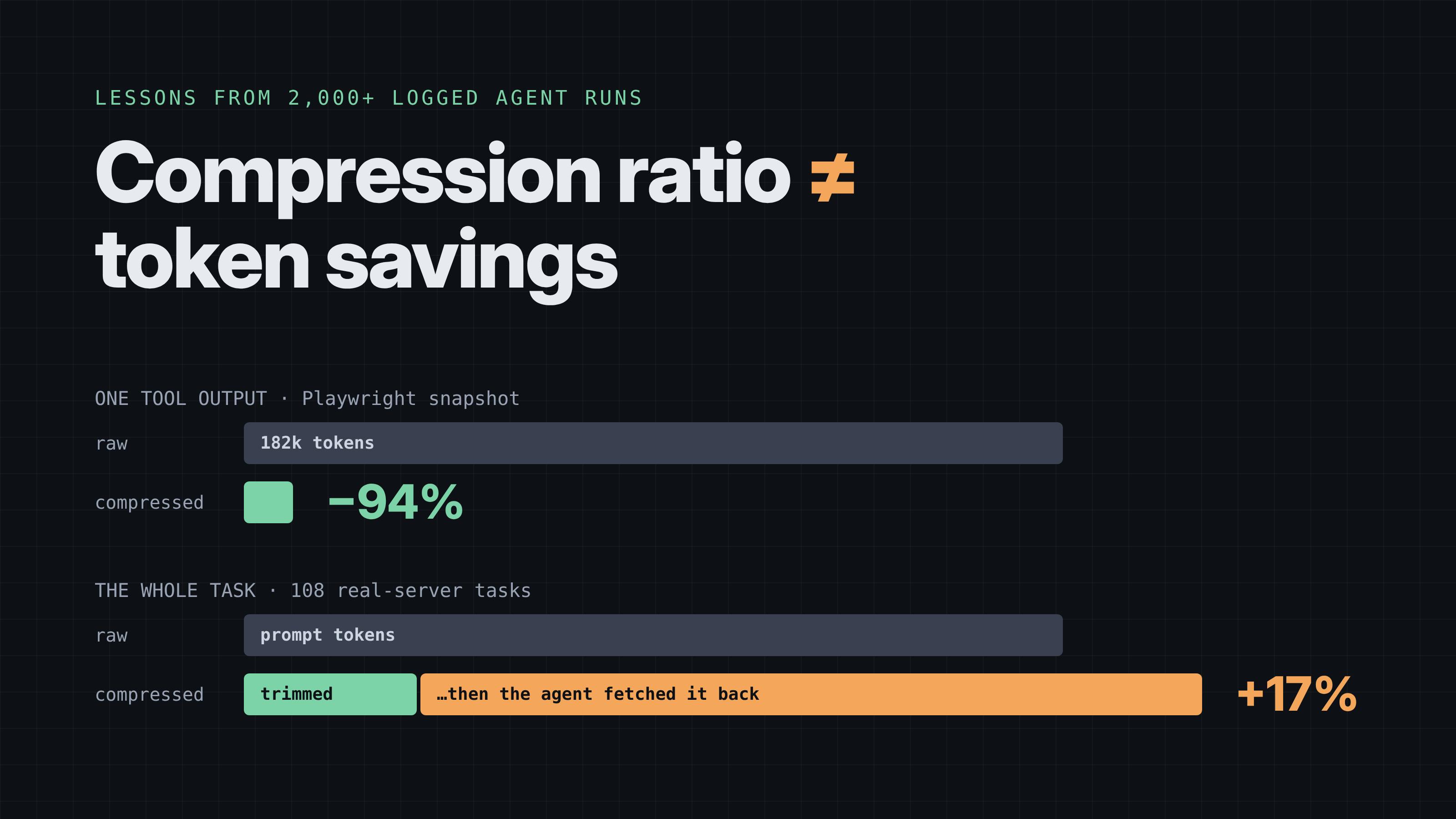
A practical guide to working context compression If you’ve wired an AI agent to real tools, you’ve seen the problem. You ask a simple question, the agent calls a tool, and back comes a wall of text: a 300-commit git log, a full database table, a browser page snapshot the size of a novel. All of it lands in the model’s context, and you pay for every token on every turn that follows. The obvious fix is to shrink tool outputs before the model sees them. So that’s what we built: a small proxy that sits between an agent and its MCP servers, trims large outputs, and keeps the full original one call away in case the model needs it. It worked on the outputs. Here’s what we measured on five popular, unmodified MCP servers: Tool output size (tokens), raw → compressed Tool output Raw Compressed Reduction Playwright snapshots 182k 11k −94% git log / show / diff 142k 16k −89% SQLite queries 129k 32k −75% fetch (web pages) 46k 10k −79% filesystem reads 41k 12k −70% Cuts of 70–94%, with the original recoverable byte for byte. We were pretty pleased with ourselves. Then we measured what actually matters: the total tokens the agent used for a whole task, and whether it still got the answer right. Over 2,000 logged agent runs later, here’s the honest summary: the savings mostly disappeared. This post is about where they went, and what that teaches anyone building or buying context compression for agents. Setup, so you can calibrate: local open-weight models via Ollama (mainly Qwen3 4B), temperature 0, real MCP servers (git, filesystem, SQLite) over public data (the Flask repository and the Chinook sample database), plus synthetic task worlds. Questions have code-computed gold answers. Every number below comes from logged runs. The tasks are short, a few tool calls each, so treat this as one well-measured corner of the space, not the whole map. Lesson 1: The agent fetches it back Here’s a real episode. The question: “According to CHANGES.rst in the Flask repo, on which date was version 0.5.1 released?” Agent → Proxy → Filesystem server Agent calls read_text_file(CHANGES.rst). Filesystem server returns 71,250 chars. Proxy returns 10,639 chars + a note: “1,377 of 1,614 lines omitted; expand(h…)” The line it needs is in the omitted part, so… Agent calls expand(h…). Proxy returns 71,250 chars (full file). ANSWER: 2010-07-06 ✓ The answer was right. The bill was worse than doing nothing: the model paid for the trimmed version and the full file. Across the real-server test set (108 tasks), the result looked like this: Success Prompt tokens vs. raw Raw (no compression) 68.5% — Our proxy 67.6% +17% Compression made things more expensive. The pattern is simple once you see it: a model reads a large output because it’s looking for one specific thing. If your compressor cuts the part containing that thing, the model asks for it back, and now you’ve paid twice. Takeaway: compression ratio is not savings. A compressor only saves tokens on outputs the model never needs to look inside, and that is exactly what it can’t know in advance. Lesson 2: Make retrieval targeted, not all-or-nothing The obvious fix: don’t make “get it back” mean “get the whole thing back”. We added a search mode, so the model can ask for just the lines it needs (illustrated with another version): expand(h…) → 71,250 chars (whole file) expand(h…, search="Version 2.0.1") → ~6 lines: 480: Version 2.0.1 481: ------------- 482: 483: Released 2021-05-21 The model took to it immediately: 14 of 16 retrievals used search on the first try, with no extra prompting. The +17% overhead disappeared: Success Prompt tokens vs. raw Real servers, raw (54 dev tasks) 61.1% — With search-based retrieval 59.3% −0.3% Synthetic tasks, raw (126 dev tasks) 54.8% — With search-based retrieval 55.6% −17% On real servers it went from costing tokens to breaking even. On synthetic tasks with bulkier, more repetitive outputs, it saved about a sixth. That’s a real improvement, but it’s nowhere near the 70–94% on the output chart. Takeaway: if you build or choose a context compressor, the retrieval path matters as much as the compression. Targeted retrieval (search, line ranges, JSON paths) is the difference between “costs more” and “breaks even or better”. Lesson 3: Just offering a tool can make a small model worse This one surprised us. In a diagnostic run we compressed nothing at all and only listed the retrieval tool next to the agent’s normal tools: Same 48 tasks, nothing compressed: Tool configuration Success normal tools only 50.0% normal tools + "expand" listed 41.7% A 4B model saw an extra tool and got distracted. It called it when it didn’t need to, or reasoned about it instead of the task. It’s a small sample, so don’t quote the exact gap, but the direction matched everything else we saw. The fix was lazy listing: the retrieval tool appears only after something has actually been trimmed, and the proxy announces it with MCP’s notifications/tools/list_changed. Claude Code handles that notification properly in our tests, so the tool shows up exactly when it becomes useful. Takeaway: every tool you add costs attention, especially for small models. Add tools when they’re needed, not “just in case”. Lesson 4: Cheap compression has a hidden cost: silently lost answers What about plain truncation, keeping only the first N characters? It’s the simplest compressor there is: Synthetic test (200 tasks) Success Tokens vs. raw Answer silently cut away Raw 66.5% — — Truncate to 13.6k chars 56.5% −25% 33 of 193 tasks Our proxy 55.5%* −1% 3 of 193 Headroom (open-source compressor) 66.5% +11% 0 Truncation does save a quarter of the tokens. It does it by throwing away the answer in about one task in six: the model never even learns the data existed. We call that silent loss, and it’s the number to ask any compression vendor for. (*About our proxy’s 55.5%: it was dragged down by a bug. See lesson 5.) Takeaway: measure what your compressor deleted that mattered, not just how much it deleted. Lesson 5: Your proxy can break things you never thought about Our proxy’s worst number had nothing to do with compression. On one test server, a memory/knowledge-graph server, our proxy scored 0 of 16 where the raw agent scored 16 of 16. The cause: when the proxy launched the real server as a subprocess, it used the MCP SDK’s default environment, which keeps only a few variables like HOME and PATH. The server’s config variable (MEMORY_FILE_PATH) never arrived, so it started with an empty store and answered “no such entity” to everything. In real life, the same bug would silently drop your GITHUB_TOKEN or API keys. Environment variable propagation MCP client └── env: GITHUB_TOKEN=… └── proxy └── env: HOME, PATH only └── server ✗ MCP client └── env: GITHUB_TOKEN=… └── proxy └── env: everything └── server ✓ It’s a one-line fix. We found it only because we measured end-to-end task success on several server types. A compression-ratio benchmark would never have caught it. Takeaway: if you put anything between an agent and its tools (proxies, gateways, wrappers), test full tasks on real servers, including ones configured through environment variables. Lesson 6: Check the ceiling before you build Here’s the part we’d do differently. Before writing any compression code, we could have run the plain agent on realistic tasks and asked: what share of the prompt tokens even comes from large tool outputs? On our tasks, the rough answer was about 40%. Only about half the runs had a large output at all, and the tokens also come from instructions, tool definitions, the question, and the model’s own replies. So even a perfect compressor the model never undid could save about 40% at best. Every time the model retrieves something, part of that comes back. A realistic result of “0–25%” was predictable from one afternoon of measurement. Where the prompt tokens go (rough, our tasks): Source Share large tool outputs ~40% ← the only part compression can touch everything else ~60% (instructions, tool schemas, conversation) Takeaway: before optimizing a part of the context, measure how big that part is in real sessions. If the ceiling is small, no clever algorithm will make the result big. So what does it mean to save tokens in agents? Pulling it together, here’s the practical checklist we’d give a team today: Measure sessions, not outputs. Total prompt tokens per completed task, plus task success. Ignore compression ratios on their own. Find your ceiling first. If big tool outputs are a small share of your tokens, look elsewhere: tool schemas, system prompts and conversation history are often bigger. If you compress, make retrieval targeted. Search or range-based retrieval turned our +17% into roughly break-even. Don’t advertise tools until they’re useful. Lazy tool listing kept a small model from getting distracted. Ask for silent loss. How often did the compressor remove the thing the task needed? Test through real servers, with real configuration, including environment variables and auth. Compression still has a place: very long sessions where old, bulky outputs sit in context for many turns, with large models that use retrieval well. Our runs didn’t test that regime (short tasks, small local models). The only way to know whether your setup is in it is to measure sessions. The data is open We’ve packaged the tasks and 1,832 fully logged agent episodes (every model call, every tool result as the model saw it, token counts and correctness labels, for raw, our proxy, Headroom and truncation) as an open benchmark: “Beyond Compression Ratios: An Open Benchmark for Agent Context Efficiency” on Hugging Face. If you build a context compressor, run it on these tasks and report two numbers: session tokens and success. We’d love to see a method that beats raw on both.
6 Lessons From Testing AI Agent Context Compression Across 2,000+ Runs
Full Article
Original Source
Read the full article at Hackernoon →KhanList aggregates and links to publicly available news content. We do not host full articles from third-party sources. Always verify important information with original sources.