
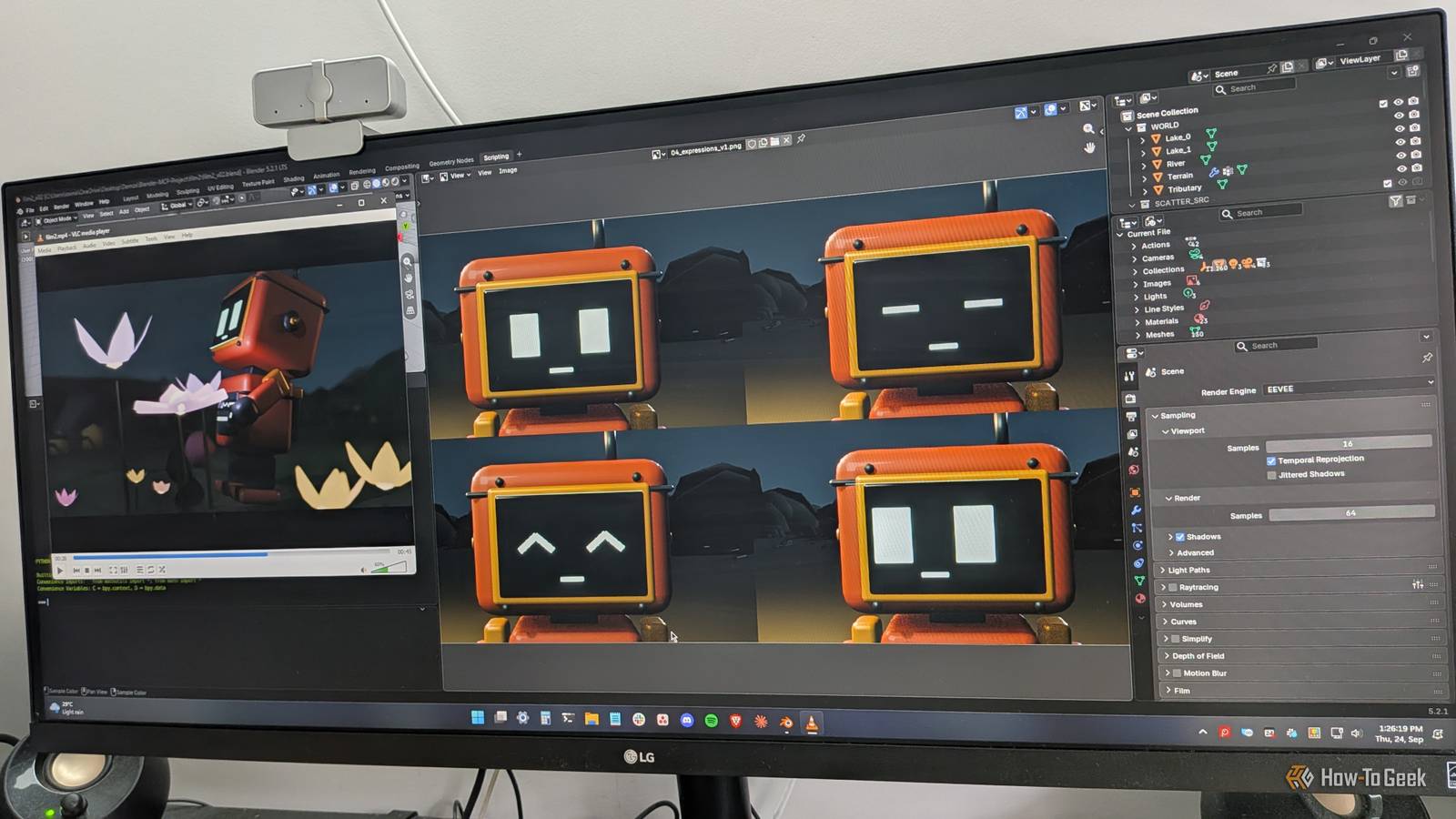
Published Oct 20, 2026, 6:00 AM EDT Tony Phillips is an experienced Microsoft Office user with a dual-honors degree in Linguistics and Hispanic Studies. Prior to starting with How-to Geek in January 2024, he worked as a document producer, data manager, and content creator for over ten years, and loves making spreadsheets and documents in his spare time. Tony is also an academic proofreader, experienced in reading, editing, and formatting over 3 million words of personal statements, resumes, reference letters, research proposals, and dissertations. Before joining How-To Geek, Tony formatted and wrote documents for legal firms, including contracts, Wills, and Powers of Attorney. Tony is obsessed with Microsoft Office! He will find any reason to create a spreadsheet, exploring ways to add complex formulas and discover new ways to make data tick. He also takes pride in producing Word documents that look the part. He has worked as a data manager in a secondary school in the UK and has years of experience in the classroom with Microsoft PowerPoint. He loves to encounter problems in Microsoft Office and use his expertise and legal-level training to find solutions. Outside of the Microsoft world, Tony is a keen dog owner and lover, football fan, astrophotographer, gardener, and golfer. When I was in college, the tech available to us was a lot more limited than it is today. Now, a phone or laptop and a few free apps can help you identify birds, make your own music, or even build entire 3D worlds, leaving your money for takeout, late-night snacks, and the occasional questionable night out. Music production Make beats while your roommates are out You don't need to play an instrument or own a studio to start making music. A laptop can give you access to virtual instruments, drum machines, synthesizers, and loops, so you can experiment with sounds without buying anything new. Free software like Waveform Free gives you a place to start arranging tracks and turning ideas into music. If you use an Apple device, GarageBand is another approachable option. You can build a beat from scratch, layer a bass line over a drum loop, or try to recreate the sound of a song you love. The first few attempts might not sound like much, but that's part of the appeal. There's always another rhythm to try, another effect to tweak, or another layer to add. A short break between assignments can easily turn into an evening spent trying to get one track just right. Bird spotting Turn your walk to class into a personal nature survey When you're rushing between lectures, it's easy to miss what's happening around you. But campus grounds, nearby parks, and even the trees outside your dorm can be home to a surprising variety of birds. Once you start paying attention, a walk you've made dozens of times can become a little more interesting. The free Merlin Bird ID app can help you identify birds by their calls or appearances. Its Sound ID feature can name a bird from its call alone, helping you distinguish the singers you can't spot in the trees around your college. You don't need binoculars or a specialized camera to get started. Your phone and a little curiosity are enough, and you might find yourself taking the long route to class just to see what else you can spot. 3D modeling Build an imaginary world on your student laptop If you've ever wanted to design a futuristic city, create a fantasy landscape, or build a world that would never fit in your dorm room, 3D modeling lets you bring those ideas to life. You can start with simple shapes and gradually turn them into something much more ambitious. Blender is a free, open-source 3D creation tool that lets you model objects, create environments, and even animate your designs. If you'd prefer something more approachable at first, Tinkercad lets you build 3D objects in your browser by combining basic shapes. You might start by making a desk lamp or a character, then move on to designing an entire scene. Before long, that lamp could be sitting in a room you designed, inside a city you've built from scratch. Video editing Turn everyday campus footage into a mini-documentary Your phone probably contains plenty of footage that never makes it beyond your camera roll. Instead of letting those clips pile up, you could turn them into a short documentary about student life, a visual tour of your campus, or a record of a particularly memorable week. Clipchamp is an approachable place to start editing videos for free, while DaVinci Resolve offers more advanced tools if your computer can handle it. Both let you cut clips together, add titles, adjust audio, and build a coherent story. You don't need to film anything elaborate—a few shots of campus between lectures, the journey to your favorite coffee shop, or preparations for a student event can give you enough material to work with. Once you start editing, you'll notice details you missed when filming. You'll also begin thinking about shots in terms of how they fit together, which can make ordinary moments feel like potential scenes. Just remember that your roommates agreed to share a kitchen, not star in your documentary. Laptop customization Make your student laptop feel completely your own Your laptop might be essential for coursework, but that doesn't mean it has to look and behave exactly like everyone else's. You can personalize its appearance, change how windows are arranged, and add shortcuts that make everyday tasks easier. On Windows, Microsoft PowerToys gives you plenty of ways to tinker. FancyZones lets you create custom layouts for snapping windows into place, while PowerRename makes renaming batches of files much easier. You can also experiment with your wallpaper, colors, desktop layout, and keyboard shortcuts. The rabbit hole opens when one change leads to another. You might start by changing your wallpaper, then spend an evening rearranging your desktop, fine-tuning your window layouts, and hunting down utilities to fix little annoyances you never knew you had. Personal knowledge management Build a personal wiki for everything you learn Between lectures, reading lists, assignments, and the random things you look up at 2 a.m., you can accumulate a surprising amount of information as a student. A personal wiki gives you somewhere to connect all those loose ends. Just don't spend an hour perfecting your note-taking system when you were supposed to be taking notes! Apps such as Obsidian and Joplin let you create digital notes and organize them around your interests. You could link together concepts from different classes, keep a record of books and articles you want to revisit, or collect explanations of topics that finally clicked. Over time, your notes can become a resource that's useful long after a particular assignment is finished. A note from one lecture might relate to something you read months ago, prompting you to follow another link and add another page. Before long, you can find yourself three links deep, following connections you hadn't expected to find. There goes your evening You might sit down to make a beat, identify a bird outside your dorm, or build your first 3D model, then look up to find it's 3 a.m. The assignment due Friday is still waiting, quietly judging you from another tab. That 10-minute study break? It's a deep dive now.
6 addictive tech habits college students can pick up without buying new gear
Full Article
Original Source
Read the full article at Howtogeek →KhanList aggregates and links to publicly available news content. We do not host full articles from third-party sources. Always verify important information with original sources.