
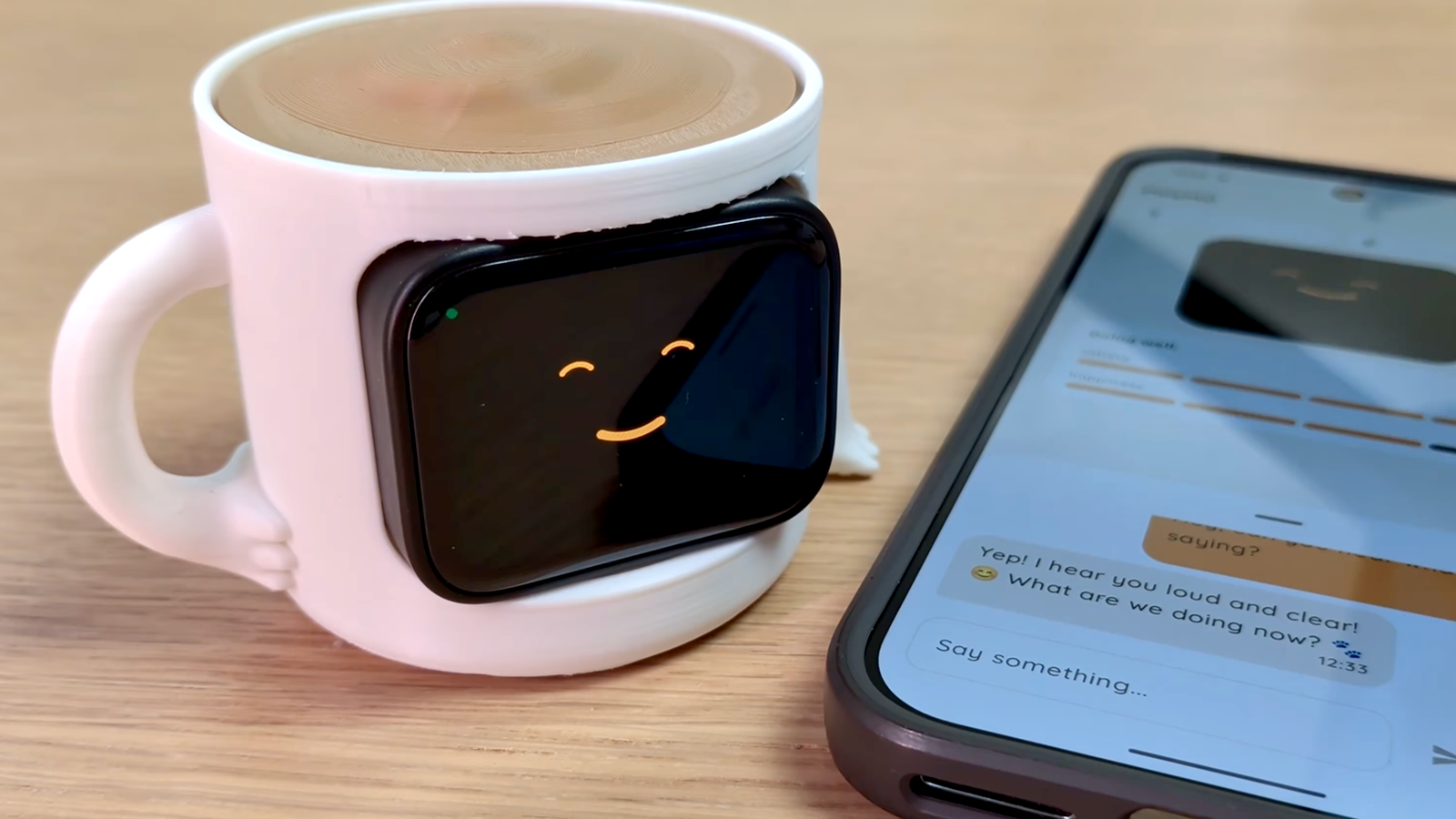
Published Nov 13, 2026, 10:00 AM EST Tim has been covering technology for almost 20 years, in that time spanning a broad range of topics from security to product reviews. He is especially focused on the Apple ecosystem, productivity, and consumer advice. Over the years Tim has written thousands of articles, reviews, and round-ups in addition to producing video content and original photography. A graduate of journalism, he found his footing as a freelancer with a laptop and loves how he is able to work from practically anywhere. Now a Senior Editor for iPhone, Mac, and Smart Home at How-To Geek, Tim still loves to write. He can also be found crafting round-ups and productivity posts for the Zapier blog. Earlier in his career Tim spent nearly a decade as a writer and eventually Apple section editor for MakeUseOf. Tim currently lives in Brisbane, Australia. Outside of work he loves to hike and work out, play video games, and spend quality time with his wonderful partner and two cats Inka and Roger. We live in an attention economy, where everything is pleading for your attention all of the time. This usually means that you spend way too much time on your phone and get distracted by social media feeds. These ESP32 weekend builds are designed to combat this problem and keep you focused on the task at hand. It’s not just your productivity on the line PolyMO is a virtual pet that acts as an extension of your Android smartphone (sorry, there’s no iOS version available). It’s a physical item that sits on your desk or lives in your pocket, reminding you to stay focused on your task and away from your phone. PolyMO’s Android companion watches specific apps and, if you spend too long in one of them, your pet will get ill. The only way to cure this sickness is to put your phone down and let PolyMO recover. As the project author states: “Illness is not instant death. A sick pet drains faster than a well one, and a pet left empty for long enough dies for good, with a reset you have to ask for.” The process doesn’t require the internet (and does not “phone home”), so none of your activity leaves your device. The build depends on a Waveshare 1.8-inch touchscreen AMOLED display with integrated ESP32-S3, placed inside a tailor-made 3D-printed case. An E-Ink dashboard with your most important information on it Avoid your phone entirely Credit: Jaime Reconret / Medium You’ve probably seen this scenario play out hundreds, if not thousands, of times: you pick up your phone with good intentions and are immediately distracted by a notification. You tap on the notification and, before long, 30 minutes have passed (and your PolyMO is dead). The best way to avoid this vicious cycle is to avoid your phone altogether. One option is to make sure that you have all the information you could possibly need right there in front of you. A simple E-Ink dashboard is perfect for this, as it allows you to tailor the display to whatever it is you’re constantly checking: the weather, your schedule, information scraped from a website, or even your unread email count. Jaime Reconret wrote about how they used a small ESP32-powered E-Ink display to check the surf conditions from their desk. This project could be a great jumping-off point for your own inventions. There are many such tutorials online, including E-Ink projects aimed at beginners and ESPHome-powered smart home displays (which can use Home Assistant to do all manner of things). A lightweight DNS sinkhole DNS is like a phone book for the internet, which is something you can use to your advantage if you’re looking to purposefully stop things from working properly. One such example is a DNS sinkhole, which allows you to route certain services to black holes so that they simply won’t work on your devices. To do this, you must create your own DNS server, point your devices at it, and then change where certain requests go. Doing this allows you to do things like prevent Facebook from resolving, whether you try to use the app or the website. All you need to do to make this work is use your custom DNS sinkhole as your DNS server in your device’s internet settings. This is one of those ESP32 projects that is all code, with no soldering or breadboards in sight. Amanvir Parhar has documented their attempts to use the ESP32 as a DNS sinkhole, which includes sharing the code necessary to build your own. The device uses Cloudflare’s 1.1.1.1 as a backbone, selectively disabling websites on your blocklist (which you can customize to your liking). A dedicated hardware Pomodoro timer A timer for your desk The Pomodoro technique is a longstanding productivity hack that rewards longer periods of work with short breaks (followed by a longer break after you’ve chained together a few decent stretches of work). The idea is to prevent you from hunting for distractions by rewarding you with designated time off at regular intervals. If the Pomodoro technique works for you, that’s great! The only problem is that for most of us, the easiest way to use it is to download an app for our phones (or just use the timer and do it manually). This means picking up your phone and risking exposure to all those distractions. So why not just build your own Pomodoro timer that sits on your desk, removing the need to touch your phone? It even provides you with an always-on readout of your current status. The video above details a build by YouTuber Auryn Codes, with the accompanying GitHub repository outlining hardware, wiring, and code. Alternatively, there’s a Roborear tutorial outlining a very similar build. You don’t need to just rely on an ESP32 to curb your doomscrolling habit. One neat way to tackle distractions is to turn them into learning opportunities.
4 weekend ESP32 projects to help you focus and stop doomscrolling (Nov 13-15)
Full Article
Original Source
Read the full article at Howtogeek →KhanList aggregates and links to publicly available news content. We do not host full articles from third-party sources. Always verify important information with original sources.