
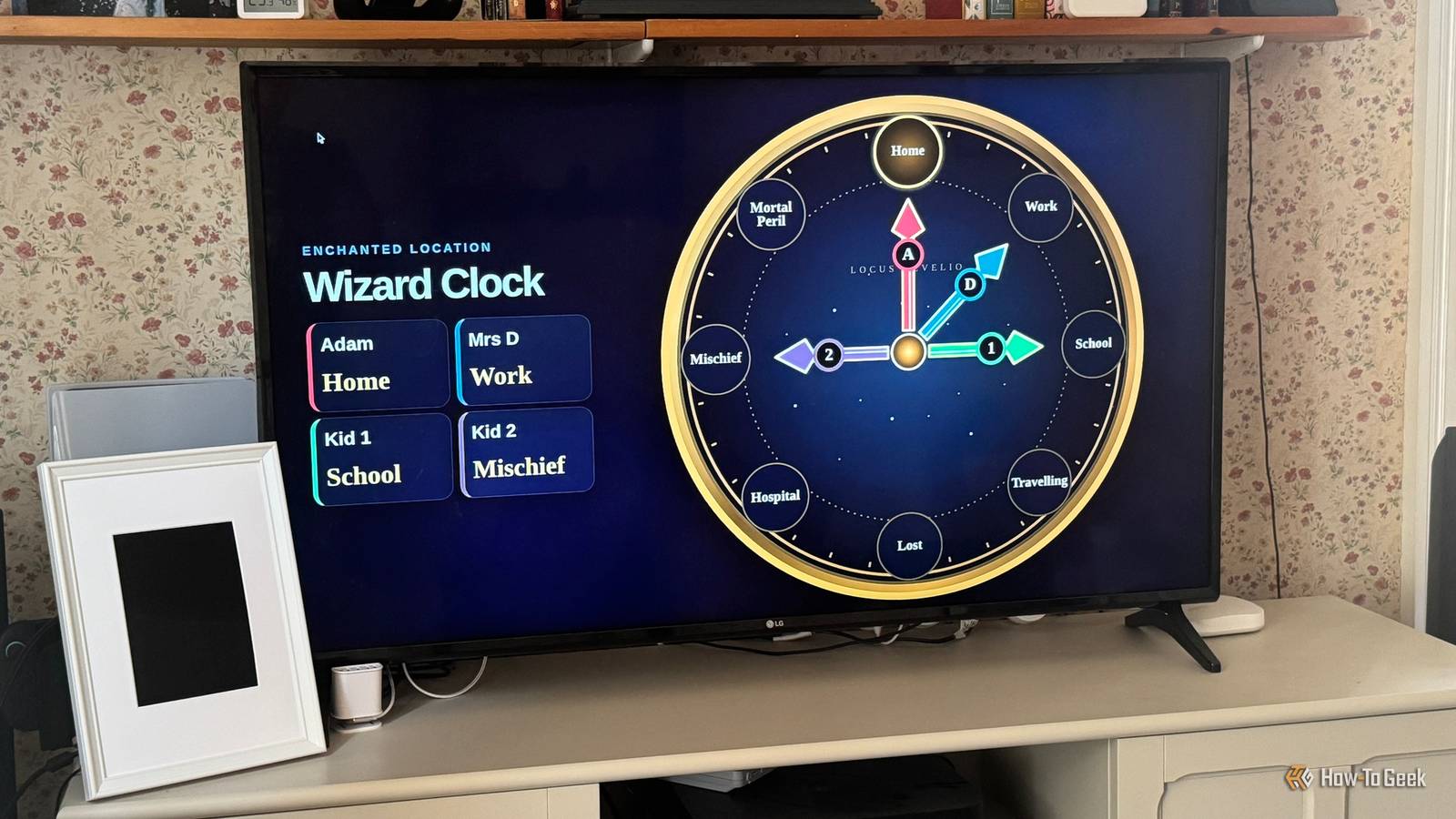
Published Sep 10, 2026, 8:30 AM EDT Sydney Butler is a technology writer with over 20 years of experience as a freelance PC technician and system builder and over a decade as a professional writer. He's worked for more than a decade in user education. On How-To Geek, he writes commerce content, guides, opinions, and specializes in editing hardware and cutting edge technology articles. Sydney started working as a freelance computer technician around the age of 13, before which he was in charge of running the computer center for his school. (He also ran LAN gaming tournaments when the teachers weren't looking!) His interests include VR, PC, Mac, gaming, 3D printing, consumer electronics, the web, and privacy. He holds a Master of Arts degree in Research Psychology with a minor in media and technology studies. His masters dissertation examined the potential for social media to spread misinformation. Outside of How-To Geek, he hosts the Online Tech Tips YouTube Channel, and writes for Online Tech Tips, Switching to Mac, and Helpdesk Geek. Sydney also writes for Expert Reviews UK. He also has bylines at 9to5Mac, 9to5Google, 9to5Toys, Tom's Hardware, MakeTechEasier, and Laptop Mag. Smart TVs have been around for a while at this point, which means there's a good chance that there's an aging TV somewhere in your home that doesn't have the smarts to be a TV anymore. Now, usually, my advice would be to plug a modern streaming box into that TV and enjoy it for a few more years, since its actual picture quality is probably fine for bedroom use or some other use case outside your living room. However, if you have a model that's got the right software support, or if you have the right type of smart home services, it can become a centerpiece of your setup. Open a Home Assistant dashboard in the TV’s web browser It's the simplest solution Credit: Adam Davidson/How-To Geek Most smart TVs have built-in browsers, and while an old TV that hasn't received updates in years might not have a browser that can handle the latest rich web pages, that doesn't mean you can't use it to display simple locally-hosted dashboards for solutions like Home Assistant. There are always new Home Assistant dashboard projects to try, and my colleague Adam Davidson's wall-mounted chore tracker is another great example of this concept. Build a custom Home Assistant dashboard of your choice, and then point that old smart TV's browser at it. Just keep in mind that a dashboard made with this in mind can't be interactive unless you feel like hooking a keyboard and mouse to your TV. Cast your smart-home dashboard instead A wireless wonder of a feature You don't have to make use of the TV's internal apps. Even new smart TVs tend to have slow hardware and buggy browsers, which means even if you could log into your Home Assistant dash, it might not run well or display correctly. The good news is that you might have the option to skip that entirely. If you have a Chromecast Device, or you have a TV with Chromecast or Google Assistant hardware built in, you can cast to that screen directly from Home Assistant using the aptly named Home Assistant Cast. There are some limitations, of course. If you check the Home Assistant Cast FAQ, there are a few notes about custom cards not working and that live video streams don't currently work. However, you can even automate casting, so that you don't have to initiate the cast manually every time. Home Assistant Cast has all the information you need to make it work in its documentation, and if you've already got castable dashboards, you should be up and running in minutes. Install a Home Assistant control layer on Android or Google TV There's an app for that Credit: Android Alliance If you have an Android or Google TV, you have the option of installing apps designed for Home Assistant, such as HA TV Dashboard. This app is designed specifically for Google TV and Android TV devices, and has its UI formatted to look best on a large TV. If you need to display live video streams, then HA TV Dashboard is probably the best solution, since it can handle and display multiple streams on your TV at the same time. This means your old smart TV still needs to have Google Play support, or it won't have access to the apps you need. If it doesn't, that's not the end of the world. You can still just plug a cheap Android TV box or stick into a free HDMI port and load the app onto that device. It's best if you have one of those lying around already, but finding a cheap used one to limit further expenditure shouldn't be an issue. Raspberry Pi 5 Brand Raspberry Pi Storage 8GB It's only recommended for tech-savvy users, but the Raspberry Pi 5 is a tinkerer's dream. Cheap, highly customizable, and with great onboard specs, it's a solid base for your next mini PC. CPU Cortex A7 Memory 8GB Operating System Raspbian Ports 4 USB-A Hide a Raspberry Pi behind the TV and make it the actual hub Out of sight, but certainly not out of mind There are numerous ways to use a Raspberry Pi with Home Assistant, and using a Pi to turn your old smart TV into a Linux PC is one of the most flexible options. Obviously, since your TV is now the front end for what's essentially a full Linux desktop OS, you can do way more than just display dashboards. Depending on which Pi model you have, you can even run other smart home services on it if you like, but the neatest trick is using the HAOS-kiosk project torun Home Assistant on a Pi and have that Pi output dashboards to an HDMI-connected device. This isn't usually possible, as HAOS is a headless system that's supposed to be accessed by other devices on the network, but here you can interact with your dashboards on the same computer that's running your HA software, using a mouse and keyboard. Adam Davidson used a Raspberry Pi to create custom TV dashboards of all kinds, which should serve as excellent inspiration for your own exploration of the possibilities.
4 ways to turn an aging smart TV into your home automation hub
Full Article
Original Source
Read the full article at Howtogeek →KhanList aggregates and links to publicly available news content. We do not host full articles from third-party sources. Always verify important information with original sources.